

LockCal
Vladimir Popov Productivity iPhoneiPadiPod touch
LockCal is a free Productivity app for iPhone and iPad by Vladimir Popov. Requires iOS 17.0. Updated October 7, 2026.
- Price
- Free
- on the App Store
- Size
- 4 MB
- Age 4+
- Updated
- Oct 7
- 2026 · v1.2
Screenshots



About LockCal
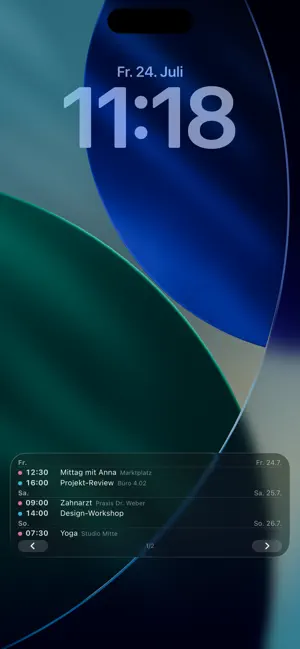
LockCal puts your schedule where you already look all day: on your Lock Screen. YOUR AGENDA AS A LIVE ACTIVITY Start your day's agenda with one tap — it stays visible as a card on the Lock Screen. Use the ‹ › buttons to page through the coming days right on the Lock Screen, without unlocking and without opening the app. FIVE DESIGNS Night Sky, Classic, Retro 2010, Minimal or Timeline — pick the layout that matches your Lock Screen. With calendar color dots, locations and a configurable number of events per page. WIDGETS ON TOP Your next events as a Lock Screen widget above or below the clock — plus a Home Screen widget. AUTOMATIC EVERY MORNING With a Shortcuts automation, your agenda starts into the day by itself and can clean itself up at night. YOUR DATA STAYS YOURS LockCal reads your calendar strictly on-device. No servers, no account, no ads, no data collection — the app does not even have internet access. ALWAYS FRESH If you like, LockCal reminds you shortly before iOS ends the Live Activity — one tap on the notification puts your agenda right back on the Lock Screen. FEATURES • Day agenda as a Live Activity with paging buttons on the Lock Screen • 5 designs, 3–6 events per page, 3 days to 2 weeks range • Toggle individual calendars, color dots, locations • Hide past events; ongoing multi-day events move to "Today" ("until Fri") • Reminder shortly before the Live Activity expires, with one-tap renewal • Lock Screen widgets (inline + rectangular) and a Home Screen widget • Shortcuts actions for automations ("Agenda to Lock Screen", "End agenda") • Dynamic Island glance with your next event • Fully localized in English and German
What’s new
Version 1.2 · Updated October 7, 2026
• Two new designs for the Lock Screen agenda: “Modern” (day headings, times in calendar color, all-day events as color pills, glass background) and “Modern List” (the same in a single column). • Renewal reminder is now configurable: shortly before it ends, regularly every 2–6 hours, or daily at a fixed time. • 31 languages, selectable right in Settings.
App privacy
The developer, Vladimir Popov, reported these privacy practices to Apple.
Data Not Collected
The developer does not collect any data from this app.
Alternatives to LockCal
Looking for apps like LockCal? Here are 6 similar apps on the App Store. The highest rated is Peek - Up Next (5.0/5), and 5 of the 6 are free to download.
-
 Peek - Up Next
5.0
Peek - Up Next
5.0
-
 Planwall: Lock Screen Calendar
1.0
Planwall: Lock Screen Calendar
1.0
-
 Upstruckt: Video Preproduction
-
 Memento Mori: Time Left Widget
-
 Calemon
5.0
Calemon
5.0
-
 MyRemindApp
| App | Rating | Price | Last updated | Compare |
|---|---|---|---|---|
| LockCal | – | Free | October 7, 2026 | |
| Peek - Up Next | 5.0 / 5 (1) | Free | Oct 20, 2026 | Compare |
| Planwall: Lock Screen Calendar | 1.0 / 5 (2) | Free | Oct 14, 2026 | Compare |
| Upstruckt: Video Preproduction | – | Free | Sep 9, 2026 | Compare |
| Memento Mori: Time Left Widget | – | 0.99 USD | Oct 8, 2026 | Compare |
| Calemon | 5.0 / 5 (1) | Free | Oct 12, 2026 | Compare |
| MyRemindApp | – | Free | Sep 8, 2026 | Compare |
Compare LockCal with the top alternatives: ratings, updates, ASO score and keyword gaps →