

Milim: Auto Subtitles
yosef dana Photo & Video iPhoneiPadiPod touch
Milim: Auto Subtitles is a free Photo & Video app for iPhone and iPad by yosef dana. Requires iOS 17.6. Updated October 18, 2026.
- Price
- Free
- on the App Store
- Size
- 9 MB
- Age 4+
- Updated
- Oct 18
- 2026 · v1.4
Screenshots


About Milim: Auto Subtitles
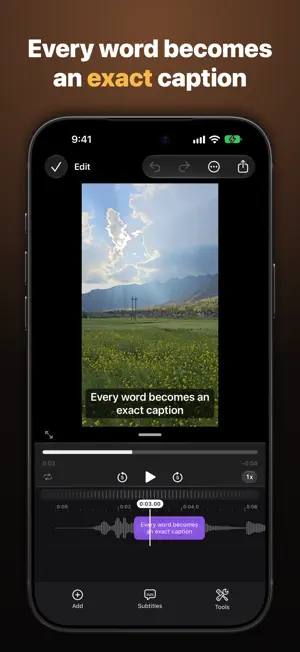
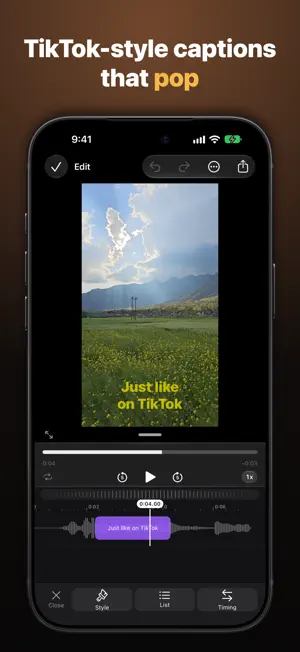
Milim turns any video into a video with professional subtitles — automatically, in minutes. Pick a video (or share it straight from Photos), and Milim recognizes the speech and creates accurate, synced subtitles. Edit, style, export — and your video is ready for social. What you get: • Automatic transcription in dozens of languages, with especially strong Hebrew — precise timing for every word • A full subtitle editor — fix text, split and merge, adjust timing on a timeline with a waveform • Dozens of designed styles — bold TikTok style, classic, minimal, outline without a background, and more • Free text and stickers on the video — titles, emoji and symbols anywhere on the frame • Sync across devices — sign in with Apple and your projects follow you to iPhone, iPad and Mac • Subtitle translation into dozens of languages • Personal dictionary — names and terms you use often are transcribed correctly • Speaker management — color and label subtitles by speaker • Export video with burned-in subtitles up to 4K, or SRT/VTT subtitle files • Share from Photos straight into the app — transcription starts on its own Milim Pro adds: • Cloud transcription with the highest accuracy — including names, slang, and resilience to noise and music (180 minutes a month with Pro, 600 with Max) • All animated styles and karaoke • Automatic splitting into short TikTok-style segments — in one tap The subscription renews automatically until canceled, which you can do at any time in your Apple ID settings. You can also use Milim for free — with on-device transcription, full editing, basic styles and unlimited export. Terms of Use: https://www.apple.com/legal/internet-services/itunes/dev/stdeula/ Privacy Policy: https://yosefdana1-png.github.io/legal/
What’s new
Version 1.4 · Updated October 18, 2026
• Milim is now available in English • Fixed downloading the Small transcription model • Cleaner outlines, thicker outline option and letter spacing • Subtitles without a background • Support for iPhone Duo and smaller screens • More improvements and fixes
App privacy
The developer, yosef dana, reported these privacy practices to Apple.
Data Linked to You
The following data, which may be collected and linked to your identity, may be used for the following purposes:
- Contact Info: Email Address
- Identifiers: User ID
Used for: App Functionality
Data Not Linked to You
The following data, which may be collected but is not linked to your identity, may be used for the following purposes:
- Purchases: Purchase History
- User Content: Audio Data, Other User Content
Used for: App Functionality
Alternatives to Milim: Auto Subtitles
Looking for apps like Milim: Auto Subtitles? Here are 6 similar apps on the App Store. The highest rated is Silence Remover (5.0/5), and 5 of the 6 are free to download.
-
 Captions Cut: Auto Subtitles
-
 AI Subtitles for Reels Relingo
-
 Auto Captions: Charlatan
-
 Undertekst: Video Subtitles
-
 Silence Remover
5.0
Silence Remover
5.0
-
 Video Translator, subtitles AI
| App | Rating | Price | Last updated | Compare |
|---|---|---|---|---|
| Milim: Auto Subtitles | – | Free | October 18, 2026 | |
| Captions Cut: Auto Subtitles | – | Free | Oct 23, 2026 | Compare |
| AI Subtitles for Reels Relingo | – | Free | Jun 16, 2026 | Compare |
| Auto Captions: Charlatan | – | Free | Oct 10, 2026 | Compare |
| Undertekst: Video Subtitles | – | 1.99 USD | Oct 22, 2026 | Compare |
| Silence Remover | 5.0 / 5 (3) | Free | Sep 28, 2026 | Compare |
| Video Translator, subtitles AI | – | Free | Oct 5, 2026 | Compare |