

Captions Cut: Auto Subtitles
Ugur Altintas Photo & Video iPhoneiPadiPod touch
Captions Cut: Auto Subtitles is a free Photo & Video app for iPhone and iPad by Ugur Altintas. Requires iOS 18.0. Updated October 23, 2026.
- Price
- Free
- on the App Store
- Size
- 73 MB
- Age 4+
- Updated
- Oct 23
- 2026 · v1.2.0
Screenshots


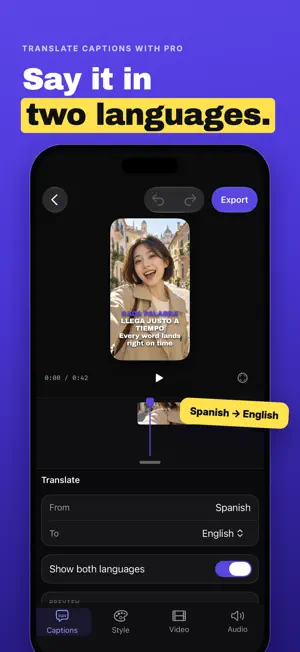
About Captions Cut: Auto Subtitles
Captions Cut turns your spoken video into bold, word-by-word animated captions in minutes. Import a clip, let AI transcribe it, then style every line until it looks exactly like your brand. MADE FOR VERTICAL VIDEO Reels, Stories, short-form and vlogs. Captions stay inside the safe area so app buttons never cover them. AI TRANSCRIPTION, WORD BY WORD Accurate speech-to-text with precise timing for every word. The active word lights up as it is spoken, karaoke style. EDIT LIKE A TEXT DOCUMENT Fix a word, split or merge lines, and adjust timing right on the timeline. Undo and redo everything. STYLE THAT STOPS THE SCROLL Start from ten designer templates, then change fonts, colors, outlines, shadows, backgrounds, animation and position. Save your look and reuse it on every video. TRANSLATE YOUR CAPTIONS Show a second language under the first, translated privately on your iPhone. EXPORT IN 1080p OR 4K Clean exports straight to Photos, ready to post anywhere. PRIVATE BY DESIGN Your video stays on your phone. Only the audio is sent for transcription and it is deleted right after. Sign in with Apple or Google to create captions, no password needed. The people in our videos are AI-generated. CAPTIONS CUT PRO Pro removes the watermark and unlocks caption translation, Pro fonts and monthly transcription credits. Need more time? Credit packs never expire. Transcription uses credits: 1 CRD = 1 second of audio. Subscription details: Captions Cut Pro is available as a monthly or yearly auto-renewing subscription. Payment is charged to your Apple Account at confirmation of purchase. The subscription renews automatically unless it is cancelled at least 24 hours before the end of the current period, and your account is charged for renewal within 24 hours before the period ends. You can manage or cancel your subscription in your Apple Account settings. Prices may vary by country. Terms of Use: https://captionscut.com/terms Privacy Policy: https://captionscut.com/privacy Help: https://captionscut.com/help
What’s new
Version 1.2.0 · Updated October 23, 2026
• Sign in with Apple or Google to create captions. New accounts get 2 minutes of captions free. • Your credits, Pro and projects now stay with your account, on your iPhone and in the web editor. • Fixed an export that could stay on "Rendering 100%".
App privacy
The developer, Ugur Altintas, reported these privacy practices to Apple.
Data Used to Track You
The following data may be used to track you across apps and websites owned by other companies:
- Identifiers: Device ID
Data Linked to You
The following data, which may be collected and linked to your identity, may be used for the following purposes:
- Identifiers: Device ID
Used for: Analytics
Data Not Linked to You
The following data, which may be collected but is not linked to your identity, may be used for the following purposes:
- Usage Data: Advertising Data, Product Interaction
- Identifiers: User ID
- Purchases: Purchase History
- User Content: Audio Data, Other User Content
Used for: Third-Party Advertising, Analytics, App Functionality
Alternatives to Captions Cut: Auto Subtitles
Looking for apps like Captions Cut: Auto Subtitles? Here are 6 similar apps on the App Store.
-
 MomentLab
-
 Milim: Auto Subtitles
-
 Pulzo: Photo Sticker Album
-
 AI Subtitles for Reels Relingo
-
 Capster: AI Captions for Video
-
 Kapto: Captions for Videos
| App | Rating | Price | Last updated | Compare |
|---|---|---|---|---|
| Captions Cut: Auto Subtitles | – | Free | October 23, 2026 | |
| MomentLab | – | Free | Jul 23, 2026 | Compare |
| Milim: Auto Subtitles | – | Free | Oct 18, 2026 | Compare |
| Pulzo: Photo Sticker Album | – | Free | Sep 23, 2026 | Compare |
| AI Subtitles for Reels Relingo | – | Free | Jun 16, 2026 | Compare |
| Capster: AI Captions for Video | – | Free | Oct 26, 2026 | Compare |
| Kapto: Captions for Videos | – | Free | Oct 22, 2026 | Compare |