

Capster: AI Captions for Video
Arjesh Vadadoriya Photo & Video iPhoneiPadiPod touch
Capster: AI Captions for Video is a free Photo & Video app for iPhone and iPad by Arjesh Vadadoriya. Requires iOS 18.0. Updated October 26, 2026.
- Price
- Free
- on the App Store
- Size
- 36 MB
- Age 4+
- Updated
- Oct 26
- 2026 · v1.4.1
Screenshots


About Capster: AI Captions for Video
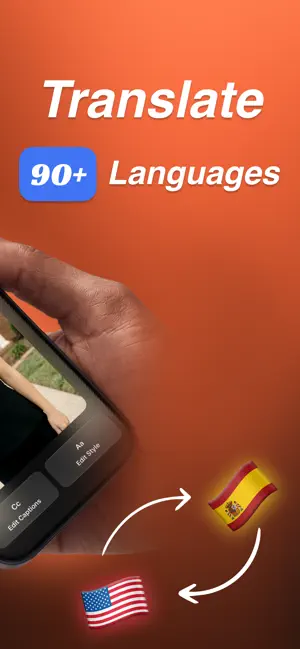
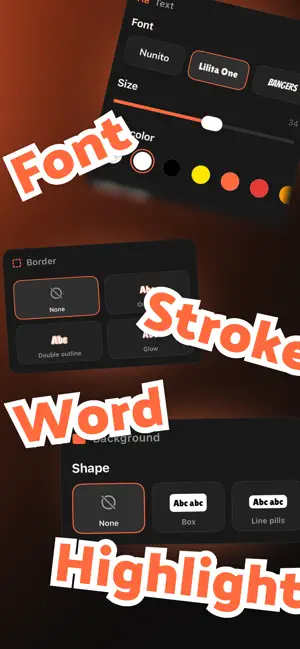
Capster turns the speech in your videos into animated, word-by-word captions. Import a clip, tap generate, and every word is transcribed, timed, and ready to style and burn into your video. Most people scroll with the sound off. Captions keep them watching, and Capster saves you from timing them by hand. AUTO CAPTIONS IN 99 LANGUAGES - Import videos from Photos or Files - Speech is transcribed automatically, with timing for every word - The spoken language is detected automatically, across 99 languages - Translate captions into 86 languages, including Spanish, French, German, Portuguese, Hindi and Japanese - Long lines split into short, readable captions automatically - No speech in the clip? Add captions yourself ANIMATED CAPTION STYLES - 17 ready-made presets: Plain, Yellow Desert, Comics, Pink Sun, Midnight, Glow and One Word - 6 cinematic real estate shorts type styles - Every preset plays a live animated preview - 18 caption fonts, with size, color, letter case and alignment - Outline, drop shadow, and a background with color, corner radius and padding - Karaoke-style highlighting gives the spoken word its own color and background - Word pop, plus fade, slide, scale and pop in and out animations - Top, center or bottom placement, or place captions exactly where you want - Save your own styles and reuse them on other videos Some styles and controls require Capster Pro. EDIT WORDS AND TIMING - Tap any caption to fix its text - Retime a caption by setting its start or end to the playhead - Split, merge, add or delete captions - Every change shows on the video instantly WHAT YOU SEE IS WHAT YOU EXPORT - Preview and export use the same rendering engine, so your final video matches the preview exactly - Captions are burned in, so they play everywhere: Reels, TikTok, YouTube Shorts, Stories - Portrait, square and landscape video, including rotated iPhone footage - Save to Photos in one tap as a high-quality MP4 YOUR PROJECTS STAY ON YOUR DEVICE - Every project is saved on device. Rename it, reopen it, or export it again any time - Try the built-in sample clip with every Pro feature unlocked - No account or sign-up needed CAPSTER PRO The free version includes 5 transcriptions and videos up to 2 minutes. Free exports include a Capster watermark and end card. Upgrade to Pro for: - Unlimited automatic captions - Videos of any length - No watermark and no end card - All presets and animations - Full style controls, including precise caption placement Transcription requires an internet connection. Pro is an auto-renewing subscription or as a one-time Lifetime purchase. Payment is charged to your Apple Account at confirmation of purchase. The subscription renews automatically unless cancelled at least 24 hours before the end of the current period. Manage or cancel any time in your Apple Account settings. Privacy Policy: https://capster.cc/privacy/ Terms of Use: https://capster.cc/terms/ Questions or feedback? [email protected]
What’s new
Version 1.4.1 · Updated October 26, 2026
- Minor UI changes and spacing fixes - Bug fixes and performance improvements
App privacy
The developer, Arjesh Vadadoriya, reported these privacy practices to Apple.
Data Not Linked to You
The following data, which may be collected but is not linked to your identity, may be used for the following purposes:
- Identifiers: User ID, Device ID
- Usage Data: Product Interaction
- Diagnostics: Crash Data, Performance Data
Used for: Analytics
Alternatives to Capster: AI Captions for Video
Looking for apps like Capster: AI Captions for Video? Here are 6 similar apps on the App Store. The highest rated is Capzy: AI Caption (4.7/5), and all 6 are free to download.
-
 Captionist: AI Video Studio
-
 Handcut: Captions & Subtitles
3.7
Handcut: Captions & Subtitles
3.7
-
 Magic Editor: AI Video Editor
4.5
Magic Editor: AI Video Editor
4.5
-
 Capzy: AI Caption
4.7
Capzy: AI Caption
4.7
-
 Auto Captions: Video Subtitles
4.6
Auto Captions: Video Subtitles
4.6
-
 AI Captions for Videos: VidCap
4.7
AI Captions for Videos: VidCap
4.7
| App | Rating | Price | Last updated | Compare |
|---|---|---|---|---|
| Capster: AI Captions for Video | – | Free | October 26, 2026 | |
| Captionist: AI Video Studio | – | Free | Oct 26, 2026 | Compare |
| Handcut: Captions & Subtitles | 3.7 / 5 (3) | Free | Oct 28, 2026 | Compare |
| Magic Editor: AI Video Editor | 4.6 / 5 (20) | Free | Oct 22, 2026 | Compare |
| Capzy: AI Caption | 4.7 / 5 (942) | Free | Dec 2, 2025 | Compare |
| Auto Captions: Video Subtitles | 4.6 / 5 (1,491) | Free | Dec 23, 2025 | Compare |
| AI Captions for Videos: VidCap | 4.7 / 5 (1,571) | Free | Oct 25, 2026 | Compare |