

Magic Editor: AI Video Editor
Alireza Namazian Photo & Video iPhoneiPadiPod touch
Magic Editor: AI Video Editor is a free Photo & Video app for iPhone and iPad by Alireza Namazian. Rated 4.7/5 from 18 ratings. Requires iOS 15.6.
- Rating
- 4.7
- 18 ratings
- Price
- Free
- on the App Store
- Size
- 164 MB
- Age 4+
- Updated
- Oct 22
- 2026 · v1.0.7
Screenshots


About Magic Editor: AI Video Editor
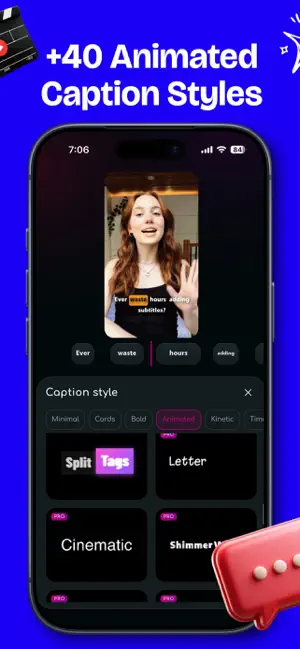
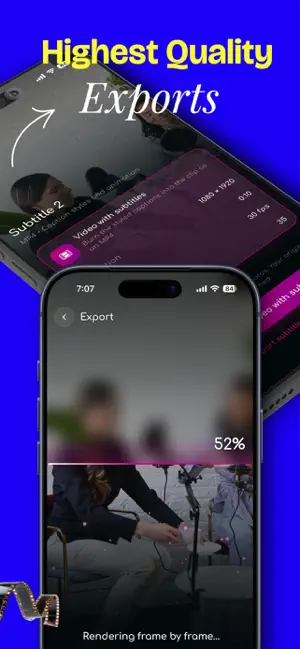
Magic Editor — AI Auto Captions & Video Editing Create videos that look professional — right from your phone. Magic Editor makes video editing and automatic subtitles simple. Turn speech into perfectly timed captions, customize animated text, clean up your audio, and polish your videos with smart editing tools. No manual typing. No complicated editing workflow. Just import your video, create your captions, and make it your own. AUTOMATIC AI CAPTIONS Turn spoken words into subtitles automatically. - Generate captions from speech in seconds. - Sync subtitles word by word. - Tap to correct or edit any word. - Customize text size, color, font, and position. - Create subtitles for talking videos, tutorials, Reels, and Shorts. ANIMATED SUBTITLES THAT STAND OUT Make every word part of your video's style. Explore animated caption designs, including word-by-word highlights, marker effects, gradients, and creative typography. - Choose from a variety of caption styles. - Customize animations and text appearance. - Use different caption styles in one video. - Make captions follow your head movement. - Create videos with expressive, dynamic subtitles. SMART VIDEO EDITING TOOLS Do more than add captions. - Smart Cuts: Simplify video editing with intelligent cuts. - Silence Removal: Remove unwanted pauses. - Filler Word Removal: Clean up unnecessary spoken words. - Audio Enhancement: Improve voice clarity and reduce background noise. - Color & Light Adjustments: Refine the visual appearance of your videos. Create polished content without switching between multiple editing apps. FONTS FOR YOUR LANGUAGE Give your captions a look that fits your content. Explore fonts and typography styles, including styles inspired by StoryFont. Enjoy support for English, Persian, and Arabic, including right-to-left text. TRANSLATE YOUR SUBTITLES Reach audiences in different languages. Translate your captions while preserving their timing, then customize their appearance to match your video. EXPORT AND SHARE Save your finished video with captions built in, or export subtitles as an SRT file for use in other editing tools. MADE FOR CONTENT CREATORS Whether you're creating Instagram Reels, TikTok videos, YouTube Shorts, educational videos, or talking-head content, Magic Editor helps you turn raw recordings into ready-to-share videos. Less time editing. More time creating. Terms of Use (EULA): https://www.apple.com/legal/internet-services/itunes/dev/stdeula/
Ratings & reviews
4.7
18 ratings
What’s new
Version 1.0.7 · Updated October 22, 2026
• New Timing tool: show captions slightly before they're spoken (optional) • New caption styles, including Solo (one big word at a time) and Halo (text that arcs around the speaker's head) • Animations now play on every line and every caption track in the preview • Faster transcript editing: Backspace joins a line to the one above, Enter moves to the next line • Smarter caption placement in empty space • Style previews now play word by word • Bug fixes and better export reliability
App privacy
The developer, Alireza Namazian, reported these privacy practices to Apple.
Data Used to Track You
The following data may be used to track you across apps and websites owned by other companies:
- Identifiers: Device ID
- Usage Data: Advertising Data
Data Linked to You
The following data, which may be collected and linked to your identity, may be used for the following purposes:
- Identifiers: Device ID, User ID
- Usage Data: Advertising Data, Product Interaction
- Purchases: Purchase History
- Contact Info: Email Address, Name, Phone Number
- User Content: Audio Data
- Diagnostics: Crash Data, Performance Data
Used for: Third-Party Advertising, Analytics, App Functionality
Alternatives to Magic Editor: AI Video Editor
Looking for apps like Magic Editor: AI Video Editor? Here are 6 similar apps on the App Store. The highest rated is iskra studio – photo editor (5.0/5), and all 6 are free to download.
-
 Sorelo: Auto Captions & Editor
4.9
Sorelo: Auto Captions & Editor
4.9
-
 iskra studio – photo editor
5.0
iskra studio – photo editor
5.0
-
 Capzy: AI Caption
4.8
Capzy: AI Caption
4.8
-
 Handcut: Captions & Subtitles
3.7
Handcut: Captions & Subtitles
3.7
-
 Captiono: AI Subtitles
4.7
Captiono: AI Subtitles
4.7
-
 Captionist: AI Video Studio
| App | Rating | Price | Last updated | Compare |
|---|---|---|---|---|
| Magic Editor: AI Video Editor | 4.7 / 5 (18 ratings) | Free | October 22, 2026 | |
| Sorelo: Auto Captions & Editor | 4.9 / 5 (36) | Free | Oct 19, 2026 | Compare |
| iskra studio – photo editor | 5.0 / 5 (2) | Free | Oct 12, 2026 | Compare |
| Capzy: AI Caption | 4.8 / 5 (922) | Free | Dec 2, 2025 | Compare |
| Handcut: Captions & Subtitles | 3.7 / 5 (3) | Free | Oct 19, 2026 | Compare |
| Captiono: AI Subtitles | 4.7 / 5 (5,708) | Free | Oct 21, 2026 | Compare |
| Captionist: AI Video Studio | – | Free | Oct 3, 2026 | Compare |