

Captionist: AI Video Studio
Hita Labs FZC Photo & Video iPhoneiPadiPod touch
Captionist: AI Video Studio is a free Photo & Video app for iPhone and iPad by Hita Labs FZC. Requires iOS 15.0. Updated October 3, 2026.
- Price
- Free
- on the App Store
- Size
- 140 MB
- Age 4+
- Updated
- Oct 3
- 2026 · v1.0.1
Screenshots

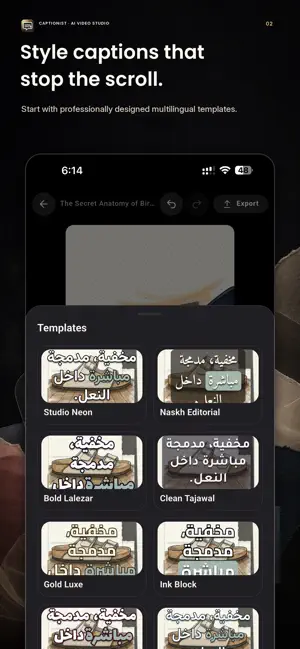


About Captionist: AI Video Studio
Turn raw footage into polished captioned videos - from your phone. Captionist is an AI video studio for creators who want accurate captions, fast editing, natural translation, and optional AI dubbing without moving an entire project into the cloud. CAPTIONS THAT READ RIGHT • Automatically transcribe speech into editable captions • Fine-tune caption timing and edit individual words • Style type, color, position, and templates • Render Arabic, Persian, Urdu, and other complex scripts with correct joining and mixed-direction text CREATE FOR EVERY AUDIENCE • Translate captions while preserving the source timing • Generate dubbed audio with a choice of studio voices • Record voiceovers and, with explicit consent, create a reusable voice • Add dubbing minutes when you need more EDIT AND EXPORT • Crop, resize, adjust, filter, and arrange clips • Preview captions directly on your video • Export watermark-free HD up to 4K video with eligible plans • Keep source videos and projects on your device; only the audio or text needed for the AI feature you request is securely sent for processing Captionist requires an account. Free tools are available; Pro and Studio subscriptions unlock higher limits and advanced features. Eligible new Pro subscribers can try Pro free for 3 days. Subscriptions renew automatically unless canceled at least 24 hours before the end of the current period. Manage or cancel subscriptions in your Apple ID settings. Privacy Policy: https://hitalabs.com/captionist/privacy Terms of Use: https://hitalabs.com/captionist/terms
What’s new
Version 1.0.1 · Updated October 3, 2026
• Free exports are now unlimited (720p, up to 60 seconds) • The watermark is optional on every plan - switch it off on the export screen • Fixed exports failing with some caption animations • Your last style and caption position are now saved when you leave the editor • Fixed a crash and freezes when importing large or long-named videos • Translation now works better on long videos • Deleting a cloned voice now removes it completely • Clearer trial limits, language picker and purchase restore
App privacy
The developer, Hita Labs FZC, reported these privacy practices to Apple.
Data Linked to You
The following data, which may be collected and linked to your identity, may be used for the following purposes:
- Purchases: Purchase History
- Location: Coarse Location
- Identifiers: User ID, Device ID
- Contact Info: Email Address, Name
- User Content: Photos or Videos, Audio Data, Other User Content
- Usage Data: Other Usage Data
- Diagnostics: Crash Data, Other Diagnostic Data
Used for: Analytics, App Functionality
Data Not Linked to You
The following data, which may be collected but is not linked to your identity, may be used for the following purposes:
- Usage Data: Product Interaction
Used for: Analytics
Alternatives to Captionist: AI Video Studio
Looking for apps like Captionist: AI Video Studio? Here are 6 similar apps on the App Store. The highest rated is Captions AI & Auto Captions (5.0/5), and all 6 are free to download.
-
 CaptionLab: AI Subtitles
-
 SubTitler - Auto Captions
-
 Subtext: Auto Captions
-
 Familingo: Subtitle Translate
-
 Captions AI & Auto Captions
5.0
Captions AI & Auto Captions
5.0
-
 Handcut: Captions & Subtitles
5.0
Handcut: Captions & Subtitles
5.0
| App | Rating | Price | Last updated | Compare |
|---|---|---|---|---|
| Captionist: AI Video Studio | – | Free | October 3, 2026 | |
| CaptionLab: AI Subtitles | – | Free | Oct 7, 2026 | Compare |
| SubTitler - Auto Captions | – | Free | Oct 11, 2026 | Compare |
| Subtext: Auto Captions | – | Free | Sep 4, 2026 | Compare |
| Familingo: Subtitle Translate | – | Free | Jul 28, 2026 | Compare |
| Captions AI & Auto Captions | 5.0 / 5 (8) | Free | Oct 18, 2026 | Compare |
| Handcut: Captions & Subtitles | 5.0 / 5 (2) | Free | Oct 17, 2026 | Compare |