

Captions AI & Auto Captions
毛女 吴 Photo & Video iPhoneiPadiPod touch
Captions AI & Auto Captions is a free Photo & Video app for iPhone and iPad by 毛女 吴. Rated 5.0/5 from 8 ratings. Requires iOS 15.6. Updated October 18, 2026.
- Rating
- 5.0
- 8 ratings
- Price
- Free
- on the App Store
- Size
- 90 MB
- Age 9+
- Updated
- Oct 18
- 2026 · v2.2.04
Screenshots


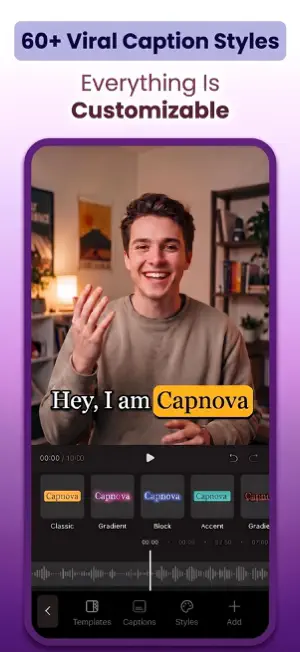
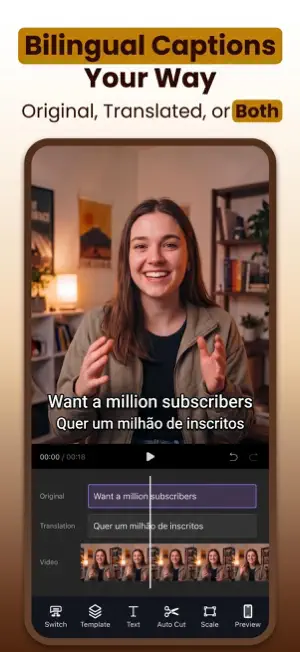
About Captions AI & Auto Captions
Struggling with tedious manual captioning? Capnova is an easy-to-use captions app and AI caption generator that creates accurate subtitles and translates them into multiple languages. With 60+ stunning templates and an intuitive built-in editor, Capnova saves you hours and makes your videos pop. Whether you're a creator, influencer, or just love sharing videos, Capnova instantly generates captions and subtitles that make your content stand out. AI AUTO CAPTIONS • Auto Captions — Create accurate video subtitles in seconds with AI speech recognition. • Perfect Sync — Captions are automatically timed to match your speech. • Multi-Language Support — Transcribe videos in English, Spanish, French, Portuguese, Hindi, and more. • AI Translation — Instantly translate captions into other languages and reach viewers worldwide. • Polished or Verbatim Captions — Choose cleaner subtitles without fillers, repetitions, or clear speech errors, or keep every spoken word. • Lyric Video Maker — Turn songs into lyric videos with perfectly synchronized captions. STYLISH & CUSTOMIZABLE CAPTIONS • 60+ Caption Templates — Choose from trending styles used by top creators. • Complete Customization — Edit fonts, colors, size, position, animation, and background. • Custom Font Upload — Import your own fonts to match your brand. • AI Highlight & Enlarge — Let AI emphasize key words with color or larger text. • Smart Text Control — Add line breaks and page breaks for clean, readable subtitles. POWERFUL BUILT-IN VIDEO EDITOR • Trim & Cut — Quickly trim videos to the perfect length. • Advanced Text Editing — Style your text with colors and dynamic animations. • B-Roll — Add supporting footage to bring your story to life and keep viewers engaged. • Smart Silence Trimming — Review and remove unwanted silent segments while keeping the natural pauses you want. • HD Export, No Watermark — Export in high quality with no watermark. BUILT FOR SOCIAL MEDIA • Social Preview — Preview your captioned video before you export. • Optimized HD Export — Export perfectly sized vertical videos for your favorite social platforms. • Trending Caption Styles — Apply popular caption templates in one tap. WHY CHOOSE CAPNOVA? • Accurate Captions — Fast, reliable speech recognition you can edit with ease. • Effortlessly Simple — An intuitive interface designed for everyone, no editing skills needed. • Lightning-Fast Results — Get captioned videos in seconds, not hours. • Always Fresh — Regular updates with new styles and features. • Trusted Globally — Join a growing community of creators worldwide. CONTACT & SUPPORT Have questions, feedback, or suggestions? We'd love to hear from you! Email: [email protected] PRIVACY POLICY https://capnova.app/privacy TERMS OF USE (EULA) https://www.apple.com/legal/internet-services/itunes/dev/stdeula/ Download Capnova now and start creating stunning, professional-looking captions that captivate your audience.
Ratings & reviews
5.0
8 ratings
What’s new
Version 2.2.04 · Updated October 18, 2026
What’s New • More caption templates and text animation effects to match your style • New B-roll support to enrich your story with supporting footage • New video filters to enhance the look of your videos • Bug fixes and performance improvements Thanks for using Capnova! Have questions or feature requests? Reach out to us at [email protected].
App privacy
The developer, 毛女 吴, reported these privacy practices to Apple.
Data Not Collected
The developer does not collect any data from this app.
Alternatives to Captions AI & Auto Captions
Looking for apps like Captions AI & Auto Captions? Here are 6 similar apps on the App Store. The highest rated is CC Captions & Subtitles (5.0/5), and all 6 are free to download.
-
 CC Captions & Subtitles
5.0
CC Captions & Subtitles
5.0
-
 Captionist: AI Video Studio
-
 SubTitler - Auto Captions
-
 Handcut: Captions & Subtitles
3.7
Handcut: Captions & Subtitles
3.7
-
 Subtext: Auto Captions
-
 CaptionLab: AI Subtitles
| App | Rating | Price | Last updated | Compare |
|---|---|---|---|---|
| Captions AI & Auto Captions | 5.0 / 5 (8 ratings) | Free | October 18, 2026 | |
| CC Captions & Subtitles | 5.0 / 5 (2) | Free | Oct 2, 2025 | Compare |
| Captionist: AI Video Studio | – | Free | Oct 3, 2026 | Compare |
| SubTitler - Auto Captions | – | Free | Oct 11, 2026 | Compare |
| Handcut: Captions & Subtitles | 3.7 / 5 (3) | Free | Oct 19, 2026 | Compare |
| Subtext: Auto Captions | – | Free | Sep 4, 2026 | Compare |
| CaptionLab: AI Subtitles | – | Free | Oct 7, 2026 | Compare |