

Auto Captions: Charlatan
Nicolas Gula Photo & Video iPhoneiPadiPod touch
Auto Captions: Charlatan is a free Photo & Video app for iPhone and iPad by Nicolas Gula. Requires iOS 18.0. Updated October 10, 2026.
- Price
- Free
- on the App Store
- Size
- 22 MB
- Age 4+
- Updated
- Oct 10
- 2026 · v1.2.1
Screenshots

About Auto Captions: Charlatan
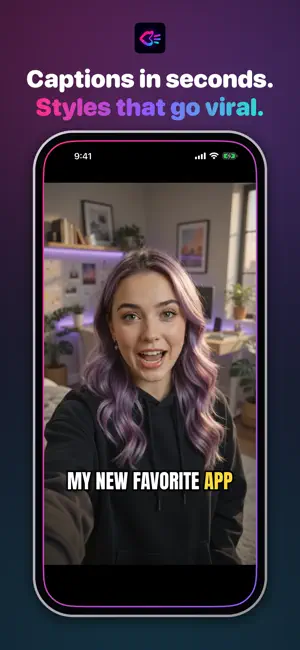
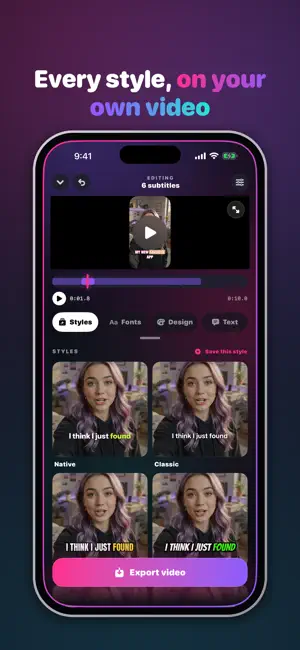
Your video is good. It just doesn't look edited. Charlatan listens to your video, writes down every word, and lets you decide how it looks — from 99 fonts, not the same three everyone else is using. PICK A VIDEO. THAT'S THE WHOLE SETUP. Choose a clip from your library or record one right there. Charlatan transcribes the audio and lays the subtitles onto the timeline, synced to what you actually said. 78 FONTS, AND THEY ARE THE POINT Impact, condensed, handwritten, marker, stencil, inline, serif. The font is what makes a caption look like yours instead of like a default. Browse by category and see each one on your own video before you commit to it. WORD BY WORD, OR PHRASE BY PHRASE Three subtitle paces: one word at a time for the classic short-form look, short punches of two or three words, or full sentences that are easier to read. Karaoke highlight lights each word up exactly when it is spoken. MAKE IT LOOK LIKE YOURS Size, position, tilt, letter spacing, ALL CAPS, colour, outline, shadow and marker highlight. Drag the subtitle anywhere in the frame, pinch to resize it. Save a style once and reuse it on every video, so everything you post looks like it came from the same place. REFRAME FOR WHERE IT IS GOING Export 9:16 for short-form, 1:1 for the feed, 16:9 for wide — or keep the original framing. TRANSLATE IT Record in one language, export the subtitles in another. EVERYTHING HAPPENS ON YOUR IPHONE The audio never leaves your phone. No account, no upload, no server, nothing to sign up for. It works on a plane. WHAT'S INCLUDED 17 fonts, the full style editor, and export. CHARLATAN PRO All 99 fonts, karaoke word-by-word highlight, translation, reframing to 9:16 / 1:1 / 16:9, saved styles, videos of any length, and no watermark. Subscriptions Charlatan Pro is available as a monthly or a yearly auto-renewable subscription, or as a one-time lifetime purchase. The yearly plan includes a 1-week free trial; the monthly plan does not. Prices are shown inside the app before you buy. Payment is charged to your Apple Account on confirmation. A subscription renews automatically unless it is cancelled at least 24 hours before the end of the current period. You can manage or cancel it at any time in your Apple Account settings. Terms of Use (EULA): https://www.apple.com/legal/internet-services/itunes/dev/stdeula/ Privacy Policy: https://dezeo.lat/charlatan/privacypolicy/
What’s new
Version 1.2.1 · Updated October 10, 2026
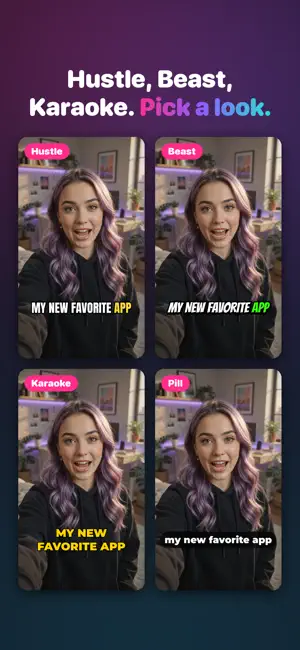
New Styles tab: eleven ready-made looks, each shown on your own video. Hustle, Beast, Karaoke, Pill, Block, Soft, Fade, Glow, Meme, Native and Classic, plus Telop, Variety and Marugo for Japanese, Korean and Chinese. The keyword of every line, picked for you and painted in its own colour. Tap the pencil on a subtitle to choose another. Real karaoke: the line waits faded and fills with colour as it is said. Or let what has been said fade out. Each word can pop, bounce or rise in on its own, and the spoken one can turn bold while the rest stay light. A rounded box that jumps from word to word, a second outline, a glow, and a shadow you can move, harden or soften. 99 fonts, now with Montserrat, TikTok Sans, Inter, Anton, Bangers and more, sorted the way people search for them: Bold, Aesthetic, Cute, Cursive, Pixel, Gothic… Japanese, Korean, Chinese, Thai, Arabic and Hebrew get their own heavy fonts, downloaded only when you need them. Optional emojis, a typewriter entrance, and a guide that shows where TikTok, Reels and Shorts buttons cover your video while you place a subtitle. The watermark of the free version now sits in the middle, see-through.
App privacy
The developer, Nicolas Gula, reported these privacy practices to Apple.
Data Not Collected
The developer does not collect any data from this app.
Alternatives to Auto Captions: Charlatan
Looking for apps like Auto Captions: Charlatan? Here are 6 similar apps on the App Store.
-
 Capbeam: Video Captions
-
 Milim: Auto Subtitles
-
 PhotoCream Pro: Film Filters
-
 Aire Subtitle
-
 Sound Off Captions
-
 VidLingo: Video Translator
| App | Rating | Price | Last updated | Compare |
|---|---|---|---|---|
| Auto Captions: Charlatan | – | Free | October 10, 2026 | |
| Capbeam: Video Captions | – | Free | Sep 22, 2026 | Compare |
| Milim: Auto Subtitles | – | Free | Oct 18, 2026 | Compare |
| PhotoCream Pro: Film Filters | – | Free | Oct 25, 2026 | Compare |
| Aire Subtitle | – | Free | Oct 5, 2026 | Compare |
| Sound Off Captions | – | Free | Aug 7, 2026 | Compare |
| VidLingo: Video Translator | – | Free | Oct 15, 2026 | Compare |