

Sound Off Captions
Joylord Systems Ltd Photo & Video iPhoneiPadiPod touch
Sound Off Captions is a free Photo & Video app for iPhone and iPad by Joylord Systems Ltd. Requires iOS 26.0. Updated August 7, 2026.
- Price
- Free
- on the App Store
- Size
- 81 MB
- Age 4+
- Updated
- Aug 7
- 2026 · v1.2
Screenshots
About Sound Off Captions
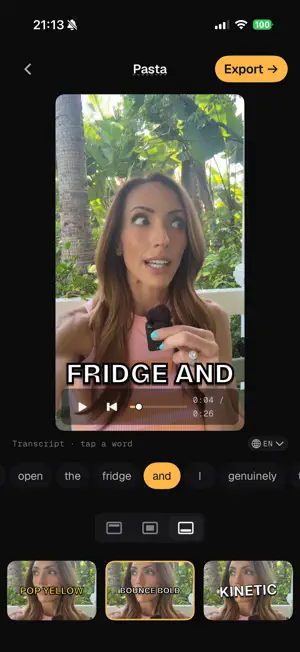
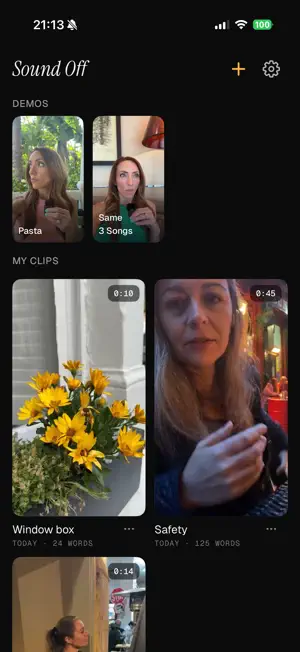
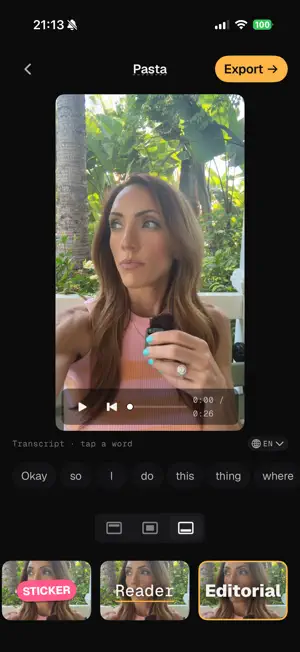
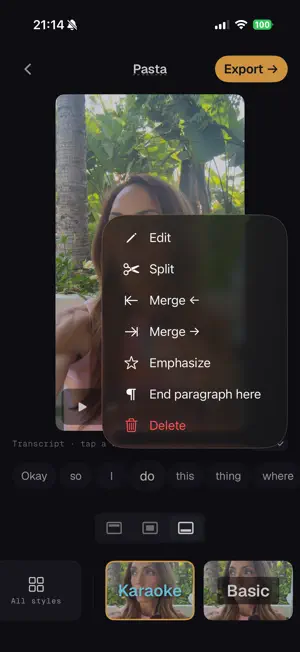
Sound Off adds stylish, animated captions to vertical video, entirely on your iPhone. Open a clip from Photos, and Sound Off transcribes the audio on the device, picks a caption style with you, and writes the finished captioned video back to Photos - ready to post to TikTok, Reels, YouTube Shorts, or anywhere else you share to. Twelve caption styles, including word-by-word animation and full-paragraph captions. No account, no upload, no subscription. WHAT YOU GET • On-device transcription. Sound Off uses Apple's on-device speech model. Your videos, audio, and transcripts stay on the iPhone. • Twelve animated caption styles. Word-by-word styles like Pop Yellow, Karaoke, Classic, and Bounce Bold animate each word as it's spoken. New paragraph styles Reader and Editorial show the whole sentence on screen, with the spoken word highlighted, for talking-head and podcast clips. • Word-level editing. Tap any word to fix a transcription mistake, split or merge phrases, mark where a paragraph ends, or emphasise a word. • Native iPhone export. Save the finished captioned video to Photos in seconds, or send it straight through the share sheet. ON-DEVICE, BY DESIGN Sound Off has no account, no sign-in, and no analytics SDK. We don't track you, and we can't see your videos. The "Data Not Collected" label on this listing is the whole story. ONE-TIME PURCHASE Sound Off is free to try. Free exports carry a small watermark. A one-time unlock removes the watermark and opens the full caption style catalogue. The same purchase works on every iPhone signed into your Apple ID. REQUIREMENTS iPhone 12 or newer, running iOS 26 or later. Vertical, portrait video up to 90 seconds. English and Spanish audio (more languages coming). SUPPORT Email [email protected] or visit soundoffcaptions.app/support.html
What’s new
Version 1.2 · Updated August 7, 2026
Sound Off speaks Spanish. • Spanish transcription, on device. Same speed, same privacy as English — nothing is uploaded. Pick your language in Settings, or change it on a clip while you're editing. • The whole app follows your iPhone's language now: menus, buttons, the lot. • Changed your mind? Tap a clip's language chip and Sound Off redoes the captions, keeping your style and your edits.
App privacy
The developer, Joylord Systems Ltd, reported these privacy practices to Apple.
Data Not Collected
The developer does not collect any data from this app.
Alternatives to Sound Off Captions
Looking for apps like Sound Off Captions? Here are 6 similar apps on the App Store. The highest rated is Subly: Subtitle Maker (5.0/5), and all 6 are free to download.
-
 Subly: Subtitle Maker
5.0
Subly: Subtitle Maker
5.0
-
 CaptionAddr: Auto Captions
4.6
CaptionAddr: Auto Captions
4.6
-
 CC Captions & Subtitles
5.0
CC Captions & Subtitles
5.0
-
 AI Captions - Subtitle Maker
-
 AI Captions for Videos: VidCap
4.7
AI Captions for Videos: VidCap
4.7
-
 Capzy: AI Caption
4.7
Capzy: AI Caption
4.7
| App | Rating | Price | Last updated | Compare |
|---|---|---|---|---|
| Sound Off Captions | – | Free | August 7, 2026 | |
| Subly: Subtitle Maker | 5.0 / 5 (2) | Free | Oct 14, 2026 | Compare |
| CaptionAddr: Auto Captions | 4.6 / 5 (7) | Free | Oct 23, 2026 | Compare |
| CC Captions & Subtitles | 5.0 / 5 (2) | Free | Oct 2, 2025 | Compare |
| AI Captions - Subtitle Maker | – | Free | Sep 30, 2026 | Compare |
| AI Captions for Videos: VidCap | 4.7 / 5 (1,570) | Free | Oct 25, 2026 | Compare |
| Capzy: AI Caption | 4.7 / 5 (936) | Free | Dec 2, 2025 | Compare |
Compare Sound Off Captions with the top alternatives: ratings, updates, ASO score and keyword gaps →