

CaptionAddr: Auto Captions
DYNSELL LLC Photo & Video iPhoneiPad
CaptionAddr: Auto Captions is a free Photo & Video app for iPhone and iPad by DYNSELL LLC. Rated 4.6/5 from 7 ratings. Requires iOS 17.0.
- Rating
- 4.6
- 7 ratings
- Price
- Free
- on the App Store
- Size
- 476 MB
- Age 4+
- Updated
- Oct 23
- 2026 · v1.14
Screenshots


About CaptionAddr: Auto Captions
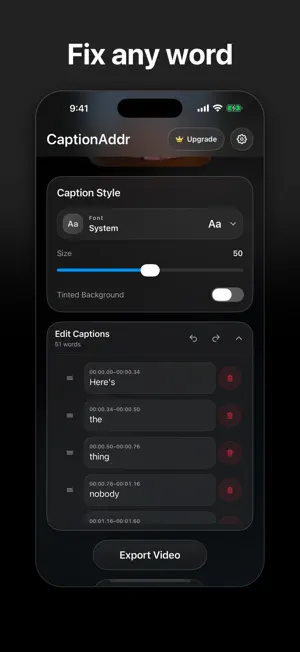
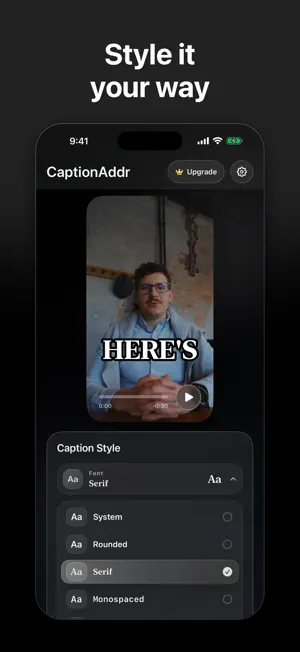
Add captions and subtitles to any video in one tap. CaptionAddr turns English speech into word-by-word captions timed to the frame, then exports a finished video with the captions burned in, ready for Reels, Shorts and Stories. Everything happens on your iPhone or iPad. Your video, audio, transcript, caption edits, and export are never uploaded to CaptionAddr or our services. No account, no ads, no watermark. Free for clips up to 2 minutes. Pro captions videos up to 30 minutes. WHY CREATORS USE IT • Most people watch with the sound off. Captions keep them watching. • Single-word captions snapped to your video's frame rate, the punchy style made for short-form video • Accurate on-device transcription powered by Whisper • Transcribes English speech (more languages are not supported yet) • Fix any word: edit, delete, or reorder individual captions • 20 caption fonts with size, position, and tinted-background controls • Clean burned-in exports that work in any app • Works offline once installed FREE • Caption, edit, and export videos up to 2 minutes • The full transcription and caption editor • Clean exports with no watermark CAPTIONADDR PRO • Everything in Free • Videos up to 30 minutes • Monthly or annual plan, with a free trial for eligible new subscribers CaptionAddr Pro is available as a monthly or an annual subscription and renews automatically unless canceled at least 24 hours before the end of the current period. Eligible new subscribers can start with a free trial: 7 days on the annual plan, 3 days on the monthly plan. The App Store shows final local pricing and eligibility before purchase. Privacy Policy: https://captionaddr.com/privacy/ Terms of Use (EULA): https://www.apple.com/legal/internet-services/itunes/dev/stdeula/ Service Terms: https://captionaddr.com/terms/
Ratings & reviews
4.6
7 ratings
What’s new
Version 1.14 · Updated October 23, 2026
New seasonal caption looks: Thanksgiving, Holiday, Year in Review, New Year Goals and Valentine's sets appear in Caption Style during their season.
App privacy
The developer, DYNSELL LLC, reported these privacy practices to Apple.
Data Linked to You
The following data, which may be collected and linked to your identity, may be used for the following purposes:
- Purchases: Purchase History
- Identifiers: User ID, Device ID
Used for: App Functionality
Data Not Linked to You
The following data, which may be collected but is not linked to your identity, may be used for the following purposes:
- Usage Data: Product Interaction
- Diagnostics: Other Diagnostic Data, Crash Data, Performance Data
Used for: Analytics, App Functionality
Alternatives to CaptionAddr: Auto Captions
Looking for apps like CaptionAddr: Auto Captions? Here are 6 similar apps on the App Store. The highest rated is Whisper Caption (5.0/5), and all 6 are free to download.
-
 Handcut: Captions & Subtitles
3.7
Handcut: Captions & Subtitles
3.7
-
 Whisper Caption
5.0
Whisper Caption
5.0
-
 Sound Off Captions
-
 Subtext: Auto Captions
-
 AutoSub - Video Translator
4.6
AutoSub - Video Translator
4.6
-
 Auto Caption Video Subtitles
4.8
Auto Caption Video Subtitles
4.8
| App | Rating | Price | Last updated | Compare |
|---|---|---|---|---|
| CaptionAddr: Auto Captions | 4.6 / 5 (7 ratings) | Free | October 23, 2026 | |
| Handcut: Captions & Subtitles | 3.7 / 5 (3) | Free | Oct 24, 2026 | Compare |
| Whisper Caption | 5.0 / 5 (1) | Free | Oct 24, 2026 | Compare |
| Sound Off Captions | – | Free | Aug 7, 2026 | Compare |
| Subtext: Auto Captions | – | Free | Sep 4, 2026 | Compare |
| AutoSub - Video Translator | 4.6 / 5 (62) | Free | Oct 14, 2026 | Compare |
| Auto Caption Video Subtitles | 4.8 / 5 (920) | Free | Oct 23, 2026 | Compare |