

Pocket Scan: PDF & Doc Scanner
X-UNI COMPANY LIMITED Productivity iPhoneiPadiPod touch
Pocket Scan: PDF & Doc Scanner is a free Productivity app for iPhone and iPad by X-UNI COMPANY LIMITED. Requires iOS 15.5. Updated October 31, 2026.
- Price
- Free
- on the App Store
- Size
- 142 MB
- Age 4+
- Updated
- Oct 31
- 2026 · v1.0.7
Screenshots


About Pocket Scan: PDF & Doc Scanner
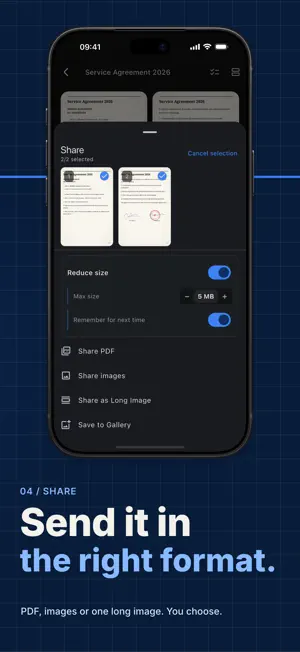
Turn your phone into a portable document scanner — fast, sharp, and truly private. Pocket Scan helps you scan paper documents, convert photos to PDF, and organize your files in seconds. Open the app and your camera is immediately ready: point it at any paper, and it automatically detects borders and captures cleanly. No waiting screens, no mandatory registration, and zero internet connection required. Whether you need to scan contracts, save receipts for expenses, or digitize old documents, Pocket Scan handles it all. → Scan Documents Anywhere, Anytime • Automatic edge detection as soon as you aim the camera • Auto-capture when steady, or manual capture on your terms • Multi-page batch scanning in a single workflow • Import existing photos from your gallery • Flashlight support for low-light environments → Crisp & Enhanced Scans • Auto-perspective correction and corner straightening • 6 enhancement filters: Original, Flatten Creases, Enhance, Contrast, B&W, Grayscale • Apply filters across all pages in one tap • Fine-tune corners, rotate, delete, or add missing pages → Export to PDF & Share Instantly • Export to high-quality PDF or image files • Choose page formats: A4, US Letter, or fit to image • Select file size options to send quickly via email or chat → Complete Privacy • All document scanning and processing happens 100% on your device • Never uploaded to any external server without your consent • Works completely offline with no account required → Pocket Scan Premium • Unlimited watermark-free exports • Full-text search inside documents • Searchable PDF exports — find words in any PDF reader • Completely ad-free experience • Flexible plans: Monthly or Yearly Privacy Policy: https://x-uni.io.vn/pocketscan/privacy Terms of Service: https://x-uni.io.vn/pocketscan/terms Download Pocket Scan today and transform paper piles into neat digital files right in your pocket!
What’s new
Version 1.0.7 · Updated October 31, 2026
Pocket Scan 1.0.7 • Fixed an issue that could stop documents from opening after an update.
App privacy
The developer, X-UNI COMPANY LIMITED, reported these privacy practices to Apple.
Data Used to Track You
The following data may be used to track you across apps and websites owned by other companies:
- Identifiers: Device ID
Data Linked to You
The following data, which may be collected and linked to your identity, may be used for the following purposes:
- Purchases: Purchase History
- Contact Info: Email Address, Name
- Identifiers: User ID
Used for: Analytics, App Functionality
Data Not Linked to You
The following data, which may be collected but is not linked to your identity, may be used for the following purposes:
- Identifiers: Device ID
- Usage Data: Advertising Data, Product Interaction
- Location: Coarse Location
- Diagnostics: Crash Data, Other Diagnostic Data
Used for: Third-Party Advertising, Analytics, App Functionality
Alternatives to Pocket Scan: PDF & Doc Scanner
Looking for apps like Pocket Scan: PDF & Doc Scanner? Here are 6 similar apps on the App Store. The highest rated is Pocket Scan: Offline Scanner (5.0/5), and all 6 are free to download.
-
 LifeX: Your Life OS
-
 Viewer for Trello
-
 Pocket Scan: Offline Scanner
5.0
-
 ID Card Scanner & PDF Maker
5.0
-
 Shortcuts Library
3.3
-
 RSSHub Radar
3.7
| App | Rating | Price | Last updated | Compare |
|---|---|---|---|---|
| Pocket Scan: PDF & Doc Scanner | – | Free | October 31, 2026 | |
| LifeX: Your Life OS | – | Free | Oct 3, 2026 | Compare |
| Viewer for Trello | – | Free | Sep 29, 2026 | Compare |
| Pocket Scan: Offline Scanner | 5.0 / 5 (2) | Free | Oct 10, 2026 | Compare |
| ID Card Scanner & PDF Maker | 5.0 / 5 (2) | Free | Oct 26, 2026 | Compare |
| Shortcuts Library | 3.3 / 5 (3) | Free | Sep 19, 2026 | Compare |
| RSSHub Radar | 3.7 / 5 (3) | Free | Feb 9, 2025 | Compare |