

CrispRecord: Voice Notes
MyeongJin Lee Productivity iPhoneiPadiPod touchMac
CrispRecord: Voice Notes is a free Productivity app for iPhone and iPad by MyeongJin Lee. Requires iOS 26.0. Updated October 7, 2026.
- Price
- Free
- on the App Store
- Size
- 28 MB
- Age 4+
- Updated
- Oct 7
- 2026 · v1.0.1
Screenshots



About CrispRecord: Voice Notes
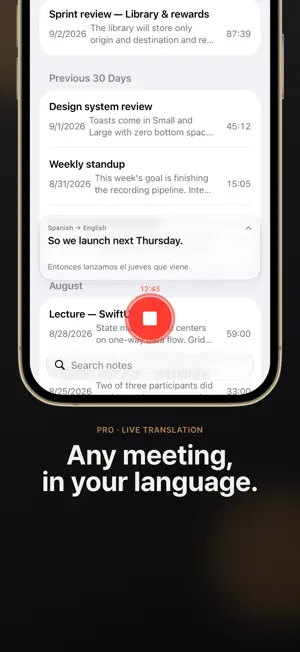
A recorder that never collects your recordings or meeting content, and a meeting-notes summarizer that works offline. Stay in the conversation instead of taking notes. Just record, and your notes are ready when the meeting ends. Notes seconds after you stop It's all sorted into the conclusion, discussion by topic, decisions, open questions, and action items. Numbers, names, and deadlines are kept word for word from the transcript. Long meetings are summarized in one pass by Apple Intelligence Cloud. Missed something? Read the captions With Pro, captions appear a little over 1 second after someone speaks, and the translation follows right behind. The moment you stop recording, the translation is saved with your notes. Find past meetings fast Search titles, notes, and full transcripts at once, or find them in Spotlight. With Pro on Mac, Ask Your Notes answers questions like "Which meeting was that budget talk in?" and shows the source. Share right after the meeting Share the summary, full transcript, translation, or audio file right away. Tap a sentence to replay from that point. One tap to record • Start with the big record button, by saying "Start recording in CrispRecord" to Siri, with the Action button, or with Shortcuts • Start and stop with one tap from the Lock Screen, Control Center, or a widget • Recording continues with the screen locked, and if the app quits, everything up to that moment is kept Record on iPhone, wrap up on Mac Turn on iCloud Sync and your notes and recordings travel only between your own devices through your iCloud. On Mac, it also records the other side of video calls. One purchase unlocks Pro on both iPhone and Mac. Meetings in other languages, too Transcribe 46 languages on device, and translate finished notes for free. Your recordings never reach our servers Transcription and translation always happen on your device. Transcript text is sent to Apple's Private Cloud Compute only to create a summary or answer Ask Your Notes, and Apple doesn't store it. Turn on Fully On-Device Mode and summaries are made on your device too. No sign-up and no login. Free • Unlimited recording, transcription, summaries, storage, and search • iCloud Sync, Siri and Shortcuts, Spotlight search • Transcription in 46 languages and translation of finished notes • 5 Apple Intelligence Cloud summaries a day No credits and no cap on saved notes. CrispRecord Pro • Unlimited Apple Intelligence Cloud summaries, within Apple's daily limit • Ask Your Notes on Mac • Live captions and translation while recording, with the translation saved the moment you stop • High-accuracy transcription on Mac: more accurate on long recordings and on conversations that mix in English terms Choose monthly, yearly, or lifetime. Future Pro features are included. Good to know • Summaries need a device with Apple Intelligence turned on. Apple Intelligence Cloud summaries are available on iOS 27 or later. • Google AI summaries are used only in Pro on Mac, and only when Apple's cloud can't be used. They are never used on iPhone. • Translation works in the languages Apple Translate supports. The first time you use a language, its transcription and translation models are downloaded once. Privacy Policy: https://recode-imajine.web.app/privacy Terms of Use: https://www.apple.com/legal/internet-services/itunes/dev/stdeula/
What’s new
Version 1.0.1 · Updated October 7, 2026
Performance improvements. Added optional app usage statistics — you choose whether to share them.
App privacy
The developer, MyeongJin Lee, reported these privacy practices to Apple.
Data Not Linked to You
The following data, which may be collected but is not linked to your identity, may be used for the following purposes:
- Purchases: Purchase History
- Location: Coarse Location
- Identifiers: Device ID, User ID
- Usage Data: Product Interaction
- User Content: Photos or Videos, Customer Support
Used for: Analytics, App Functionality
Alternatives to CrispRecord: Voice Notes
Looking for apps like CrispRecord: Voice Notes? Here are 6 similar apps on the App Store. The highest rated is Dictofon: AI Voice Recorder (5.0/5), and all 6 are free to download.
-
 Dicta - AI Note Taker
-
 FocusPro AI
-
 Transcribe Voice Notes AI
-
 Dictofon: AI Voice Recorder
5.0
Dictofon: AI Voice Recorder
5.0
-
 Doli – Your Interpreter
5.0
Doli – Your Interpreter
5.0
-
 Recapp - AI Meeting Recorder
| App | Rating | Price | Last updated | Compare |
|---|---|---|---|---|
| CrispRecord: Voice Notes | – | Free | October 7, 2026 | |
| Dicta - AI Note Taker | – | Free | Oct 10, 2026 | Compare |
| FocusPro AI | – | Free | Sep 2, 2026 | Compare |
| Transcribe Voice Notes AI | – | Free | May 25, 2026 | Compare |
| Dictofon: AI Voice Recorder | 5.0 / 5 (2) | Free | Oct 12, 2026 | Compare |
| Doli – Your Interpreter | 5.0 / 5 (1) | Free | Oct 12, 2026 | Compare |
| Recapp - AI Meeting Recorder | – | Free | Oct 22, 2026 | Compare |