

Dictofon: AI Voice Recorder
Artem Leonov Productivity iPhoneiPadiPod touchApple Watch
Dictofon: AI Voice Recorder is a free Productivity app for iPhone and iPad by Artem Leonov. Rated 5.0/5 from 2 ratings. Requires iOS 26.0.
- Rating
- 5.0
- 2 ratings
- Price
- Free
- on the App Store
- Size
- 3.4 GB
- Age 4+
- Updated
- Oct 12
- 2026 · v3.1.7
Screenshots


About Dictofon: AI Voice Recorder
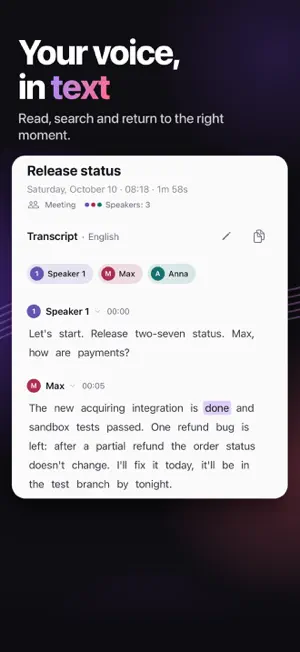
Dictofon is an AI voice recorder for iPhone and iPad with offline audio-to-text transcription and summaries. Record meetings, lectures and interviews, distinguish speakers and ask questions about your recordings. Transcription and AI processing run on your device. RECORD OR IMPORT • Start with one tap. Recording can continue in the background; mark important moments with bookmarks. • Pause recording and resume in the same file. • Continue a saved note: new audio and text are appended, while your existing text and edits are preserved. • Import audio and video, including Ogg/Opus voice messages. • Record on Apple Watch: audio transfers to the paired iPhone for transcription. • Read live text when your device and language support Apple's speech recognition. TRANSCRIPTS AND SUMMARIES • Bundled models recognize 25 European languages, including English, Spanish, French, German, Italian, Ukrainian and Russian. • Speakers are marked in the transcript. Rename or merge them, or assign an individual passage to another speaker. • Create a summary when you need it. Choose the recording type or let Dictofon identify it. • Key points, decisions, tasks with owners and deadlines, and chapters appear when present in the recording. Add tasks to Apple Reminders. • Rewrite a summary and restore an earlier version when needed. • Turn the material into meeting minutes, lecture notes, an interview, an email, a diary entry or a post. Available documents depend on the recording type. ASK YOUR RECORDING What was decided? Who is handling the launch? What are the deadlines? Chat uses the transcript, summary and relevant passages. Tap a timestamp in an answer to play that moment. You can also save an answer as the summary. FIND, LISTEN AND SHARE • Folders, tags, favorites, Trash and search by meaning. • Word highlighting during playback, 0.8–2× speed, silence skipping, bookmarks, trimming, re-transcription and a replacement dictionary. • Translations stay alongside the original. Apple or the built-in model is used, depending on the language and device. • Export transcript text as TXT, PDF, SRT or VTT; Markdown can include summaries, tasks and chapters. • Siri, widgets, Control Center, the Action button and a recording card on the Lock Screen. ON-DEVICE PROCESSING Audio is not sent to a transcription server. Bundled speech recognition, speaker detection, summaries and chat run on your device. No separate account, advertising, trackers or third-party analytics. Optional iCloud sync uses your own Apple Account. Protect access with Face ID, Touch ID or your passcode. REQUIREMENTS AND LANGUAGES iOS 26 or later. Interface: English, Russian and Simplified Chinese. The bundled Qwen3.5 4B model for generated summaries and answers requires an iPhone or iPad with 8 GB of RAM. Other devices can show key passages from the transcript; Apple Intelligence is used when the device and language are supported. Bundled models work offline after installation; the app download takes several gigabytes. Automatic mode selects the speech model. Additional languages require a full download of the optional Whisper pack from Hugging Face. Available languages and quality vary; some need manual language selection. Live text, Apple translation and search by meaning need Apple support and language packs. Built-in model translation requires an eligible device and can make mistakes. iCloud needs internet access. Transcription may wait for you to reopen the app, then continues automatically; an interrupted attempt may restart from the beginning. AI summaries, model translation and chat need the app open. Pause notices are available if notifications are allowed. Models: NVIDIA Parakeet TDT 0.6B v3 (CC-BY-4.0), GigaAM-v3 (MIT), Qwen3.5 4B and FluidAudio (Apache 2.0), llama.cpp (MIT). Other model details and licenses are in the app.
What’s new
Version 3.1.7 · Updated October 12, 2026
• Smoother recording start and stop: controls appear together and the timer stays visible until the note is saved. • Ending a system background task no longer cancels running or queued transcriptions. Work may wait for your return and then continues automatically. • The system card shows preparation, language detection and queue status. Pause notifications can explain when transcription or local AI needs the app open, if notifications are allowed. • Improved recovery when Whisper language detection is interrupted in the background. A retry may read the recording from the beginning.
App privacy
The developer, Artem Leonov, reported these privacy practices to Apple.
Data Not Collected
The developer does not collect any data from this app.
Alternatives to Dictofon: AI Voice Recorder
Looking for apps like Dictofon: AI Voice Recorder? Here are 6 similar apps on the App Store. The highest rated is SmartShoppingList (5.0/5), and all 6 are free to download.
-
 Rechka: audio to text
-
 Second Brain - Voice Notes
-
 AI Note Taker : Voice Recorder
4.7
-
 Screenshot Manager: Shotnest
-
 SmartShoppingList
5.0
-
 Beseda
| App | Rating | Price | Last updated | Compare |
|---|---|---|---|---|
| Dictofon: AI Voice Recorder | 5.0 / 5 (2 ratings) | Free | October 12, 2026 | |
| Rechka: audio to text | – | Free | Sep 2, 2026 | Compare |
| Second Brain - Voice Notes | – | Free | Feb 24, 2026 | Compare |
| AI Note Taker : Voice Recorder | 4.7 / 5 (7) | Free | Oct 20, 2026 | Compare |
| Screenshot Manager: Shotnest | – | Free | Oct 6, 2026 | Compare |
| SmartShoppingList | 5.0 / 5 (1) | Free | Nov 19, 2025 | Compare |
| Beseda | – | Free | Oct 19, 2026 | Compare |