

ResizePing: Photo Resizer, PDF
Ramiz Raja Photo & Video iPhoneiPadiPod touch
ResizePing: Photo Resizer, PDF is a free Photo & Video app for iPhone and iPad by Ramiz Raja. Requires iOS 17.0. Updated October 24, 2026.
- Price
- Free
- on the App Store
- Size
- 24 MB
- Age 4+
- Updated
- Oct 24
- 2026 · v1.0.50
Screenshots


About ResizePing: Photo Resizer, PDF
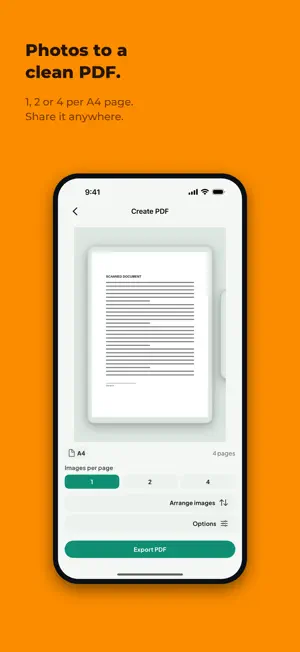
Resize and compress photos to an exact file size or exact dimensions, combine photos into one picture, turn photos into PDFs, shrink videos, turn a video clip into a GIF, merge and split PDFs, and pull the audio out of a video as MP3. ResizePing does the job on your device, so your files never leave your phone and nothing is uploaded. Need a photo under 100 KB for a form, a passport picture at the right print size, a video small enough to send, or one PDF out of five files? Pick the tool, set the target, and ResizePing hits it. EXACT SIZE, EVERY TIME Pick an exact file size in KB or MB, or exact dimensions: pixels, percent, or a print size. Work on a single photo or a whole batch at once. Before you run anything, ResizePing shows the projected result size for every photo and warns you when a target is impossible, so you never export and then find out it missed. • One-tap presets: 100 KB, 1 MB, 1080 px, passport 35x45 mm • Best, Balanced or Smallest quality • JPG, PNG and WEBP output, HEIC input • Location data stripped by default, so a shared photo does not carry where it was taken EVERY TOOL, ONE APP Photos, PDFs, video, GIFs and audio in one place. Choose what you want to do from the home screen and go: no separate apps for a photo resizer, a PDF merger, a video compressor, a GIF maker and an audio extractor. Everything is private and everything runs on your device. COMBINE PHOTOS INTO ONE PICTURE Stack photos vertically, join them side by side, or lay them out in a 2, 3 or 4-column grid. Reorder them by dragging, set the spacing and margin, and choose the background colour. Export one clean picture that is ready to send, print or post. PHOTOS TO A CLEAN PDF Put 1, 2 or 4 photos on each A4 page, portrait or landscape. Scanned receipts, ID copies, homework pages or a set of product shots become one tidy PDF that you can share anywhere. VIDEO, TO THE SIZE YOU NEED Shrink a video to 200, 100 or 50 MB, or type your own target, and see the estimated result before you start. Fits messaging apps, email limits and upload forms. VIDEO TO GIF Pick a video, choose the start and end, and turn that moment into a GIF. Drag the handles, watch the preview play exactly the clip you picked, and share the GIF anywhere. PRINT SIZES BUILT IN Passport and document sizes in mm, cm or inch with DPI that you can set yourself. A 35x45 mm passport photo at 300 DPI comes out at the exact pixel size the print shop expects. MERGE, SPLIT, COMPRESS PDFS Merge several PDFs into one, split a PDF into parts, extract just the pages you need, compress a large PDF so it fits an email, or turn PDF pages into JPG images. VIDEO TO MP3, PLAY IT IN-APP Pull the audio out of a video as an MP3 and play it right away in the built-in player, with play, pause and a seek bar. EVERY JOB, REMEMBERED Every result compares the before and after size, with Share and Done. Your history can be filtered by status and format, and you can re-run any job in one tap with the same settings. Share photos, videos and PDFs into ResizePing from Photos, Files, Drive or any other app, and the right tool opens. WHAT PEOPLE USE IT FOR • Upload forms and applications that cap a photo at 20 KB, 50 KB, 100 KB, 200 KB, 500 KB, 1 MB or 2 MB, or any number you type. • Passport, visa and ID photos at an exact size in millimetres. • Emailing or messaging photos without a slow upload. • Turning a stack of phone photos into one PDF for a landlord, school or office. • Making a long video fit a 100 MB attachment limit. • Turning a funny moment from a video into a GIF to share. • Joining before and after shots, or a set of screenshots, into one picture. • Pulling the audio from a lecture or a concert video as an MP3. PRIVATE BY DESIGN Your photos, videos and PDFs are processed on your device. There is no account to create and nothing to upload. You decide what to keep and what to share. Free to use. No account needed. Support: [email protected]
What’s new
Version 1.0.50 · Updated October 24, 2026
Bug fixes and performance improvements.
App privacy
The developer, Ramiz Raja, reported these privacy practices to Apple.
Data Used to Track You
The following data may be used to track you across apps and websites owned by other companies:
- Identifiers: Device ID
Data Not Linked to You
The following data, which may be collected but is not linked to your identity, may be used for the following purposes:
- Identifiers: Device ID
- Location: Coarse Location
- Usage Data: Product Interaction
- Diagnostics: Crash Data, Other Diagnostic Data
Used for: Third-Party Advertising, Analytics, App Functionality
Alternatives to ResizePing: Photo Resizer, PDF
Looking for apps like ResizePing: Photo Resizer, PDF? Here are 6 similar apps on the App Store. The highest rated is PhotoFit – Resize & Compress (5.0/5), and all 6 are free to download.
-
 Image Resizer - Compress Photo
-
 PhotoFit – Resize & Compress
5.0
PhotoFit – Resize & Compress
5.0
-
 Image Size & Compress: ReIma
-
 IntelliSize: Resize & Clean Up
3.0
IntelliSize: Resize & Clean Up
3.0
-
 PrintExact: Print to Size
1.0
PrintExact: Print to Size
1.0
-
 Printmira: Photo Print & PDF
| App | Rating | Price | Last updated | Compare |
|---|---|---|---|---|
| ResizePing: Photo Resizer, PDF | – | Free | October 24, 2026 | |
| Image Resizer - Compress Photo | – | Free | Oct 5, 2026 | Compare |
| PhotoFit – Resize & Compress | 5.0 / 5 (2) | Free | Oct 10, 2026 | Compare |
| Image Size & Compress: ReIma | – | Free | Oct 28, 2026 | Compare |
| IntelliSize: Resize & Clean Up | 3.0 / 5 (1) | Free | Oct 20, 2026 | Compare |
| PrintExact: Print to Size | 1.0 / 5 (1) | Free | Sep 24, 2026 | Compare |
| Printmira: Photo Print & PDF | – | Free | Oct 26, 2026 | Compare |