

Printmira: Photo Print & PDF
冲 洪 Photo & Video iPhoneiPadiPod touch
Printmira: Photo Print & PDF is a free Photo & Video app for iPhone and iPad by 冲 洪. Requires iOS 17.0. Updated October 21, 2026.
- Price
- Free
- on the App Store
- Size
- 3 MB
- Age 4+
- Updated
- Oct 21
- 2026 · v1.8.8
Screenshots

About Printmira: Photo Print & PDF
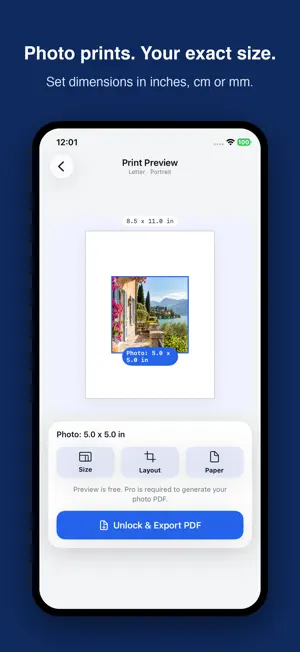
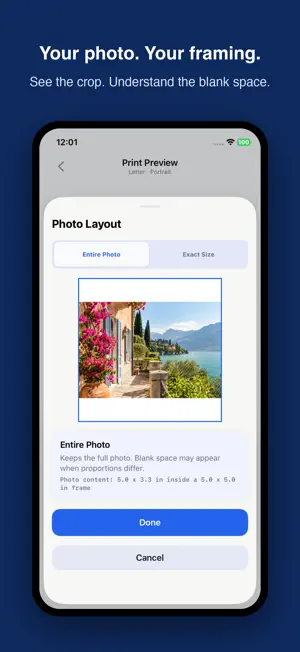
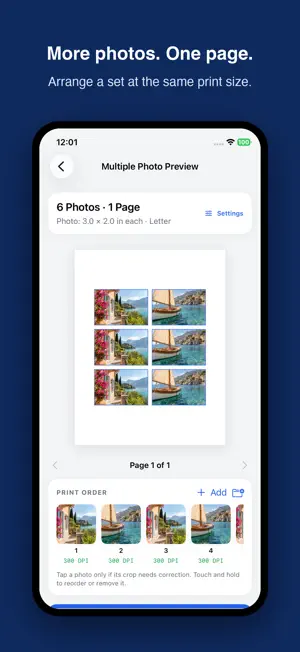
Printmira is an iPhone app for preparing photos at the physical size you want to print. Enter dimensions in inches, centimeters or millimeters, preview the layout on your chosen paper, and export a PDF for printing. Prepare a photo for a picture frame, arrange multiple photos on one sheet, or size an image for a craft project. Choose dimensions such as 4 x 6 or 5 x 7 inches, or enter a custom size. Create, edit and preview single-photo and multi-photo projects for free. All photo PDF exports require Printmira Pro. SET YOUR PRINT SIZE - Set photo dimensions separately from the paper size. - Preview your layout on Letter, A4, 4 x 6 or 5 x 7 paper. - Crop to fill the chosen dimensions, or keep the whole image within them with white space when needed. - Check cropping, white space and estimated DPI before export. ARRANGE MULTIPLE PHOTOS - Import images from Photos or Files. - Add up to 20 photos to a project with one shared photo size and paper setup. - Use Auto Arrange to place several photos on a page when they fit, or One Per Page for separate pages. - Adjust each photo's crop and add optional cut guides. - Revisit recent projects saved on your device. COMMON PRINTING QUESTIONS Can I set a photo's print size in centimeters? Yes. Enter the width and height in centimeters, millimeters or inches, choose the paper, and preview the layout before exporting a PDF. Can I put multiple photos on one page? Yes, when the selected photo size fits more than once on the chosen paper. Auto Arrange uses the same photo size and paper setup throughout the project. The number of photos per page depends on those settings. How do I keep the printed size accurate? Match the printer's paper setting to your PDF. Choose Actual Size or 100% scale where available, and avoid options that resize the page. Printer settings and printable margins can affect the final result. PRINTMIRA PRO Monthly and annual subscriptions, or a lifetime purchase, unlock unlimited PDF exports and unlimited locally saved projects. After generating a PDF, you can save, share or print it. Terms of Use: https://www.apple.com/legal/internet-services/itunes/dev/stdeula/
What’s new
Version 1.8.8 · Updated October 21, 2026
Bug fixes and improvements.
App privacy
The developer, 冲 洪, reported these privacy practices to Apple.
Data Not Collected
The developer does not collect any data from this app.
Alternatives to Printmira: Photo Print & PDF
Looking for apps like Printmira: Photo Print & PDF? Here are 6 similar apps on the App Store. The highest rated is Print to Size (4.9/5), and 5 of the 6 are free to download.
-
 Photo Printer: Print to Size
-
 Print Photos Exact Size
-
 Photo Printer - Print to Size
4.6
Photo Printer - Print to Size
4.6
-
 Perfect Print : Exact Photo
4.6
Perfect Print : Exact Photo
4.6
-
 Print to Size
4.9
Print to Size
4.9
-
 PhotoPrint LT - photo printer
4.5
PhotoPrint LT - photo printer
4.5
| App | Rating | Price | Last updated | Compare |
|---|---|---|---|---|
| Printmira: Photo Print & PDF | – | Free | October 21, 2026 | |
| Photo Printer: Print to Size | – | Free | Aug 19, 2026 | Compare |
| Print Photos Exact Size | – | Free | Apr 30, 2026 | Compare |
| Photo Printer - Print to Size | 4.6 / 5 (48) | Free | Oct 21, 2026 | Compare |
| Perfect Print : Exact Photo | 4.6 / 5 (118) | Free | Oct 21, 2026 | Compare |
| Print to Size | 4.9 / 5 (20,037) | 2.99 USD | Oct 11, 2026 | Compare |
| PhotoPrint LT - photo printer | 4.5 / 5 (422) | Free | Jan 29, 2024 | Compare |