

IntelliSize: Resize & Clean Up
Nasim Mahmoudzadeh Photo & Video iPhoneiPadiPod touch
IntelliSize: Resize & Clean Up is a free Photo & Video app for iPhone and iPad by Nasim Mahmoudzadeh. Requires iOS 18.1. Updated October 20, 2026.
- Price
- Free
- on the App Store
- Size
- 3 MB
- Age 4+
- Updated
- Oct 20
- 2026 · v1.0.1
Screenshots
About IntelliSize: Resize & Clean Up
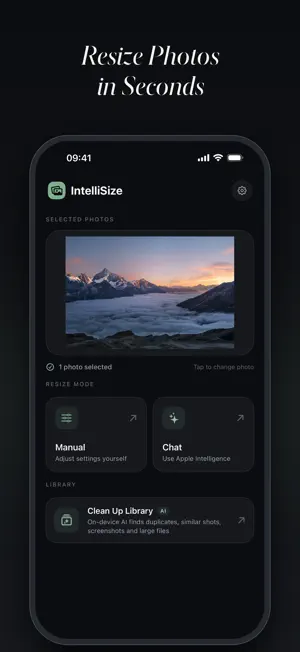
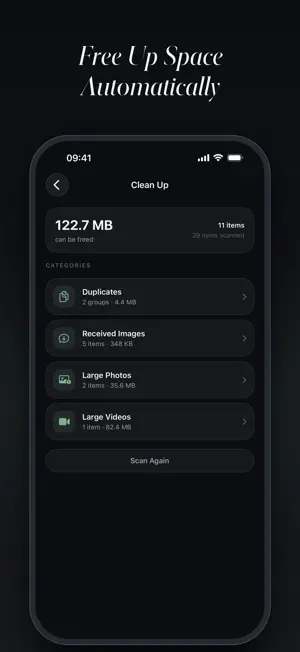
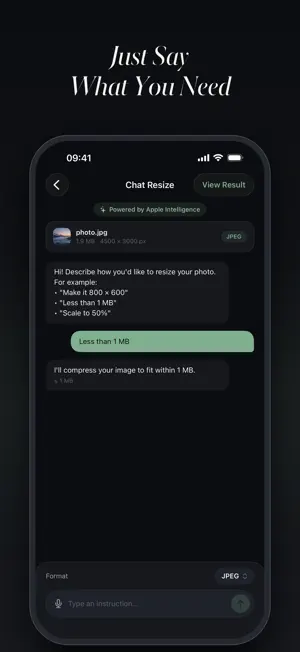
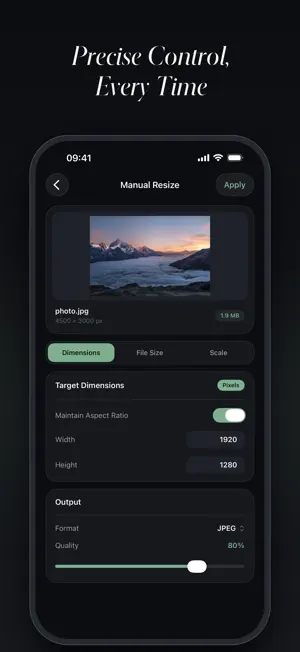
IntelliSize – Resize, Compress and Clean Up Your Photos Resize a picture to exact pixels, shrink it under 1 MB for an email or online form, convert HEIC to JPEG – or let on-device AI find the duplicates, screenshots and oversized files filling up your library. IntelliSize gives you precise control in seconds, right on your iPhone. Completely free, with no limits, no account and no watermark. THREE WAYS TO RESIZE • By dimensions – enter an exact width and height in pixels, centimetres or inches. Lock the aspect ratio to keep proportions perfect, or type just one side and let IntelliSize work out the other. • By file size – need an image under 500 KB or 2 MB? Set a maximum size and IntelliSize compresses the photo to fit automatically. Ideal for email attachments, job applications, visa and passport forms, and websites with strict upload limits. • By percentage – drag a slider to scale a photo to 50%, 25% or any percentage of the original. AI CHAT MODE Just say what you want, in plain language or by voice: • "Make this under 1 MB" • "Resize to 1080 × 1920" • "Scale down to 30% and save as PNG" IntelliSize understands the request and applies the right settings for you – no technical knowledge required. Powered by Apple Intelligence on supported devices; on other iPhones a built-in parser handles the same everyday requests. CLEAN UP LIBRARY – FREE UP SPACE WITH ON-DEVICE AI One scan sorts your library into what you can safely remove: • Duplicates – exact copies of the same photo; the best version is kept • Similar Photos – shots taken moments apart that look alike • Burst Shots – frames from the same burst, with the picked frame kept • Screenshots – screen captures you may no longer need • Received Images – saved from messaging apps or the web • Large Photos and Large Videos – the files taking up the most space • Live Photos – convert to stills to reclaim the hidden video clip • Text & Documents – photographed receipts, invoices, forms and notes, searchable by their text Review every group before you delete, keep the best shot with a single tap, compress large photos in place, and watch how much space you get back. Deleted items go to Recently Deleted, so nothing is lost by accident. BATCH PROCESSING Select up to 10 photos and resize, compress or convert them all at once. Review each result, then save them one by one or all together. FORMATS & QUALITY • Export as JPEG, PNG, HEIC, TIFF, BMP or GIF • Convert between formats – HEIC to JPEG for compatibility, or JPEG to HEIC to save space • Adjustable compression quality • Before-and-after comparison of file size and dimensions on every result • Save to Photos or share to any app PRIVACY FIRST Everything happens on your device. Resizing, AI chat and the library scan use only Apple's native on-device frameworks, so your photos never leave your iPhone and no account is needed. AVAILABLE IN 10 LANGUAGES English, Arabic, Chinese (Simplified), French, German, Japanese, Korean, Portuguese, Spanish and Turkish. Requires iOS 18.1 or later. AI Chat with Apple Intelligence needs a compatible iPhone. Privacy Policy: https://intellisizecrop.com/privacy.html Terms of Use: https://intellisizecrop.com/terms.html
What’s new
Version 1.0.1 · Updated October 20, 2026
Free up space with on-device AI. IntelliSize scans your photo library and groups what you can safely remove: • Duplicates – exact copies, the best version is kept • Similar Photos – shots taken moments apart that look alike • Burst Shots – frames from the same burst • Screenshots and Received Images – captures and images saved from chats or the web • Large Photos and Large Videos – the files taking up the most space • Live Photos – convert to stills to reclaim the hidden video • Text & Documents – photographed receipts, forms and notes, with full-text search
App privacy
The developer, Nasim Mahmoudzadeh, reported these privacy practices to Apple.
Data Not Linked to You
The following data, which may be collected but is not linked to your identity, may be used for the following purposes:
- Usage Data: Product Interaction
Used for: Analytics
Alternatives to IntelliSize: Resize & Clean Up
Looking for apps like IntelliSize: Resize & Clean Up? Here are 6 similar apps on the App Store. The highest rated is Pantala: Motion Video Editor (5.0/5), and 4 of the 6 are free to download.
-
 Pantala: Motion Video Editor
5.0
-
 Video to Frames: Extract Photo
-
 Phototriage: Honest Cleanup
-
 Infrared Camera
-
 Dual Camera Video Front & Back
-
 One Souvenir
| App | Rating | Price | Last updated | Compare |
|---|---|---|---|---|
| IntelliSize: Resize & Clean Up | – | Free | October 20, 2026 | |
| Pantala: Motion Video Editor | 5.0 / 5 (3) | Free | Sep 9, 2026 | Compare |
| Video to Frames: Extract Photo | – | Free | Oct 16, 2026 | Compare |
| Phototriage: Honest Cleanup | – | 4.99 USD | Sep 15, 2026 | Compare |
| Infrared Camera | – | 0.99 USD | Sep 2, 2026 | Compare |
| Dual Camera Video Front & Back | – | Free | Sep 8, 2026 | Compare |
| One Souvenir | – | Free | Aug 6, 2026 | Compare |