

PullKey - Korean Keyboard
Bluecosmium Utilities iPhoneiPadiPod touch
PullKey - Korean Keyboard is a free Utilities app for iPhone and iPad by Bluecosmium. Requires iOS 15.0. Updated September 24, 2026.
- Price
- Free
- on the App Store
- Size
- 21 MB
- Age 4+
- Updated
- Sep 24
- 2026 · v1.2.0
Screenshots

About PullKey - Korean Keyboard
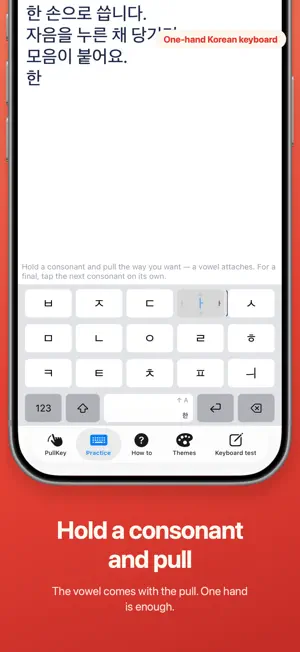
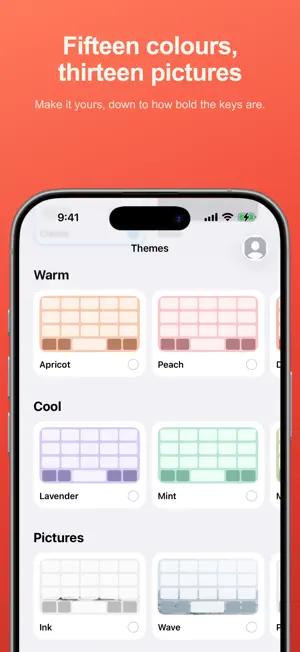
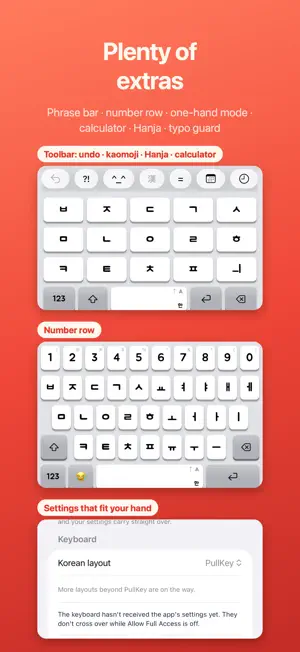
Type Korean with one thumb — and learn Hangul while you do. Hold a consonant and pull the way the vowel is written. Pull ㄱ right and you get 가. Pull it up and you get 고. There is no vowel side to cross to, so your thumb stays where it is. Tap for a final consonant, pull for the next syllable. Those two lines are the whole rule. Because your finger says which one you meant, the keyboard never guesses — and nothing you have already typed changes shape behind the cursor. ■ How it types ㅏ is a vertical stroke with a mark to the right, so you pull right. ㅗ is a horizontal stroke with a mark above, so you pull up. The shape of the letter is the direction of your thumb. Because a vowel arrives with the consonant that carries it, one gesture makes a whole syllable. ■ It stays where your thumb is Every vowel is reached from the consonant key itself, so your thumb doesn't travel — and no shift trip for tense consonants: press ⇧ and pull, or double-tap. One-handed mode moves the keys to either edge, and you can set the keyboard height — on a large phone that decides whether one hand is enough. ■ It doesn't guess No autocorrect. No word suggestions. No learning what you write. What you type is what you get, every time. ■ It doesn't take anything Nothing you type is stored. Nothing is sent anywhere. There is no networking code in this app at all — turn on airplane mode and everything still works. To fit the pull distance to your hand we count how far and which way your gestures go — never which letters, and never off your phone. ■ Learning Korean? The gesture itself teaches the structure: pulling ㄱ right is "consonant + ㅏ" written with your hand, and a separate tap is what a final consonant is. Practice comes in four stages, from simple pulls to full sentences, with each word's meaning beside it — 화장실, 얼마예요, 카드 돼요. ■ What you can change · Pull sensitivity, or let it measure your habits and set itself · How long a linked pull stays open (하하 vs 햐) · When haptics fire and how strong · Keyboard height and skin · Hand fit — we watch where you actually land and move the target under it From the app or from inside the keyboard, either way. ■ Pick a layout Four, switchable any time in Settings. · PullKey — pull a consonant and the vowel attaches. · Simple vowels — 2-set minus ㅑㅕㅛㅠ, so every key grows. Those four come from tapping a key twice, quickly. · Mui — simple vowels minus ㅌ and ㅍ; twenty keys. · Standard 2-set — the same layout as the stock iPhone keyboard. Until PullKey feels natural, use the one you know. ■ Pick how it looks Fifteen colours and thirteen quiet pictures. Each one is drawn as a small keyboard, so what you pick is what you get. On a picture you also choose how solidly the keys sit on top of it. ■ Also · Latin letters, numbers, symbols, emoji · Pull space sideways to move the cursor, up to switch Hangul/Latin · Pull delete left to erase a word, up to erase to the end of the line · Save phrases with a title, enter in one tap; {오늘} {시각} fill in date and time · Abbreviations — only pairs you wrote, expanded on space · Optional row above the keys — Hanja, kaomoji, calculator, romanize, swap 한/A, date math · Five key sounds, three loudness levels · Number row; two spaces for a full stop ■ Free and Pro The keyboard is free: all four layouts, Latin and symbols, sensitivity, hand fit, one-hand mode, haptics, cursor pulls, word delete, typo guard and practice. No trial, no expiry. PullKey Pro opens looks and extras: · Themes — 15 colours, 13 pictures (three free) · Six fonts, five key sounds · Toolbar — phrases, Hanja, calculator, kaomoji, romanize, swap 한/A, date math · Abbreviations, phrase placeholders, the Lab $6.99 once, yours for good. No renewals, no subscription. Terms of Use: https://www.apple.com/legal/internet-services/itunes/dev/stdeula/ Privacy Policy: https://bluecosmium.com/danggyeoki/privacy/
What’s new
Version 1.2.0 · Updated September 24, 2026
· The keyboard is now free — no trial, no expiry · PullKey Pro: themes, fonts, key sounds, toolbar, abbreviations, Lab — $6.99 once · Improvements
App privacy
The developer, Bluecosmium, reported these privacy practices to Apple.
Data Not Collected
The developer does not collect any data from this app.
Alternatives to PullKey - Korean Keyboard
Looking for apps like PullKey - Korean Keyboard? Here are 6 similar apps on the App Store. The highest rated is 한자 한글 키보드 (5.0/5), and all 6 are free to download.


| App | Rating | Price | Last updated | Compare |
|---|---|---|---|---|
| PullKey - Korean Keyboard | – | Free | September 24, 2026 | |
| meta Keyboard | – | Free | May 28, 2026 | Compare |
| 또각또각 - 한글 키보드 | – | Free | Oct 19, 2026 | Compare |
| 한자 한글 키보드 | 5.0 / 5 (3) | Free | Oct 27, 2026 | Compare |
| Tadak — Hangul Keyboard | 1.0 / 5 (1) | Free | Aug 20, 2026 | Compare |
| 마이 키보드 | – | Free | Oct 28, 2026 | Compare |
| 글쇠 키보드 - 한글 키보드, 자동완성 | – | Free | Oct 27, 2026 | Compare |