

Tadak — Hangul Keyboard
Woohyun KANG Utilities iPhoneiPadiPod touch
Tadak — Hangul Keyboard is a free Utilities app for iPhone and iPad by Woohyun KANG. Rated 1.0/5 from 1 ratings. Requires iOS 26.0. Updated August 20, 2026.
- Rating
- 1.0
- 1 ratings
- Price
- Free
- on the App Store
- Size
- 104 MB
- Age 4+
- Updated
- Aug 20
- 2026 · v0.4.0
Screenshots
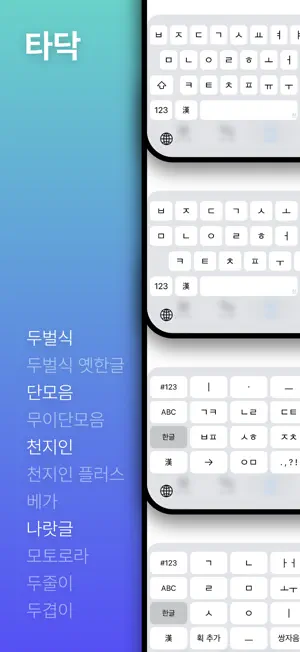

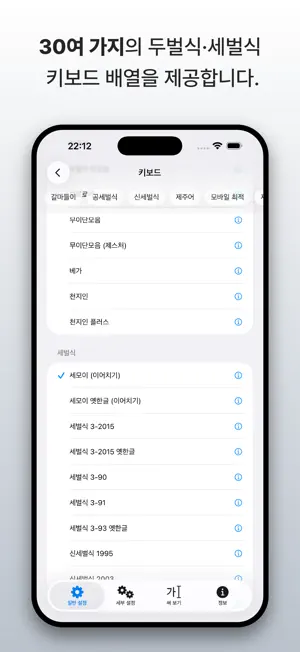

About Tadak — Hangul Keyboard
Tadak is a Korean keyboard for iPhone and iPad that supports a wide variety of layouts. Explore diverse layouts beyond the standard two-set and Cheonjiin, including Danmoeum, Naratgul, Old Hangul, three-set, and Shin three-set. Tadak supports over 30 different layouts, including: - Two-set (두벌식) - Dugyeob-E (두겹이) - Dujul-E (두줄이) - Dujul-E Danmoeum (두줄이 단모음) - Danmoeum (단모음) - Mui-Danmoeum (무이단모음) - Three-set 3-90 (세벌식 3-90) - Three-set 3-91 (세벌식 3-91) - Three-set 3-93 Old Hangul (세벌식 3-93 옛한글) - Three-set 3-2015 (세벌식 3-2015) - Shin three-set 1995 (신세벌식 1995) - Shin three-set 2003 (신세벌식 2003) - Shin three-set M (신세벌식 M) - Shin three-set P2 (신세벌식 P2) - Semo-E (세모이) - Ahnmatae (안마태) - Romaja (Latin) to Hangul Input (로마자로 한글 입력) - Cheonjiin (천지인) - Cheonjiin Plus (천지인 플러스) - Naratgul (나랏글) - Vega (베가) - Motorola (모토로라) Enjoy the same native iOS features built into iPhone and iPad: - Tap-and-drag input on Cheonjiin and Danmoeum layouts, instead of multi-tapping - One-Handed Keyboard (iPhone) - Floating Keyboard (iPad) (*Available on supported layouts) - Cursor control via the space bar - “.” shortcut - Key flicks (iPad) - Text replacement Tadak also offers these advanced features: - Color-coded Jamo (Initial, Medial, and Final Consonants): Even on complex three-set layouts, the clear color coding helps you easily distinguish which keys input initial or final consonants. - Hanja Conversion: Convert text into Hanja character-by-character or word-by-word. You can also convert Hangul consonants into special symbols. - Old Hangul Input: Type Middle and Early Modern Korean seamlessly. (*Characters may not render properly if your device environment does not fully support Old Hangul display.) - Import Custom Layouts: Load custom keyboard data files to use your own personalized layouts. This feature is adapted from the core mechanics of the Nalgaeset Hangul Input Method.
What’s new
Version 0.4.0 · Updated August 20, 2026
[Keyboard Features] - Added a palette feature. When a key is pressed and held, a palette is displayed, allowing you to drag and select the character you want to enter. (For example, pressing and holding the “ㄱ” key lets you choose between “ㄱ” and “ㄲ”.) - Improved the behavior of special keys when pressed and held or touched together with another key to make them work more like the system keyboard. - On iPhone and iPad models smaller than 10.5 inches, Caps Lock can now be activated by quickly tapping the Shift key twice. - On iPad models 10.5 inches and larger, and iPad models 12.9 inches and larger, the Caps Lock key can be used to switch between the Latin and Hangul layouts. The available Latin layouts are QWERTY, Dvorak, Colemak, Colemak-DH, QWERTZ, and AZERTY. [Keyboard UI] - Fixed UI issues related to Caps Lock. - Adjusted the intensity of haptic feedback to more closely match the system keyboard. [Keyboard Layouts] - Danmoeum (단모음) Keyboards - Gesture support is now available in all versions, and the existing “Gesture (제스처)” version has been renamed to “Gesture Only (제스처 전용)”. - Added Shift keys to the iPad layout, allowing individual characters to be entered using Shift instead of repeated taps. - Added support for iPad models 12.9 inches and larger. - Added the DujulE Danmoeum (Gesture Only) [두줄이 단모음 (제스처 전용)] layout. [Other] Fixed an issue where multiple windows could be opened on iPad.
App privacy
The developer, Woohyun KANG, reported these privacy practices to Apple.
Data Not Collected
The developer does not collect any data from this app.
Alternatives to Tadak — Hangul Keyboard
Looking for apps like Tadak — Hangul Keyboard? Here are 6 similar apps on the App Store. The highest rated is 한자 한글 키보드 (5.0/5), and all 6 are free to download.


| App | Rating | Price | Last updated | Compare |
|---|---|---|---|---|
| Tadak — Hangul Keyboard | 1.0 / 5 (1 rating) | Free | August 20, 2026 | |
| 나의 키보드 | – | Free | Oct 5, 2026 | Compare |
| 또각또각 - 한글 키보드 | – | Free | Oct 19, 2026 | Compare |
| 푸키 - 이모지, 천지인, 나랏글 | – | Free | Jan 26, 2026 | Compare |
| HusKyBoard | – | Free | Oct 8, 2026 | Compare |
| 한자 한글 키보드 | 5.0 / 5 (3) | Free | Oct 3, 2026 | Compare |
| Han Keyboard | – | Free | Aug 2, 2026 | Compare |