

Han Keyboard
Min Seon Kim Utilities iPhoneiPadiPod touch
Han Keyboard is a free Utilities app for iPhone and iPad by Min Seon Kim. Requires iOS 15.0. Updated August 2, 2026.
- Price
- Free
- on the App Store
- Size
- 28 MB
- Age 4+
- Updated
- Aug 2
- 2026 · v1.4.5
Screenshots


About Han Keyboard
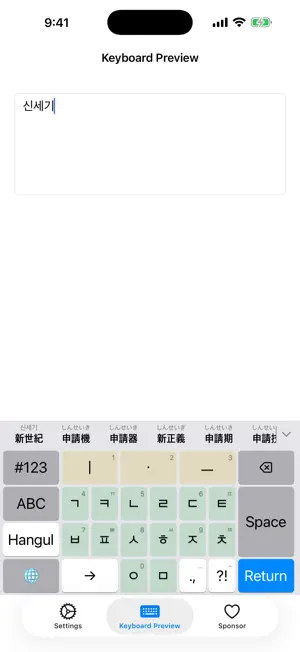
**Han Keyboard is a multi-functional keyboard designed for convenient Korean text input.** It also provides supplementary support for Hanja and Japanese input for Korean keyboard users. All features of the keyboard are available for free. **Various Korean Input Methods:** • Cheonjiin+·Danmoum·Danmoum Next·Mui Danmoum - Simple Korean input optimized for mobile • Cheonjiin·Vega·Motorola·Naratgeul - Support for classic mobile input methods • 2-beolsik·3-beolsik Final·Shin 3-beolsik P2 Symbol Extended - Fast typing experience similar to PC **Various English Layouts:** • QWERTY - Standard English keyboard • Dvorak - Alternative English keyboard • Colemak & Colemak-DH - Ergonomic English keyboards **Responsive Layout Support** • Support for situations where the keyboard display needs to change based on current composition state, such as the Key Alternation(Galma-deul-i) feature in Shin 3-beolsik P2 Symbol Extended **Convenience Features:** • Custom settings for portrait/landscape modes - Optimal input environment according to screen orientation • Hanja and Japanese Input Support - Hanja and Japanese input optimized for Korean keyboard environments • One-handed mode support - Convenient input on large screens with left/right hand convenience modes • Gesture-based one-handed mode switching - Quick layout changes with swipe gestures • Keyboard height adjustment - Personalized settings with 80%~110% size adjustment • Haptic feedback - Vibration feedback that enhances typing sensation (Off/Light/Medium/Strong) • Korean component color differentiation - Different backgrounds displayed for consonant·vowel or initial·medial·final consonant keys **Personalization Settings:** • Choose different input methods for portrait and landscape modes • Independent settings for Korean/English keyboards • Detailed customization based on usage patterns • Easy management with intuitive settings app
What’s new
Version 1.4.5 · Updated August 2, 2026
### Bug Fixes - Fixed an issue where the keyboard could occasionally crash when the Japanese input method was enabled. - Fixed an issue where the ㄶ combination was not entered correctly with the Cheonjiin input method.
App privacy
The developer, Min Seon Kim, reported these privacy practices to Apple.
Data Not Collected
The developer does not collect any data from this app.
Alternatives to Han Keyboard
Looking for apps like Han Keyboard? Here are 6 similar apps on the App Store. The highest rated is Korean Keyboard + Translator (4.4/5), and all 6 are free to download.


| App | Rating | Price | Last updated | Compare |
|---|---|---|---|---|
| Han Keyboard | – | Free | August 2, 2026 | |
| 한本키보드 | – | Free | Apr 20, 2026 | Compare |
| Tadak — Hangul Keyboard | 1.0 / 5 (1) | Free | Aug 20, 2026 | Compare |
| SYKeyboard | – | Free | Oct 13, 2026 | Compare |
| 한字키보드 | – | Free | Mar 19, 2026 | Compare |
| Korean Keyboard + Translator | 4.4 / 5 (21) | Free | Jun 17, 2024 | Compare |
| 나의 키보드 | – | Free | Oct 5, 2026 | Compare |
Compare Han Keyboard with the top alternatives: ratings, updates, ASO score and keyword gaps →