

meta Keyboard
KYEONGKYU LEE Utilities iPhoneiPadiPod touch
meta Keyboard is a free Utilities app for iPhone and iPad by KYEONGKYU LEE. Requires iOS 18.1. Updated May 28, 2026.
- Price
- Free
- on the App Store
- Size
- 2 MB
- Age 4+
- Updated
- May 28
- 2026 · v1.0.5
Screenshots


About meta Keyboard
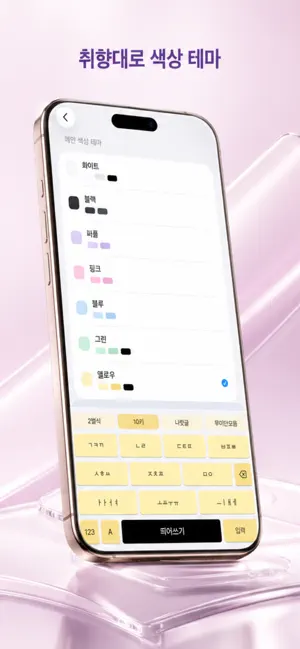
1.Korean typing experience • Supports Korean/English input switching • Includes 2-Bulsik, 10-Key, Naratgeul, and Mui Danmoum layouts • Provides number/symbol input and essential editing actions 2.Theme customization • Choose a main color theme for your keyboard style 3.Input convenience settings • Configure key haptics and key sound options • Uses a practical layout for space, return, and special keys • Keeps interaction simple for fast daily typing 4.iOS settings integration • Check keyboard activation status inside the app • Verify Full Access status and open iOS Settings quickly • Guides users through required setup steps before use 5.Lightweight daily workflow • Focuses on core controls without complex setup • Built for practical Korean-first everyday typing • Syncs app-side preferences with the keyboard extension
What’s new
Version 1.0.5 · Updated May 28, 2026
[Update Notes] Bug Fixes
App privacy
The developer, KYEONGKYU LEE, reported these privacy practices to Apple.
Data Not Collected
The developer does not collect any data from this app.
Alternatives to meta Keyboard
Looking for apps like meta Keyboard? Here are 6 similar apps on the App Store. The highest rated is Tadak — Hangul Keyboard (1.0/5), and all 6 are free to download.


| App | Rating | Price | Last updated | Compare |
|---|---|---|---|---|
| meta Keyboard | – | Free | May 28, 2026 | |
| Heekey | – | Free | May 11, 2025 | Compare |
| 푸키 - 이모지, 천지인, 나랏글 | – | Free | Jan 26, 2026 | Compare |
| Tadak — Hangul Keyboard | 1.0 / 5 (1) | Free | Aug 20, 2026 | Compare |
| 또각또각 - 한글 키보드 | – | Free | Oct 19, 2026 | Compare |
| 나랏글 | – | Free | Oct 16, 2026 | Compare |
| 담백 키보드 | – | Free | May 5, 2026 | Compare |
Compare meta Keyboard with the top alternatives: ratings, updates, ASO score and keyword gaps →