

PDF Sign – Signature Scanner
FILIP PANKAU Productivity iPhoneiPadiPod touch
PDF Sign – Signature Scanner is a free Productivity app for iPhone and iPad by FILIP PANKAU. Rated 5.0/5 from 1 ratings. Requires iOS 15.0.
- Rating
- 5.0
- 1 ratings
- Price
- Free
- on the App Store
- Size
- 31 MB
- Age 4+
- Updated
- Sep 29
- 2026 · v1.0.2
Screenshots


About PDF Sign – Signature Scanner
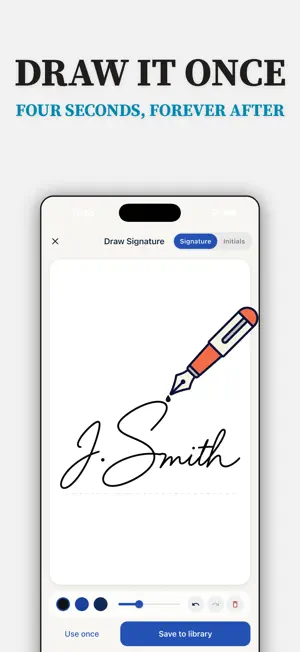
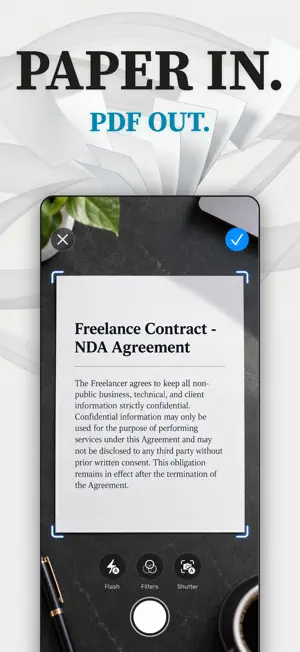
Sign any PDF in seconds — right on your iPhone. No account, no cloud, nothing uploaded. PDF Sign is the fast, private way to sign, scan, and send documents. Draw your signature once, then place it on any contract, lease, or form with a drag of your finger. Your documents and signatures never leave your device. SIGN IN SECONDS • Open PDFs from Files, Mail, or any app's share sheet • Draw a smooth, ink-like signature with your finger or Apple Pencil • Already signed on paper? Scan your signature with the camera and reuse it — no finger-drawing needed • Save multiple signatures and initials to your library • Add text, dates, checkmarks, and highlights to fill out any form • Export a flattened PDF that looks identical in every reader • Redact sensitive info, add watermarks, password-protect exports SCAN PAPER TO PDF • Scan documents with automatic edge detection and perspective correction • Clean up scans with Document, Black & White, Grayscale, and Enhanced filters • Rotate, reorder, merge, and extract pages • Turn photos from your library into PDF pages • Make scans searchable with on-device text recognition (OCR) • Select and copy text straight from any page PRIVATE BY DESIGN • No account. No sign-up. No cloud. • Documents and signatures are stored only on your device • Lock the app and your signature library with Face ID • Signing, scanning and exporting never need a connection — try it in Airplane Mode NO NONSENSE No document limits, no forced watermarks, no locked-away basics. One app with everything included — signing, scanning, OCR, redaction, encryption. Simple electronic signatures are legally valid for everyday agreements in most countries (US ESIGN/UETA, EU eIDAS). For court-grade certificate signatures, consult your recipient's requirements. Sign it. Send it. Nothing uploaded. Terms of Use (EULA): https://ventoinfo.com/pdfsign/terms-of-use.html
What’s new
Version 1.0.2 · Updated September 29, 2026
NEW: Signature scanner. Already signed on paper? Scan your signature with the camera — the ink is lifted off the page, ready to place on any document. Also: bug fixes and performance improvements.
App privacy
The developer, FILIP PANKAU, reported these privacy practices to Apple.
Data Linked to You
The following data, which may be collected and linked to your identity, may be used for the following purposes:
- Purchases: Purchase History
- Identifiers: User ID
Used for: Analytics, App Functionality
Alternatives to PDF Sign – Signature Scanner
Looking for apps like PDF Sign – Signature Scanner? Here are 6 similar apps on the App Store. The highest rated is Sign Documents: Signature App (5.0/5), and all 6 are free to download.
-
 Sign Documents: Signature App
5.0
Sign Documents: Signature App
5.0
-
 PDF Mind: Editor & Scanner
-
 Looks Scanned: PDF Signer
-
 Signature Maker: Scan&Sign PDF
-
 Plume: Private PDF Signature
-
 eSign - Sign & Fill PDF
| App | Rating | Price | Last updated | Compare |
|---|---|---|---|---|
| PDF Sign – Signature Scanner | 5.0 / 5 (1 rating) | Free | September 29, 2026 | |
| Sign Documents: Signature App | 5.0 / 5 (1) | Free | Oct 5, 2026 | Compare |
| PDF Mind: Editor & Scanner | – | Free | Oct 8, 2026 | Compare |
| Looks Scanned: PDF Signer | – | Free | Sep 25, 2026 | Compare |
| Signature Maker: Scan&Sign PDF | – | Free | Nov 5, 2025 | Compare |
| Plume: Private PDF Signature | – | Free | Oct 30, 2026 | Compare |
| eSign - Sign & Fill PDF | – | Free | Mar 22, 2026 | Compare |