

PhotoLayout – Photo Collages
Tony Ruprich Photo & Video iPhoneiPadiPod touch
PhotoLayout – Photo Collages is a free Photo & Video app for iPhone and iPad by Tony Ruprich. Requires iOS 17.0. Updated October 28, 2026.
- Price
- Free
- on the App Store
- Size
- 2 MB
- Age 4+
- Updated
- Oct 28
- 2026 · v1.3
Screenshots


About PhotoLayout – Photo Collages
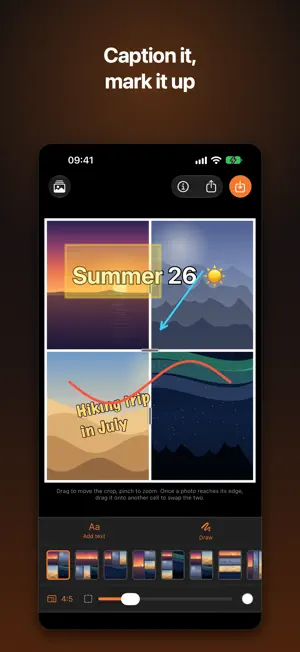
Photo collages, as straightforward as they used to be. PhotoLayout turns up to nine photos into a single picture. Pick your photos, choose one of the suggested layouts, adjust it until it fits. That’s the whole app. LAYOUTS THAT MATCH THE COUNT Every number of photos gets its own set of arrangements. With five photos, for instance: two on the left and three on the right, five stripes stacked, five columns side by side, or one large picture next to four narrow ones. 88 layouts in total, each one tap away — including ones with a picture in the middle and the rest around it. EVERYTHING CAN BE MOVED The dividers between pictures are draggable. Pull a handle and the two neighbouring cells grow or shrink — every other cell keeps its size. That’s how a template becomes your layout. EVERY PHOTO CROPPED THE WAY YOU WANT Drag to move the crop, pinch to zoom. For small cells there’s the large view: the same cell filling the whole screen, with a zoom slider. Whatever you set there carries over to the collage unchanged. SWAP AND REPLACE A photo in the wrong spot? Drag it onto another cell and the two trade places. Or replace it with a different picture from your library. FORMAT, BORDER AND CORNERS Nine aspect ratios, each one portrait and landscape — from 1:1 to 16:9. Plus a border between the pictures, adjustable from none to wide: in any colour, as a gradient, or made from the photos themselves, softly blurred. Round the corners, and add a fine outline that sets every photo apart from the border. TEXT AND DRAWINGS ON TOP Captions in twelve typefaces, free in colour, size and rotation, with their own outline colour and line breaks — emoji included. Plus a pen: freehand, lines, arrows, rectangles and ellipses, in any colour and width. Translucent for highlighting, without hiding the photo underneath. ON IPHONE, IPHONE DUO AND IPAD One app for all of them. The arrangement follows the space available: in landscape the collage sits on the left with every tool in a column beside it, in portrait it keeps the familiar layout. That holds on every iPhone, on iPad — in all four orientations, Split View included — and on iPhone Duo, folded or unfolded. SAVED AT FULL RESOLUTION Your finished collage goes to your photo library with a long edge of 2560 pixels. Each photo is re-rendered at exactly the resolution it occupies in the picture — never an upscaled preview. WHAT YOU START STAYS Finished collages are kept under “My Collages” — together with the photos used and the layout. Open one again whenever you like to carry on with it, share it or delete it. NOTHING ELSE ATTACHED No account, no sign-up, no ads, no tracking, no subscriptions. Your photos stay on your device. It doesn’t even read your library — the system hands it exactly the pictures you tap in the picker, and it puts the result back there.
What’s new
Version 1.3 · Updated October 28, 2026
ROUNDED CORNERS, GRADIENTS, BLUR The border between your photos becomes a frame. Round the corners as much as you like, and a fine outline sets every photo apart. Fill the border with a colour, with a gradient — eight ready-made ones, or two colours of your own and a direction — or with a blur, where the photos themselves, softly blurred, form the background. MADE FOR IPHONE DUO PhotoLayout follows along as you open or close it; the collage and the selection stay as they were. Unfolded, the tools sit beside the collage; folded, it can stand up in landscape too. LANDSCAPE ON EVERY IPHONE Your iPhone can now rotate. In landscape the collage sits on the left and the tools beside it, as on iPad. Aspect ratio, border and width stay in view, and the border settings open next to the picture instead of on top of it. ALSO After reopening a saved collage, the colour picker no longer marked the current border colour — fixed.
App privacy
The developer, Tony Ruprich, reported these privacy practices to Apple.
Data Not Collected
The developer does not collect any data from this app.
Alternatives to PhotoLayout – Photo Collages
Looking for apps like PhotoLayout – Photo Collages? Here are 6 similar apps on the App Store. The highest rated is Face Editor 3D: Video & Photo (5.0/5), and all 6 are free to download.
-
 PixWeave
-
 Collage Lab
-
 Face Editor 3D: Video & Photo
5.0
Face Editor 3D: Video & Photo
5.0
-
 CullKit: NAS Photo Cull & Rate
-
 Splitgram: Photo+Video Collage
-
 PictGrid - Simple Collage
| App | Rating | Price | Last updated | Compare |
|---|---|---|---|---|
| PhotoLayout – Photo Collages | – | Free | October 28, 2026 | |
| PixWeave | – | Free | Feb 17, 2026 | Compare |
| Collage Lab | – | Free | Aug 28, 2026 | Compare |
| Face Editor 3D: Video & Photo | 5.0 / 5 (3) | Free | Sep 14, 2026 | Compare |
| CullKit: NAS Photo Cull & Rate | – | Free | Sep 16, 2026 | Compare |
| Splitgram: Photo+Video Collage | – | Free | Aug 26, 2026 | Compare |
| PictGrid - Simple Collage | – | Free | Sep 1, 2025 | Compare |