

CullKit: NAS Photo Cull & Rate
idyation GmbH Photo & Video iPhoneiPadiPod touchMac
CullKit: NAS Photo Cull & Rate is a free Photo & Video app for iPhone and iPad by idyation GmbH. Requires iOS 26.0. Updated September 16, 2026.
- Price
- Free
- on the App Store
- Size
- 22 MB
- Age 4+
- Updated
- Sep 16
- 2026 · v1.8.0
Screenshots


About CullKit: NAS Photo Cull & Rate
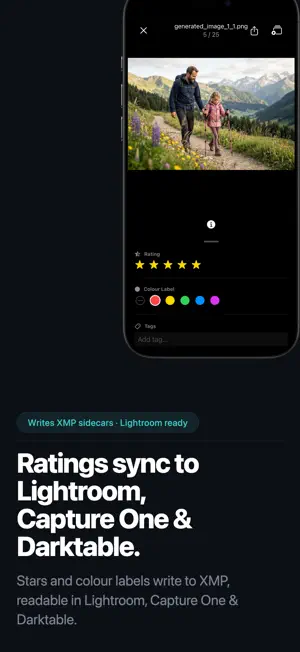
Cull, rate, and tag thousands of photos fast, straight from your Synology NAS, the Apple Photos library on your iPhone and iPad, an SD card or external SSD, any network share over SMB, or a local folder on your Mac, iPad, or iPhone. Now with on-device AI that scores every frame, groups bursts, and suggests your keepers. Ratings, keywords, and captions sync to Lightroom and Capture One via XMP. No desktop step, no cloud, no lock-in. CullKit turns any photo source into a focused review tool. Point it at Synology Photos, your Apple Photos library on iPhone and iPad, a mounted NAS share, an SD card straight out of the camera, an external SSD, or a folder on your device, then rip through a shoot, mark keepers with stars, and let your ratings and metadata write back to XMP sidecars so Lightroom, Capture One, and Darktable pick them up automatically. AI culling, right on your device • Every photo gets on-device scores for sharpness, faces, eyes open, and overall quality • Bursts and near-duplicates are grouped, with the best shot suggested and side-by-side compare • Auto-cull pre-selects keepers and rejects in one tap; every suggestion is revertible • Filter and sort by AI verdict, check key faces up close, zoom to full quality • A cull intensity slider decides how strict the AI is: keep more or keep less • All analysis runs on your iPhone, iPad, or Mac. No photo ever leaves your device Why photographers choose CullKit • Works anywhere your photos live: Synology Photos, the Apple Photos library on iPhone and iPad, an SD card or external SSD, any NAS or network share over SMB, or a local folder on Mac, iPad, and iPhone • Cull large shoots full-screen with swipe gestures and keyboard shortcuts • Edit star ratings, colour labels, keywords, captions, and copyright, written to Synology Photos and XMP sidecars • Fast, sharp RAW previews so you can review big shoots without waiting on full-size decodes • RAW + JPEG pair handling so you review one frame, not two • HEIC, video, and Live Photo support for modern mixed libraries • 100% local and private: your photos never leave your devices, nothing is uploaded to a cloud • Built natively for iPhone, iPad, and Mac, no clunky web wrapper Designed for • Wedding, portrait, event, and travel photographers reviewing hundreds to thousands of frames • Synology Photos users who want Lightroom-compatible metadata • iPhone and iPad shooters who want to cull their Apple Photos library with real ratings and gestures • Photographers who want to cull straight from the SD card before importing anything • QNAP, TrueNAS, UGREEN, and other NAS owners: mount your share over SMB and cull it the same way • Anyone who just wants to cull a local folder, no NAS required Free and Pro • Free: browse and offline-view your library; your first culling sessions are free to try • Pro: full culling, AI Assist and auto-cull, ratings, XMP metadata persistence, move, and delete • 7-day free trial, then monthly or yearly subscription CullKit works best with Synology Photos and is not affiliated with or endorsed by Synology Inc. Terms of Use: https://www.apple.com/legal/internet-services/itunes/dev/stdeula/ Privacy Policy: https://cullkit.com/privacy.html
What’s new
Version 1.8.0 · Updated September 16, 2026
The AI groups bursts and near-duplicates for you. Now you can correct it when it gets one wrong. Select two or more photos and group them yourself. Add a loose shot to a group the AI already found, or merge two groups it split apart. The rest of the app treats a hand-made group like any other: the best shot gets suggested, and the stack collapses in the grid the same way. Take photos back out Pull a single photo out of a group, or ungroup a whole stack in one tap. In the compare view you can drop any frame out of the group while you are looking at it. Your groups stay put A hand-made group survives a re-run of the analysis, including a forced one. Start an auto-cull, discard it, and your grouping is exactly as you left it. Tidier toolbar Move, grouping, and Organize by Date now share one Organize menu, so Delete has the corner to itself. Everything still runs on your device. No photo leaves it.
App privacy
The developer, idyation GmbH, reported these privacy practices to Apple.
Data Not Linked to You
The following data, which may be collected but is not linked to your identity, may be used for the following purposes:
- Purchases: Purchase History
- Contact Info: Email Address
- User Content: Other User Content
- Diagnostics: Other Diagnostic Data
Used for: Analytics, App Functionality
Alternatives to CullKit: NAS Photo Cull & Rate
Looking for apps like CullKit: NAS Photo Cull & Rate? Here are 6 similar apps on the App Store. The highest rated is cullstudio (5.0/5), and all 6 are free to download.
-
 cullstudio
5.0
-
 Photo Triager: RAW Culling
1.0
-
 Cull: Photo Picker
-
 Cull: AI Photo Culling
-
 SDCull
4.9
-
 Photo Workflow - CaptureBuddy
| App | Rating | Price | Last updated | Compare |
|---|---|---|---|---|
| CullKit: NAS Photo Cull & Rate | – | Free | September 16, 2026 | |
| cullstudio | 5.0 / 5 (1) | Free | Oct 12, 2026 | Compare |
| Photo Triager: RAW Culling | 1.0 / 5 (1) | Free | Apr 3, 2026 | Compare |
| Cull: Photo Picker | – | Free | Oct 2, 2026 | Compare |
| Cull: AI Photo Culling | – | Free | Oct 13, 2026 | Compare |
| SDCull | 4.9 / 5 (15) | Free | Oct 6, 2026 | Compare |
| Photo Workflow - CaptureBuddy | – | Free | Sep 25, 2026 | Compare |