

Cull: AI Photo Culling
Sahil Jain Photo & Video iPhoneiPadiPod touch
Cull: AI Photo Culling is a free Photo & Video app for iPhone and iPad by Sahil Jain. Requires iOS 17.0. Updated October 13, 2026.
- Price
- Free
- on the App Store
- Size
- 2 MB
- Age 4+
- Updated
- Oct 13
- 2026 · v1.3.1
Screenshots

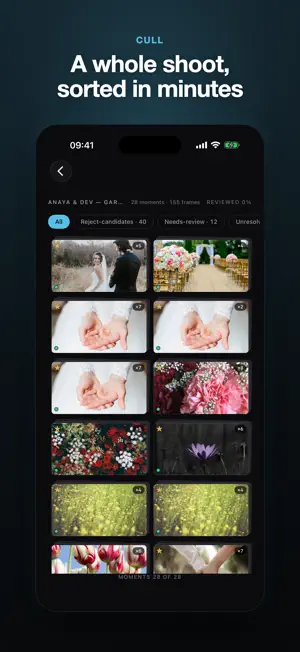


About Cull: AI Photo Culling
Cull does the first pass on a photo shoot for you — entirely on your device. Import a shoot and Cull scores every frame for the things that decide a keeper: sharpness, eyes open or closed, and exposure. It groups the near-identical shots into moments, stars the best of each burst, and lets you keep or reject at a glance. What took an evening now takes minutes. THE FREE FIRST PASS • On-device AI scoring — every frame rated for focus, eyes, and exposure. No cloud, no account, no waiting on an upload. • Best of each burst — near-duplicates grouped into moments with the strongest frame starred for you. • Fast keep / reject — swipe or tap through a shoot, zoom to 100%, and see exactly why each frame scored the way it did. • Straight into your editor — export standards-based XMP sidecars (picks flagged, stars as ratings), a JPEG folder, a Photos album, or a CSV. • Private by design — photos never leave your device, and your originals are never modified or deleted. THE PRO TOOLKIT — ONE PURCHASE, YOURS FOREVER • Compare mode — 2–4 frames of a burst side-by-side with synced zoom and pan, then "Pick this" to decide the whole moment. • Focus map — a heat overlay showing exactly where focus landed in the frame. • People view — the shoot grouped by person: see everyone's blinks, sweep them per person, and confirm every person has a keeper. • Custom profiles — dial the AI's strictness from conservative to aggressive, and let it learn from your overrules. • Pro export pack — full-resolution JPEGs of your picks, plus custom XMP label colors and reject mapping. Pro is a single one-time purchase. No subscription, ever. BUILT FOR REAL SHOOTS Portrait, event, sports, wedding — pick a grouping profile that matches how you shoot. RAW supported, including CR2/CR3, NEF, ARW, RAF, ORF, RW2, and DNG. Works fully offline; you can use it in airplane mode. Cull — the first pass, done.
What’s new
Version 1.3.1 · Updated October 13, 2026
Import straight from your camera card. • Choose a whole memory card or any folder and Cull now finds the photos inside its subfolders, such as DCIM/100MSDCF on Sony cameras. Previously only photos at the top level were picked up. • If a folder really has no photos in it, Cull now tells you instead of returning to an empty screen. • Folder imports now keep access to every file until the import finishes.
App privacy
The developer, Sahil Jain, reported these privacy practices to Apple.
Data Not Collected
The developer does not collect any data from this app.
Alternatives to Cull: AI Photo Culling
Looking for apps like Cull: AI Photo Culling? Here are 6 similar apps on the App Store. The highest rated is cullstudio (5.0/5), and all 6 are free to download.
-
 PhotoSelect: AI Photo Culling
-
 CullKit: NAS Photo Cull & Rate
-
 cullstudio
5.0
-
 Cull: Photo Picker
-
 SDCull
4.9
-
 Photo Triager: RAW Culling
1.0
| App | Rating | Price | Last updated | Compare |
|---|---|---|---|---|
| Cull: AI Photo Culling | – | Free | October 13, 2026 | |
| PhotoSelect: AI Photo Culling | – | Free | Oct 16, 2026 | Compare |
| CullKit: NAS Photo Cull & Rate | – | Free | Sep 16, 2026 | Compare |
| cullstudio | 5.0 / 5 (1) | Free | Oct 12, 2026 | Compare |
| Cull: Photo Picker | – | Free | Oct 2, 2026 | Compare |
| SDCull | 4.9 / 5 (15) | Free | Oct 6, 2026 | Compare |
| Photo Triager: RAW Culling | 1.0 / 5 (1) | Free | Apr 3, 2026 | Compare |