

Face Editor 3D: Video & Photo
Sergii Melnyk Photo & Video iPhoneiPadiPod touch
Face Editor 3D: Video & Photo is a free Photo & Video app for iPhone and iPad by Sergii Melnyk. Rated 5.0/5 from 3 ratings. Requires iOS 17.6.
- Rating
- 5.0
- 3 ratings
- Price
- Free
- on the App Store
- Size
- 23 MB
- Age 4+
- Updated
- Sep 14
- 2026 · v3.0.1
Screenshots
About Face Editor 3D: Video & Photo
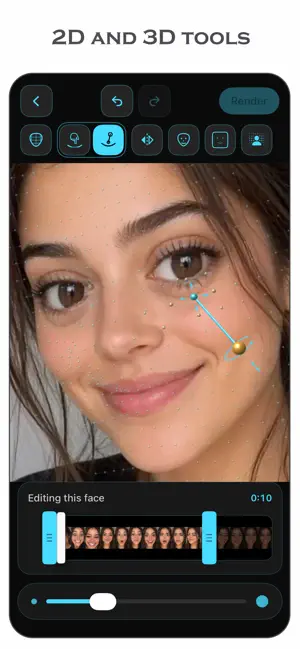
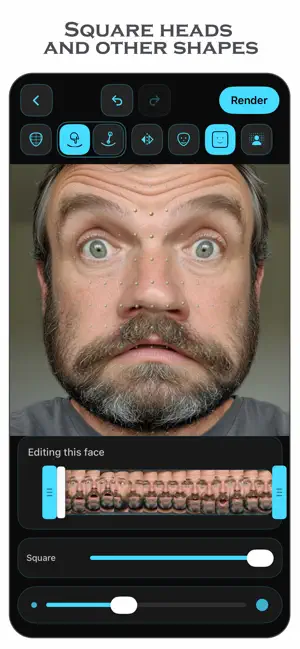
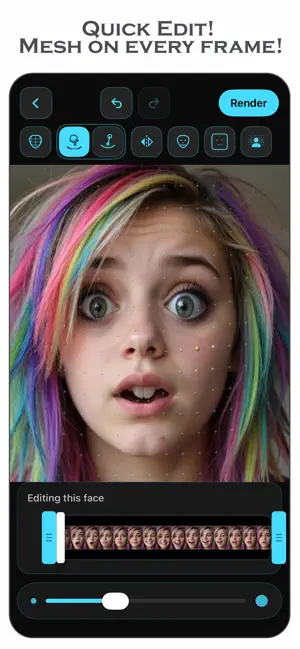
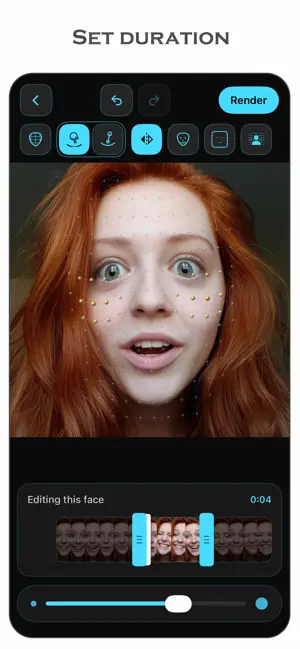
Reshape a face in a video the way you would in a photo — by hand, one push at a time. FaceEditor3D fits a three-dimensional mesh to the face in your clip and follows it frame by frame. Move the nose once and it stays moved: through turns, tilts and the whole length of the shot. No keyframes, no tracking to set up. HOW IT WORKS Load a video or a photo, or film one here with either camera. Tap the mark on the face you want and the mesh settles onto it — with several people in the shot, each keeps its own edits and they all come out of a single render. Then work the face either way you like: drag it with a finger, or drop the rod where you want to work, aim it, and push. A first-run walkthrough shows you the moves and then gets out of the way. TWO WAYS TO WORK A finger works flat: press where you mean and pull, and the face moves across the screen with you. It needs no explaining. The rod works in three dimensions. Its foot chooses the spot, its handle aims, and pushing along it drives the face into or out of the screen — the one direction a finger on a flat pane cannot ask for. It also keeps aiming and pushing apart, so a rod led round in a circle does not dent everything it passes. Start with the finger. Reach for the rod when you want depth, or precision. SCULPT BY HAND • Two tools, one tap apart: a finger for flat work, the rod for depth • Nose, lips, chin, cheeks, brow — anywhere on the face • Every face in the shot, each with its own edits, all in one render • Mirroring, so both sides move together on a face that is looking at you • Undo and redo at every step • Sliders for the usual changes when you would rather not draw them by hand • Five meshes, from a broad gentle one for cheeks and jaws to a tight one for the tip of a nose YOUR OWN FACE SHAPE The mesh is built from an average head unless you tell it otherwise. Tap My Mesh and the front camera and its depth sensors measure the shape of yours, so edits follow your own features. It is asked for deliberately, kept only while you are working, and forgotten when you go back. Nothing about your face is written to disk. SQUARE HEADS AND OTHER SHAPES Turn a head into a box, a circle or a diamond — or pinch it in at the top or the chin. The shape follows the head as it turns and tilts, with a slider for how far to take it. The phrase about someone giving you a square head, made real. SET DURATION Put the effect where the joke is. Mark where it starts and ends on the filmstrip; the rest of the video comes out exactly as you filmed it. It fades in and out, so it reads as an effect and not a glitch. Import a video of any length; the effect covers up to a minute of it. Or keep just the part you marked. A NEW BACKGROUND Put the person somewhere else. Keep the room, blur it, fill it with a colour, or drop in a picture or a video of your own. A moving background behind a photograph turns it into a clip, with the background's own sound. SEE IT, THEN SAVE IT Drag the divider across the frame to compare before and after, both playing in step. Watch the render's progress, see roughly how long is left, and stop it if you change your mind. Save the result to your library or share it straight from the app. EVERYTHING STAYS ON YOUR PHONE No account. No sign-in. Nothing is uploaded and nothing is sent anywhere to be processed — the face detection, the mesh, the rendering and the background all run on the device in front of you. No watermark on what you make. GOOD TO KNOW • Any length of video in, up to 60 seconds of effect • Photographs at full resolution • Works on a face that is turned or tilted, not only one facing the camera • The screen stays awake while a render runs — but leaving the app stops it Made for people who want to change one thing about a face and get on with their day, not learn a workstation. Terms of Use (EULA): https://www.apple.com/legal/internet-services/itunes/dev/stdeula/
App privacy
The developer, Sergii Melnyk, reported these privacy practices to Apple.
Data Not Collected
The developer does not collect any data from this app.
Alternatives to Face Editor 3D: Video & Photo
Looking for apps like Face Editor 3D: Video & Photo? Here are 6 similar apps on the App Store. The highest rated is Video Teleprompter Mirror Pro (5.0/5), and all 6 are free to download.
-
 Mirror Booth: Face Symmetry
-
 Backdropy: Video Background
-
 PhotoLayout – Photo Collages
-
 Nose Editor: Reshape & Retouch
-
 Video Teleprompter Mirror Pro
5.0
Video Teleprompter Mirror Pro
5.0
-
 Vidnix: AI Photo&Video Maker
5.0
Vidnix: AI Photo&Video Maker
5.0
| App | Rating | Price | Last updated | Compare |
|---|---|---|---|---|
| Face Editor 3D: Video & Photo | 5.0 / 5 (3 ratings) | Free | September 14, 2026 | |
| Mirror Booth: Face Symmetry | – | Free | Oct 26, 2026 | Compare |
| Backdropy: Video Background | – | Free | Oct 4, 2026 | Compare |
| PhotoLayout – Photo Collages | – | Free | Oct 28, 2026 | Compare |
| Nose Editor: Reshape & Retouch | – | Free | Sep 23, 2026 | Compare |
| Video Teleprompter Mirror Pro | 5.0 / 5 (2) | Free | Sep 14, 2026 | Compare |
| Vidnix: AI Photo&Video Maker | 5.0 / 5 (2) | Free | Oct 28, 2026 | Compare |