

FaveNest – Visual Bookmarks
Dion Software, LLC Productivity iPhoneiPadiPod touchMacApple Watch
FaveNest – Visual Bookmarks is a free Productivity app for iPhone and iPad by Dion Software, LLC. Rated 5.0/5 from 2 ratings. Requires iOS 26.0.
- Rating
- 5.0
- 2 ratings
- Price
- Free
- on the App Store
- Size
- 15 MB
- Age 4+
- Updated
- Oct 16
- 2026 · v1.4
Screenshots


About FaveNest – Visual Bookmarks
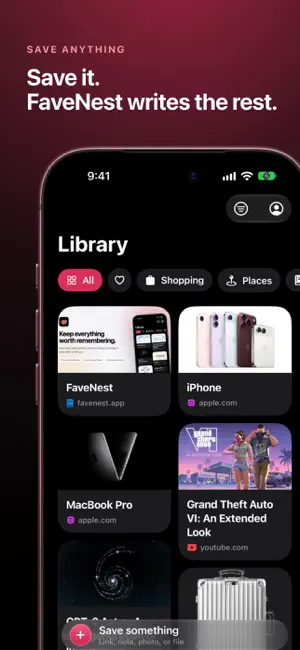
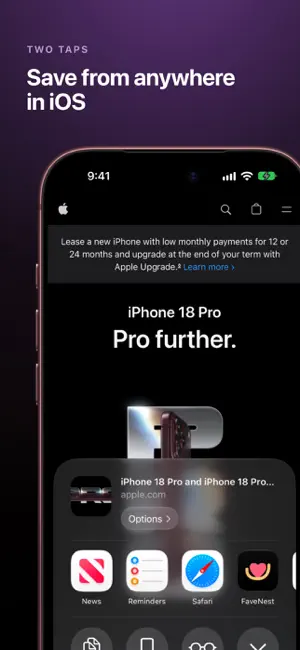
Save a link and forget about it. FaveNest writes the title, the summary, the category, and the tags — on your iPhone, with no account and no server of ours in between. Links, notes, screenshots, PDFs, and places land in one library that's actually pleasant to look at, and follow you to your iPad and Mac through your own iCloud. NO ACCOUNT, NOTHING TO SIGN UP FOR No account. No sign-up. No FaveNest server. Your library lives on your device and syncs through your own private iCloud, which means nobody but you can read it. Nothing is sent to an online AI service unless you add your own API key. SAVING TAKES TWO TAPS Share a link from Safari, a photo from Photos, a place from Maps, or a file from Files, and FaveNest has it filed before you've put your phone down. IT WRITES THE BORING PART On-device Apple Intelligence reads what you saved and writes a real title and a real summary — yours, not the publisher's headline — then picks the category and the tags. The models run on your iPhone. FIND IT AGAIN IN SECONDS • Search that reads your notes, the page text, and the words inside your screenshots • Results in Spotlight, alongside everything else on your iPhone • Filter by category, tag, or favorite • Shortcuts that save a link or pull one up, hands-free A LIBRARY, NOT A LIST • Two-column cards that show the picture a page is really about • Webpage previews saved for reading offline • Places from Apple Maps or a Google Maps link, each with its own address, Look Around view, and a tag for what kind of place it is • Custom categories shaped around how you actually think ALSO ON YOUR MAC A real Mac app, not a website in a window: the same library in a sidebar, with menus, keyboard shortcuts, and a FaveNest button in Safari's toolbar. One purchase covers iPhone, iPad, and Mac. YOURS TO KEEP Export your whole library to JSON whenever you like, notes and images intact. No lock-in, ever. FAVENEST PRO Pro unlocks the on-device intelligence: titles and summaries written for your library rather than lifted from the publisher, categories and tags chosen by what a save is actually about, the Places map, unlimited custom categories, and every interface tint. One purchase unlocks Pro on iPhone, iPad, and Mac. Everything you save stays yours either way. Without Pro, FaveNest still saves without limit, still syncs, still searches, and still exports. It just organizes from metadata and keywords instead of being written by a model. SUBSCRIPTION • FaveNest Pro Monthly — $2.99 per month, with a 7-day free trial • FaveNest Pro Yearly — $19.99 per year, with a 7-day free trial • FaveNest Pro Lifetime — $49.99 once Payment is charged to your Apple Account at confirmation of purchase. Subscriptions renew automatically unless turned off at least 24 hours before the end of the current period. Manage or cancel in your Apple Account settings. Any unused portion of a free trial is forfeited when you buy a subscription. Terms of Use: https://favenest.app/terms Privacy Policy: https://favenest.app/privacy Apple Intelligence features require a compatible iPhone. On other devices FaveNest organizes your library from page metadata, recognized entities, and keywords, or from a cloud model of your choice with your own OpenAI, Anthropic, or OpenAI-compatible API key.
What’s new
Version 1.4 · Updated October 16, 2026
Remind me. Pick a time in any item's menu, and FaveNest reminds you on iPhone, iPad, and Mac. Read it here, even offline. Tap Read on a saved article to read it in FaveNest without a connection, select and translate a passage, or have it read aloud. Ask your library. With Pro, ask a question in Search and get a short answer with the saves it came from. Search also ignores accents and filters by type, category, tag, or date. Made for iPhone Duo. The bars stand along the edge, cards keep clear of the fold, an item opens as two pages on the inner display, and the reader keeps to one half while folded. FaveNest on your Home Screen. Widgets show your recent saves, favorites, a category, or one older save a day, on the Home Screen, the Lock Screen, and your Mac's desktop. Controls add a save, a note, or a search from Control Center. Also in this release: - More Like This shows saves about the same thing. - With Pro, the models can organize the saves you made before. - Saves from TikTok, Instagram, Reddit, YouTube, and more arrive with real titles. - Sharing a link saves it once.
App privacy
The developer, Dion Software, LLC, reported these privacy practices to Apple.
Data Not Collected
The developer does not collect any data from this app.
Alternatives to FaveNest – Visual Bookmarks
Looking for apps like FaveNest – Visual Bookmarks? Here are 6 similar apps on the App Store.
-
 LifeOps: Personal Manager
-
 Life-Ops
-
 BigStepper: Walk to Unlock
-
 Reembr
-
 Timeshape: Time & Life Tracker
-
 HoldON: Screen Time Control
| App | Rating | Price | Last updated | Compare |
|---|---|---|---|---|
| FaveNest – Visual Bookmarks | 5.0 / 5 (2 ratings) | Free | October 16, 2026 | |
| LifeOps: Personal Manager | – | Free | Jul 20, 2026 | Compare |
| Life-Ops | – | Free | Jul 7, 2026 | Compare |
| BigStepper: Walk to Unlock | – | Free | Sep 23, 2026 | Compare |
| Reembr | – | Free | Sep 7, 2026 | Compare |
| Timeshape: Time & Life Tracker | – | Free | Oct 15, 2026 | Compare |
| HoldON: Screen Time Control | – | Free | Oct 6, 2026 | Compare |