

HoldON: Screen Time Control
Ronald Radhames Santana Franco Productivity iPhoneiPadiPod touch
HoldON: Screen Time Control is a free Productivity app for iPhone and iPad by Ronald Radhames Santana Franco. Requires iOS 17.6. Updated October 6, 2026.
- Price
- Free
- on the App Store
- Size
- 18 MB
- Age 4+
- Updated
- Oct 6
- 2026 · v1.0.4
Screenshots
About HoldON: Screen Time Control
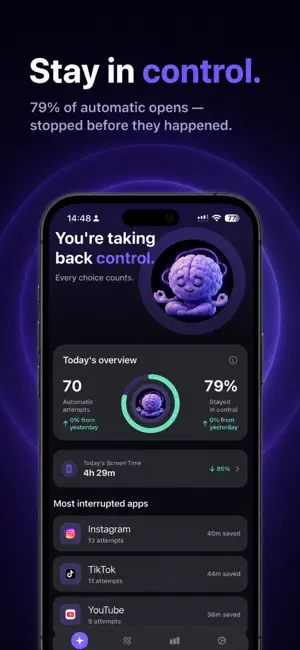
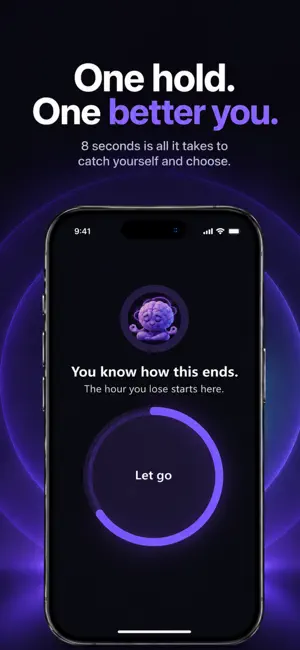
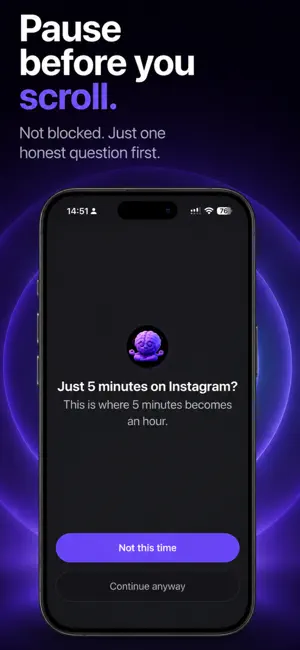
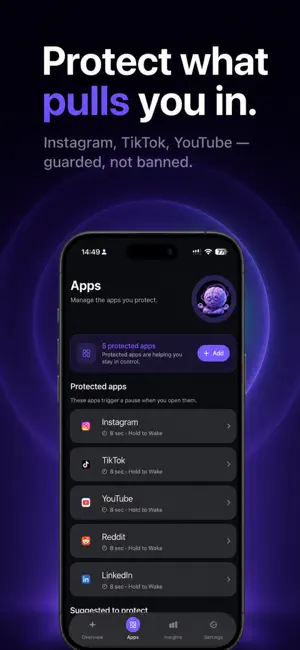
Your thumb opens the app before you've decided to. HoldOn catches that automatic reach and creates a moment to choose before the scroll starts. BREAK THE AUTOPILOT Choose the apps and websites that pull you in most. The next time you try to open one, HoldOn interrupts the automatic pattern and asks you to make the decision consciously. No hard lock. No guilt. Just a moment between impulse and action. HOLD TO WAKE HoldOn's signature intervention makes continuing an active choice. Press and hold for 8 seconds while HoldOn brings your attention back to the decision. Change your mind? Just let go. If you still want the app, finish the hold and continue intentionally. CHOOSE HOW MUCH TIME YOU ACTUALLY NEED If you decide to continue, choose a session from 1 to 10 minutes. When that time ends, HoldOn protects the app again. Need more time? You can choose again. The goal isn't to stop you from using your phone. It's to stop 10 intentional minutes from becoming 45 unconscious ones. OTHER WAYS TO PAUSE Different moments call for different interventions: • Hold to Wake — actively hold before continuing • Breathing — slow down with a guided breathing pause • Reflection — notice the urge before reacting • Intention Check — reconnect with why you're opening the app Choose the experience that works best for you. SEE YOUR PROGRESS HoldOn helps you see what happens when you interrupt autopilot: • Conscious decisions • Attempts interrupted • Time reclaimed • Current and longest streaks • Weekly progress Over time, the goal is simple: less automatic scrolling, more intentional use. YOU'RE ALWAYS IN CONTROL HoldOn creates friction without taking away your freedom. You always have a way to stop protection, change your settings, or consciously continue. Your attention is your life. Take it back. HoldOn is free to try. Premium unlocks the full intervention library and Insights. Privacy Policy: https://www.getholdon.com/privacy.html Terms of Use (EULA): https://www.apple.com/legal/internet-services/itunes/dev/stdeula/
What’s new
Version 1.0.4 · Updated October 6, 2026
• A sharper Hold screen. Let go of the ring and it now counts as a real win: a conscious decision, saved to your progress. • New, more direct messages on the shield and in your notifications. • When the minutes you chose are up, HoldOn now tells you plainly and pauses the app. • Polish and fixes.
App privacy
The developer, Ronald Radhames Santana Franco, reported these privacy practices to Apple.
Data Not Linked to You
The following data, which may be collected but is not linked to your identity, may be used for the following purposes:
- Purchases: Purchase History
- Identifiers: User ID
- Usage Data: Product Interaction
Used for: Analytics
Alternatives to HoldON: Screen Time Control
Looking for apps like HoldON: Screen Time Control? Here are 6 similar apps on the App Store. The highest rated is Uglify Screen Time (5.0/5), and all 6 are free to download.
-
 StreakMe: Daily Habits
-
 ScreenCard - Screen Time
-
 Uglify Screen Time
5.0
Uglify Screen Time
5.0
-
 Sprout: Earn Your Screen Time
5.0
Sprout: Earn Your Screen Time
5.0
-
 FaveNest – Visual Bookmarks
5.0
FaveNest – Visual Bookmarks
5.0
-
 Ransom: Exercise Screen Time
4.7
Ransom: Exercise Screen Time
4.7
| App | Rating | Price | Last updated | Compare |
|---|---|---|---|---|
| HoldON: Screen Time Control | – | Free | October 6, 2026 | |
| StreakMe: Daily Habits | – | Free | Jul 28, 2026 | Compare |
| ScreenCard - Screen Time | – | Free | Oct 1, 2026 | Compare |
| Uglify Screen Time | 5.0 / 5 (1) | Free | Oct 15, 2026 | Compare |
| Sprout: Earn Your Screen Time | 5.0 / 5 (6) | Free | Oct 21, 2026 | Compare |
| FaveNest – Visual Bookmarks | 5.0 / 5 (2) | Free | Oct 16, 2026 | Compare |
| Ransom: Exercise Screen Time | 4.7 / 5 (3) | Free | Oct 13, 2026 | Compare |