

PDF Document Scanner: Pageora
Nikola Sretenovic Productivity iPhoneiPadiPod touch
PDF Document Scanner: Pageora is a free Productivity app for iPhone and iPad by Nikola Sretenovic. Requires iOS 26.0. Updated October 10, 2026.
- Price
- Free
- on the App Store
- Size
- 7 MB
- Age 4+
- Updated
- Oct 10
- 2026 · v1.0.3
Screenshots


About PDF Document Scanner: Pageora
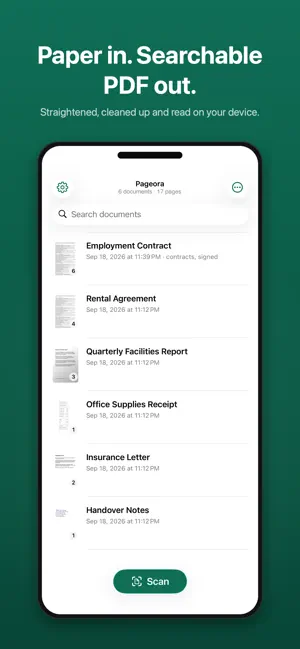
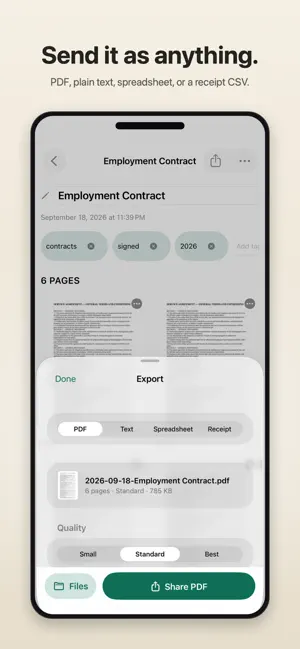
Scan it, file it, send it. Paper in front of you becomes a clean, straight PDF in your own iCloud in seconds — no account, no ads, no subscription, and nothing collected about you. SCAN, OR BRING PHOTOS YOU ALREADY HAVE Point the camera at any paper — letters, contracts, receipts, handwritten notes. Pages are straightened and cleaned up automatically, in color, grayscale or crisp black & white. Already photographed it? Import JPG, HEIC or PNG from your photo library, or an existing PDF. Imported photos are straightened automatically, and you can crop any page by hand when a photo needs it. YOURS, IN YOUR ICLOUD Every scan is a normal PDF in your own iCloud Drive — in the Files app, on your other devices, and still yours if you ever delete the app. Pageora has no server. FIND ANYTHING Every PDF is searchable. Search finds words inside your documents, not just titles — including from your iPhone's Home Screen. Where Apple Intelligence is available, scans name and tag themselves on your device, and you can browse your library by tag. REDACTION THAT MEANS IT Draw a box over anything sensitive and the text underneath is deleted from the PDF, not covered. Copy, extraction and search find nothing — because nothing is there. EDIT PAGES, SEND IT HOW YOU LIKE Crop, rotate, reorder, retake or delete a page. Export at the size you need, and password-protect a PDF before you send it. PAGEORA UNLIMITED, IF YOU WANT MORE Your scans tag themselves — rules sort every new scan by what it is, and you can find duplicates and back up the whole library. Due dates Pageora spots go straight to Calendar. Receipts become spreadsheets — where Apple Intelligence is available, Pageora reads the shop, date and total off the page, ready for your accountant. Tables, text, archive PDF/A and email-sized PDFs too. Finish documents here — sign and date, merge and split, black out a word everywhere at once, and keep private pages behind Face ID. ONE PAYMENT, OR NONE The free app is the full scanner for up to 25 documents — full quality, no watermarks, no ads. Pageora Unlimited removes the limit and turns everything above on, for a single one-time purchase. No subscription, ever. Privacy: Pageora collects no data — no analytics, no tracking, no account. The App Store privacy label says "Data Not Collected" because that is the truth.
What’s new
Version 1.0.3 · Updated October 10, 2026
Share in one tap. The Share button on a document now opens the share sheet straight away, and you can share from the library with a swipe or a long press. Format, quality and password options live under Export Options. Import photos right next to the Scan button, or open PDFs and photos from Mail, Messages and Files straight into Pageora. Crop any page by hand, and undo automatic straightening whenever it guesses wrong: Adjust, then Use Original Photo. Photos of screens are no longer squeezed into a page shape. Scan up to 25 documents before you need Pageora Unlimited, and see what it adds before you decide: the receipt fields Pageora read, the due dates it found and the tags your filing rules would apply. Browse your library by tag from the top of the list. Receipts are read even when they are not on the first page. Draw a new signature whenever you like, and delete your saved signature from Settings. Better names for imported photos, a page that fails to process no longer costs you the whole scan, and a new icon for iOS 26.
App privacy
The developer, Nikola Sretenovic, reported these privacy practices to Apple.
Data Not Collected
The developer does not collect any data from this app.
Alternatives to PDF Document Scanner: Pageora
Looking for apps like PDF Document Scanner: Pageora? Here are 6 similar apps on the App Store. The highest rated is DocClear: PDF Scanner & OCR (5.0/5), and all 6 are free to download.
-
 DocClear: PDF Scanner & OCR
5.0
DocClear: PDF Scanner & OCR
5.0
-
 Paperix - PDF Secure and Local
5.0
Paperix - PDF Secure and Local
5.0
-
 Pagira - HTML Viewer & Comics
4.0
Pagira - HTML Viewer & Comics
4.0
-
 Epson Datacom
2.4
Epson Datacom
2.4
-
 Photo Markup - Draw on Photos
4.3
Photo Markup - Draw on Photos
4.3
-
 Drawboard PDF Annotate, Markup
4.8
Drawboard PDF Annotate, Markup
4.8
| App | Rating | Price | Last updated | Compare |
|---|---|---|---|---|
| PDF Document Scanner: Pageora | – | Free | October 10, 2026 | |
| DocClear: PDF Scanner & OCR | 5.0 / 5 (2) | Free | Sep 2, 2026 | Compare |
| Paperix - PDF Secure and Local | 5.0 / 5 (4) | Free | Oct 10, 2026 | Compare |
| Pagira - HTML Viewer & Comics | 4.0 / 5 (2) | Free | Oct 23, 2026 | Compare |
| Epson Datacom | 2.4 / 5 (7) | Free | Sep 29, 2025 | Compare |
| Photo Markup - Draw on Photos | 4.3 / 5 (374) | Free | Aug 23, 2026 | Compare |
| Drawboard PDF Annotate, Markup | 4.8 / 5 (1,999) | Free | Oct 21, 2026 | Compare |