

Drawboard PDF Annotate, Markup
Drawboard Pty Ltd Productivity iPhoneiPadiPod touchMac
Drawboard PDF Annotate, Markup is a free Productivity app for iPhone and iPad by Drawboard Pty Ltd. Rated 4.8/5 from 1,970 ratings. Requires iOS 17.0.
- Rating
- 4.8
- 1.9K ratings
- Price
- Free
- on the App Store
- Size
- 97 MB
- Age 4+
- Updated
- Oct 13
- 2026 · v5.10.0
Screenshots

About Drawboard PDF Annotate, Markup
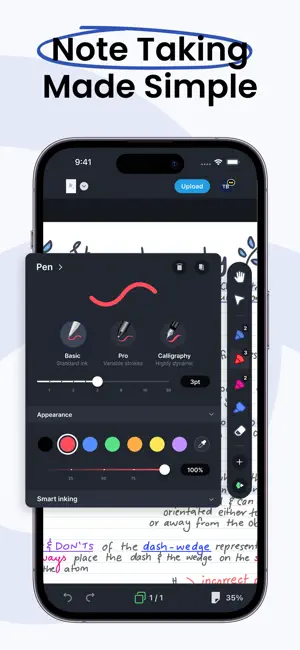
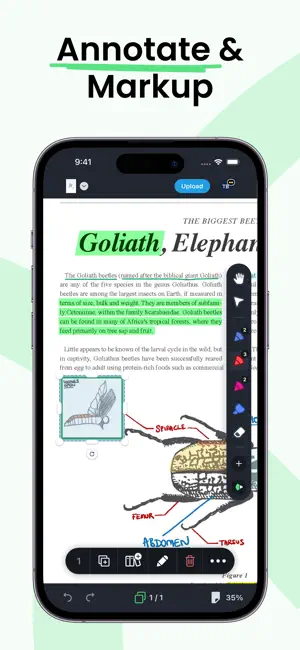
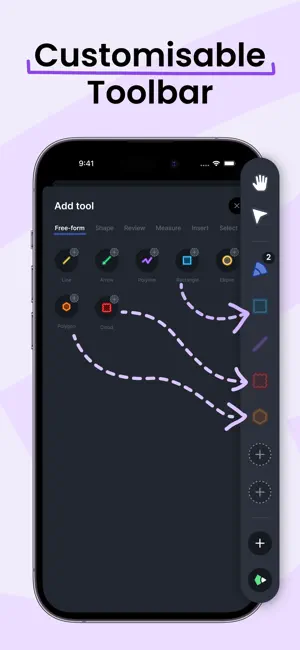
Powerful PDF tools at your fingertips. The latest PDF technology and software for a better experience. With an intuitive UI designed for delight – there’s a better way to PDF! Do your best work with Drawboard. - Dynamic PDF tools that feel good to use - Multi-platform access and storage. Where you are, your work is. - Paperless. A way of working for a sustainable future TOOLS FOR EVERY JOB Fast, responsive, and accurate markup tools. Draw with best-in-class ink for flawless Apple Pencil hand-feel and finally replace pen and paper. CROSS-PLATFORM ACCESS ON ANY DEVICE Upload your annotated PDFs to the cloud and mark up with others in real time with instant sync. Go Pro in-app for additional storage capacity and advanced features. WORK YOUR WAY Customize your workspace by docking your favorite tools and build a toolbar that works for you! MORE - Text review markup - freehand highlighter, text highlighter, underline, strikeout, squiggly on PDF. - Insert lines and shapes - cloud tool, rectangle, ellipse, line, arrow, polygon and polyline on PDF. - Add text with a range of fonts and text styling options - Insert images and camera photos onto PDFs. - Convert JPG and PNG image files to PDF. - Write, annotate, ink and draw on PDFs. - Customize and edit annotation colors, stroke widths, and opacities. - Create new blank PDF documents of different size, color, orientation and page count. - Insert, rotate and delete PDF pages. - Open, read, mark up and save large and complex PDF documents. GET MORE WITH PRO - Redact text and sections of your PDF documents - Measure elements on your page with length and area measurement tools and smart page calibration - Add callouts, hyperlinks and audio notes to your documents - On-page ruler - measure objects on your page with the ease of using a tape measure
Ratings & reviews
4.8
1.9K ratings
What’s new
Version 5.10.0 · Updated October 13, 2026
New features: • Callouts are now much easier to move; just drag and it moves the way you expect Bug fixes: • Fixes an issue where some measurement labels were missing in exported PDFs • Improves memory use and stability when working with large and image-heavy documents
App privacy
The developer, Drawboard Pty Ltd, reported these privacy practices to Apple.
Data Not Linked to You
The following data, which may be collected but is not linked to your identity, may be used for the following purposes:
- Contact Info: Email Address, Name
- Usage Data: Product Interaction
- Identifiers: User ID
- Diagnostics: Performance Data, Other Diagnostic Data, Crash Data
- User Content: Other User Content
Used for: Developer’s Advertising or Marketing, Analytics, App Functionality
Alternatives to Drawboard PDF Annotate, Markup
Looking for apps like Drawboard PDF Annotate, Markup? Here are 6 similar apps on the App Store. The highest rated is LiquidText (4.6/5), and all 6 are free to download.
-
 LiquidText
4.6
LiquidText
4.6
-
 Highlights: PDF Reader & Notes
4.5
Highlights: PDF Reader & Notes
4.5
-
 Bluebeam
1.5
Bluebeam
1.5
-
 Flexcil Note & Good PDF Reader
4.4
Flexcil Note & Good PDF Reader
4.4
-
 Notes Writer: PDF, Voice, AI
4.5
Notes Writer: PDF, Voice, AI
4.5
-
 PDF Viewer by Nutrient
4.6
PDF Viewer by Nutrient
4.6
| App | Rating | Price | Last updated | Compare |
|---|---|---|---|---|
| Drawboard PDF Annotate, Markup | 4.8 / 5 (1,970 ratings) | Free | October 13, 2026 | |
| LiquidText | 4.6 / 5 (6,381) | Free | Sep 24, 2026 | Compare |
| Highlights: PDF Reader & Notes | 4.5 / 5 (1,623) | Free | Oct 10, 2026 | Compare |
| Bluebeam | 1.5 / 5 (405) | Free | Sep 23, 2026 | Compare |
| Flexcil Note & Good PDF Reader | 4.4 / 5 (408) | Free | Oct 8, 2026 | Compare |
| Notes Writer: PDF, Voice, AI | 4.5 / 5 (7,328) | Free | Oct 15, 2026 | Compare |
| PDF Viewer by Nutrient | 4.6 / 5 (9,099) | Free | Oct 9, 2026 | Compare |