

TrustScan: Safe QR Scanner
Umaid Ali Utilities iPhoneiPadiPod touch
TrustScan: Safe QR Scanner is a free Utilities app for iPhone and iPad by Umaid Ali. Requires iOS 15.0. Updated November 9, 2026.
- Price
- Free
- on the App Store
- Size
- 37 MB
- Age 4+
- Updated
- Nov 9
- 2026 · v1.3.1
Screenshots
Save to Pinterest


About TrustScan: Safe QR Scanner
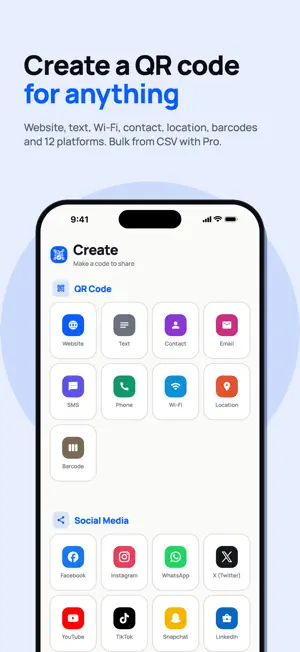
TrustScan is a QR code scanner, barcode reader and link checker that shows you where every link really goes, before you open it. Point your camera at any QR code: TrustScan reads it instantly, runs 21 safety checks on the link and tells you in plain words whether it looks safe, needs caution or is dangerous. WHY USE A SAFE QR SCANNER? QR code scams, also called quishing, are growing fast: fake stickers on parking meters, tampered restaurant menus, phishing codes in emails and on packages. Nobody can read a QR code by eye, and most scanners open whatever is inside without checking it. TrustScan checks the link first, so a malicious link can be caught before your browser loads it. Not sure if a link is safe? Scan it and see. 21 SAFETY CHECKS ON EVERY LINK • Lookalike domains that imitate a real brand (paypa1, rnicrosoft, Cyrillic letters) • Punycode tricks and brand impersonation • Fake sign-in pages that ask for passwords, OTP codes or recovery phrases • Links that hide their real destination behind "@", a URL shortener or a redirect • Files that download instead of opening a page (.exe, .msi, .dmg), a common way to spread malware and viruses • javascript: and data: links that can run code on your device • Unencrypted HTTP, raw IP addresses and domain endings abused by scammers Every verdict explains what was found, so you learn to recognize a phishing link yourself. Scanned a short link? One tap follows it and checks the real destination too. SCAN ANY CODE Read QR codes, Data Matrix, Aztec and PDF417, plus barcodes such as EAN, UPC, Code 128 and Code 39. Scan with the camera, or scan a QR code from a photo or screenshot in your library. The flashlight and zoom help in low light or with distant codes. Scan a Wi-Fi QR code to see the network name and Wi-Fi password, then copy the password in one tap. Contact cards, calendar events, email addresses, SMS and phone numbers are recognized and shown clearly. Batch mode keeps scanning without stopping. QR CODE GENERATOR Create QR codes for a website, text, Wi-Fi network, contact card (vCard), email, SMS, phone number or location, plus barcodes and codes for 12 platforms including WhatsApp, Instagram, Facebook, TikTok, YouTube and PayPal. Choose your colors, then share or save in seconds. YOUR SCAN HISTORY Search, filter by type, star favorites and export to CSV for Excel. Prefer to keep no record? Turn history off for incognito scanning. PRIVATE BY DESIGN • No account, no sign-up, no email address • Every safety check runs on your device and works offline; the links you scan are not uploaded to us • Camera frames are processed in memory and never recorded • Following a short link is optional and only contacts the sites that link redirects through AVAILABLE IN 14 LANGUAGES English, Español, Português, Français, Deutsch, Русский, العربية, हिन्दी, اردو, বাংলা, Bahasa Indonesia, 日本語, Türkçe and 中文, with full right-to-left support. TRUSTSCAN PRO: ONE-TIME PURCHASE, NO SUBSCRIPTION • Ad-free: no banner and no full-screen ads • QR code generator with logo: add your own logo to the center of any code • Export print-quality SVG and high-resolution PNG • Lock your scan history with Face ID, Touch ID or your passcode • Generate QR codes in bulk from a CSV file • Scan Sessions: count stock or check people in, with duplicate detection and spreadsheet export The QR code reader, the barcode scanner and all 21 safety checks are free forever. The free version shows ads; Pro removes them and adds tools for people who use QR codes at work.
What’s new
Version 1.3.1 · Updated November 9, 2026
• The free version now shows ads; Pro removes them • Ads are never personalized, and none are shown in the EEA, the UK and Switzerland • Choose whether to share crash reports and usage counts, with a new switch in Settings • In the EEA, the UK and Switzerland they stay off until you agree • The privacy policy in the app now says how long data is kept and how to delete it • History search now shows results while the keyboard is open • A long History now loads faster • History's day headings are now correct after the clocks change
App privacy
The developer, Umaid Ali, reported these privacy practices to Apple.
Data Linked to You
The following data, which may be collected and linked to your identity, may be used for the following purposes:
- Location: Coarse Location
- Identifiers: Device ID, User ID
- Usage Data: Product Interaction, Advertising Data
- Purchases: Purchase History
Used for: Third-Party Advertising, Developer’s Advertising or Marketing, Analytics, App Functionality
Data Not Linked to You
The following data, which may be collected but is not linked to your identity, may be used for the following purposes:
- Diagnostics: Performance Data, Other Diagnostic Data, Crash Data
- Purchases: Purchase History
Used for: Third-Party Advertising, Developer’s Advertising or Marketing, Analytics, App Functionality
Alternatives to TrustScan: Safe QR Scanner
Looking for apps like TrustScan: Safe QR Scanner? Here are 6 similar apps on the App Store. The highest rated is AI scanner for daily use (5.0/5), and all 6 are free to download.
-
 AI scanner for daily use
5.0
-
 QR Studio
-
 QR & Barcode Scanner: Fabric
-
 Router Watch: WiFi Scanner
-
 QArt-QR Code Generator & Scan
-
 LocalDrop: Wi-Fi File Transfer
| App | Rating | Price | Last updated | Compare |
|---|---|---|---|---|
| TrustScan: Safe QR Scanner | – | Free | November 9, 2026 | |
| AI scanner for daily use | 5.0 / 5 (1) | Free | Sep 5, 2026 | Compare |
| QR Studio | – | Free | Nov 11, 2026 | Compare |
| QR & Barcode Scanner: Fabric | – | Free | Nov 21, 2026 | Compare |
| Router Watch: WiFi Scanner | – | Free | Oct 26, 2026 | Compare |
| QArt-QR Code Generator & Scan | – | Free | Aug 6, 2026 | Compare |
| LocalDrop: Wi-Fi File Transfer | – | Free | Nov 15, 2026 | Compare |