

LocalDrop.Dev
Toan Nguyen Utilities iPhoneiPadiPod touchMac
LocalDrop.Dev is a free Utilities app for iPhone and iPad by Toan Nguyen. Requires iOS 13.0. Updated August 6, 2026.
- Price
- Free
- on the App Store
- Size
- 30 MB
- Age 4+
- Updated
- Aug 6
- 2026 · v1.2.10
Screenshots
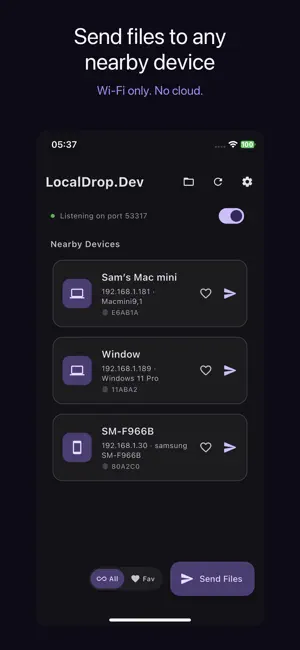


About LocalDrop.Dev
Looking at a photo on your iPhone and want to edit it on your Mac? Caught a bug screenshot and need to send it to a friend on another device? Copied a long link on your computer and want to open it on your phone? LocalDrop does all of that in one or two taps — your devices just need to be on the same Wi-Fi (your home network, your office, or even a coffee shop hotspot). No internet required. No accounts. No third-party servers. Your data goes straight from one device to the other. ▸ ONE TAP. SENT. Right-click a file in Finder, or use the Share Sheet on iPhone or iPad → tap "Send via LocalDrop" → pick a device → done. No dragging across windows, no copying links, no helper apps. ▸ SEND TEXT BETWEEN DEVICES — WITHOUT A CHAT APP Need to move a link, an OTP code, a snippet of code, or a wallet address from your Mac to your iPhone? Or paste long text from your phone onto your computer to edit it? LocalDrop has a dedicated text box — type or paste, pick a device, and the text appears on the other side within a second. It lands straight on the clipboard, ready to paste. No more sending notes to yourself through Messenger or WhatsApp. No more retyping 20 characters on a virtual keyboard. No more clutter in your inbox. ▸ SCREENSHOTS AND SCREEN RECORDING, BUILT IN • Capture a region, the full screen, or a single window with a keyboard shortcut. • Record video of your screen with the cursor included. Export as MP4 or MOV. • Annotate captures with text, arrows, and shapes in the built-in image editor. • After capturing, send it straight to your phone or another computer in one click — no need to save to Desktop and attach it through chat. ▸ EDIT WITH LOCALDROP Right-click any image (PNG, JPG, WebP, BMP) in Finder → Quick Actions → Edit Image with LocalDrop. The built-in editor opens with annotation tools — add text, arrows, rectangles, highlights. Every edit auto-saves next to the original. Then send the annotated image to another device in one click. ▸ WORKS ACROSS EVERY DEVICE LocalDrop runs on macOS, iOS, and other platforms. Two-way between platforms — between any of your devices, in either direction. You're not locked into one operating system. All your devices need is the same Wi-Fi. No extra service. No pairing. No QR codes. The app finds nearby devices automatically. ▸ PRIVATE BY DEFAULT • Data goes directly from one device to another over your Wi-Fi. It does not pass through LocalDrop's servers or any other company's. • Every transfer is encrypted end-to-end, even on public Wi-Fi (cafes, airports, hotels). • The first time you connect to a new device, the app asks you to confirm so you know you're sending to the right machine. Subsequent transfers are silent. • No account required. No telemetry. No ads. ▸ NO SIZE LIMITS A 10 GB file sends as smoothly as a 10 MB one. Speed depends on your Wi-Fi alone — no throttling like cloud services. ▸ HIGHLIGHTS • Send text between devices, lands on the clipboard • Share files of any size over Wi-Fi • Send the same files to multiple devices at once • Built-in screenshot, screen recording, and image editor • Right-click integration in Finder and File Explorer • Right-click image → Edit with LocalDrop • Share Sheet integration on iOS and iPadOS • Cross-platform: macOS, iOS and other platforms • End-to-end encryption — your data never leaves your local Wi-Fi • Works without internet • Localized in 10 languages LocalDrop is source-available (BSL 1.1 license, automatically converts to Apache 2.0 in 2030). Free for personal and internal business use.
What’s new
Version 1.2.10 · Updated August 6, 2026
• Report a bug now works on iPhone and iPad. The Report a bug tab in Settings used to open on an error and could never be sent.
App privacy
The developer, Toan Nguyen, reported these privacy practices to Apple.
Data Not Collected
The developer does not collect any data from this app.
Alternatives to LocalDrop.Dev
Looking for apps like LocalDrop.Dev? Here are 6 similar apps on the App Store. The highest rated is SourceExtract (5.0/5), and 4 of the 6 are free to download.
-
 SafeScan Wallet
-
 SourceExtract
5.0
SourceExtract
5.0
-
 Simple Viewer
-
 Xtools - AI Toolbox
5.0
Xtools - AI Toolbox
5.0
-
 Prism – AI Playground
-
 Dark Mode Plus
5.0
Dark Mode Plus
5.0
| App | Rating | Price | Last updated | Compare |
|---|---|---|---|---|
| LocalDrop.Dev | – | Free | August 6, 2026 | |
| SafeScan Wallet | – | Free | Jul 28, 2026 | Compare |
| SourceExtract | 5.0 / 5 (2) | 1.99 USD | Apr 15, 2026 | Compare |
| Simple Viewer | – | Free | Oct 10, 2026 | Compare |
| Xtools - AI Toolbox | 5.0 / 5 (2) | Free | Sep 14, 2026 | Compare |
| Prism – AI Playground | – | Free | Apr 30, 2026 | Compare |
| Dark Mode Plus | 5.0 / 5 (2) | 1.99 USD | Aug 6, 2026 | Compare |
Compare LocalDrop.Dev with the top alternatives: ratings, updates, ASO score and keyword gaps →