

SafeScan Wallet
Oliver Hofer Utilities iPhoneiPadiPod touch
SafeScan Wallet is a free Utilities app for iPhone and iPad by Oliver Hofer. Requires iOS 18.0. Updated October 20, 2026.
- Price
- Free
- on the App Store
- Size
- 15 MB
- Age 4+
- Updated
- Oct 20
- 2026 · v1.4
Screenshots
Save to Pinterest


About SafeScan Wallet
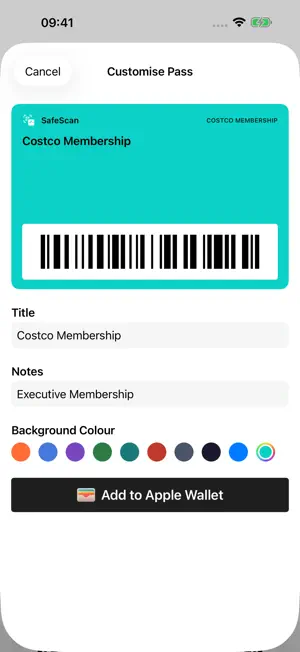
Every code deserves to be remembered — and every link deserves to be checked before you tap it. You tap the QR code on a restaurant table, open the menu, and close the tab. Two hours later — gone. You hold your iPhone near an access badge and have no way to save what's on it. You spot a QR code stuck over another one on a parking meter — is it the real one, or a scam? SafeScan Wallet is your guide. Built for people who believe a scan should be a permanent, trustworthy memory — not a fleeting moment you scramble to recover, or a gamble on where a link leads. No sign-in. No ads. Just a fast, private vault, with real protection against the scams hiding among the codes. HOW IT WORKS 1. Point, Import, or Tap Scan with your camera, import a screenshot, or tap an NFC tag. No second device needed. 2. It Fills In and Checks It Page titles and favicons fill in automatically. Pro subscribers also get every URL checked against a real-time threat database before they tap Open. 3. Find It Forever Search, browse, and revisit every scan. Your history is private, local, and always yours. --- ALWAYS ONE TAP AWAY Add SafeScan Wallet to Control Center. One tap opens the live scanner, the QR generator, or your card wallet — from anywhere on your iPhone, even the lock screen. NFC TAG READING — free for everyone Tap the NFC icon in the Scanner tab to read NFC tags with your iPhone. Text and links from NDEF tags save straight to your library, just like a camera scan — try an access badge, transit card, or smart poster. SCAN YOUR SCREEN See a QR code in an email or on a website? Screenshot it and import it. SafeScan Wallet decodes any image — no second device required. SMART TITLING Every URL is automatically enriched with its page title and favicon. No more "Untitled Link" clutter in your history. PRIVATE BY DESIGN Zero ads. Zero trackers required. No account needed for any feature, including Pro. Your scan history stays on your device. WI-FI & CONTACTS Scan a router sticker once, save the credentials, and share them as a QR code forever. Scan a business card and save the contact without retyping a single detail. ADD TO WALLET & LOYALTY CARDS Digitize loyalty and membership barcodes into a free in-app card list — pin your favorites for the checkout line. Unlock Add to Wallet (SafeScan Basic or Pro) to export any scan as a real Apple Wallet pass, including a "Poster" style with an automatically branded background, and full EAN-8 support. ORGANIZE WITH CATEGORIES (SafeScan Basic or Pro) Create custom categories, sort scans with a swipe, and navigate with a mail-style sidebar. LINK SAFETY CHECK & QUISHING PROTECTION (SafeScan Pro) Every URL is checked against Google's real-time threat database the moment it's scanned, routed through a privacy proxy so your identity is never exposed to Google. Pro also catches "quishing" — fake QR codes stuck over real ones to steal payment details — by flagging brand-impersonation and look-alike domains, with plain-language risk explanations powered by on-device Apple Intelligence on eligible hardware. EXPORT YOUR DATA Your entire history is exportable to CSV, JSON, or an optionally passphrase-protected ZIP backup, any time. No lock-in, ever. UNIVERSAL PURCHASE Use on iPhone and iPad Stop losing the codes that matter. Download SafeScan Wallet and start building your vault today. --- Terms of Use (EULA): https://www.apple.com/legal/internet-services/itunes/dev/stdeula/
What’s new
Version 1.4 · Updated October 20, 2026
Smarter quishing protection for SafeScan Pro. Scammers have started sticking fake QR codes over real ones — on parking meters, menus, event flyers — to steal payment details. SafeScan Pro's Safe Browsing check now catches two more of their favorite tricks: URLs that borrow a trusted brand's name on the wrong domain (like "paypal" outside paypal.com), and look-alike domains that swap in foreign characters that look identical to Latin letters. On eligible hardware, Pro also explains a flagged link in plain language — "This page uses PayPal's name, but the address isn't paypal.com" — generated entirely on-device with Apple Intelligence. NFC tag reading — free for everyone. Tap the new NFC icon in the Scanner tab to read NFC tags with your iPhone. Text and links from NDEF tags save straight to your library, just like a camera scan. Raw tag data — UID and type — from ISO 15693, MIFARE Ultralight/NTAG, and FeliCa tags is captured too, with type, manufacturer, and memory details shown in scan details. New Wallet pass style (iOS27): PosterGeneric. Add to Wallet now offers a "Poster" style (iOS 27+) with a branded background, automatically generated to match your card's color and pattern from Favourites — no photo needed. Also improved: EAN-8 and EAN-13 barcodes can now be added to Wallet passes (requires iOS27), and library backups can now be protected with an optional passphrase. Thanks for using SafeScan!
App privacy
The developer, Oliver Hofer, reported these privacy practices to Apple.
Data Not Collected
The developer does not collect any data from this app.
Alternatives to SafeScan Wallet
Looking for apps like SafeScan Wallet? Here are 6 similar apps on the App Store. The highest rated is SourceExtract (5.0/5), and 5 of the 6 are free to download.
-
 LocalDrop: Wi-Fi File Transfer
-
 SourceExtract
5.0
-
 Xtools - AI Toolbox
5.0
-
 Yonder: Text Display
-
 Simple Viewer
-
 Simple Photo Transfer Wireless
| App | Rating | Price | Last updated | Compare |
|---|---|---|---|---|
| SafeScan Wallet | – | Free | October 20, 2026 | |
| LocalDrop: Wi-Fi File Transfer | – | Free | Nov 15, 2026 | Compare |
| SourceExtract | 5.0 / 5 (2) | 1.99 USD | Apr 15, 2026 | Compare |
| Xtools - AI Toolbox | 5.0 / 5 (2) | Free | Nov 1, 2026 | Compare |
| Yonder: Text Display | – | Free | Oct 6, 2026 | Compare |
| Simple Viewer | – | Free | Oct 22, 2026 | Compare |
| Simple Photo Transfer Wireless | – | Free | Jul 13, 2026 | Compare |
Compare SafeScan Wallet with the top alternatives: ratings, updates, ASO score and keyword gaps →