

Router Watch: WiFi Scanner
Harun Demirkaya Utilities iPhoneiPadiPod touch
Router Watch: WiFi Scanner is a free Utilities app for iPhone and iPad by Harun Demirkaya. Requires iOS 15.0. Updated October 26, 2026.
- Price
- Free
- on the App Store
- Size
- 45 MB
- Age 4+
- Updated
- Oct 26
- 2026 · v1.0
Screenshots
Save to Pinterest

About Router Watch: WiFi Scanner
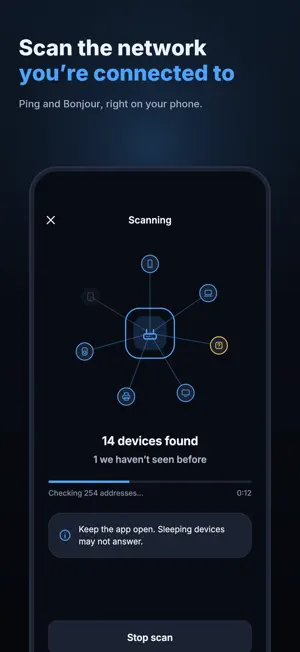
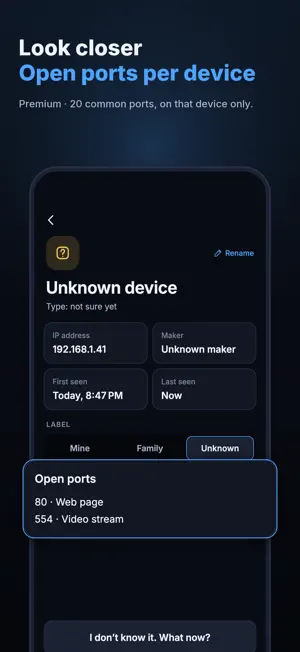
WiFi scanner for your home network: see who’s on your Wi-Fi. Scan the network you’re connected to in about 30 seconds and get a list of the devices that answer: phones, laptops, TVs, speakers, cameras, consoles and smart plugs. Label each one as Mine, Family or Unknown. Next time, anything new stands out at the top. What it can’t do: Router Watch only lists what answers on the network you’re on. It can’t block or remove a device, it never logs in to your router, and it never scans outside your local network. Some devices sleep or don’t answer scans, and a phone can’t always see a device’s maker, so no scan can promise a complete list. No account. No ads. Your device list stays on your phone. How it scans • Ping sweep of your local network (up to 1,024 addresses) • Bonjour (mDNS) names, so a TV shows up as “Living Room TV” • Device names from your router’s DNS and Windows network names Included • Unlimited scans of the network you’re on • The first 5 devices of every scan, unknown ones first • Names and labels for your devices • Network health: Wi-Fi security type, whether your router’s login page opens over plain http, and how many devices are still unknown. No made-up score. • A step-by-step guide for a device you don’t recognize Premium • New device alerts: Router Watch checks your Wi-Fi each time you open the app and sends a daily reminder to check • The full device list on every scan • Open ports summary: 20 common ports checked on that one device • Scan history: who joined and who left since the last scan When to check After you give your Wi-Fi password to guests or a neighbour. When the internet feels slow. When you move into a shared flat or a rental. After you set up a new router, mesh system or smart home gadget. When a device you don’t recognize appears. Privacy • No account, no email, no sign-up. • Scan results, device names and labels are kept on this phone. Nothing about your devices is uploaded. • iPhone asks for Local Network access before the first scan. Router Watch uses it only to talk to devices on your own network. • Delete all device data any time in Settings. Subscriptions Monthly or yearly subscription, or a one-time lifetime purchase. The price is shown before you pay. Payment is charged to your Apple ID account. Subscriptions renew automatically unless cancelled at least 24 hours before the end of the current period; manage or cancel them in your account settings. Available in 14 languages. Privacy Policy: https://hdklabs.app/wifiwatch/privacy.html Terms of Use: https://hdklabs.app/wifiwatch/terms.html Support: [email protected]
App privacy
The developer, Harun Demirkaya, reported these privacy practices to Apple.
Data Not Linked to You
The following data, which may be collected but is not linked to your identity, may be used for the following purposes:
- Identifiers: Device ID
- Usage Data: Product Interaction
- Purchases: Purchase History
- Diagnostics: Crash Data, Performance Data
Used for: Analytics, App Functionality
Alternatives to Router Watch: WiFi Scanner
Looking for apps like Router Watch: WiFi Scanner? Here are 6 similar apps on the App Store. The highest rated is NetRadar: Who's On My WiFi (5.0/5), and all 6 are free to download.
-
 NetRadar: Who's On My WiFi
5.0
-
 Who is connected to My Wifi
4.0
-
 NetGuard: WiFi Scanner
4.8
-
 Router Setup Page
3.0
-
 Router Admin + Near By Wifi
4.2
-
 WiFi Guard - Network scanner
4.2
| App | Rating | Price | Last updated | Compare |
|---|---|---|---|---|
| Router Watch: WiFi Scanner | – | Free | October 26, 2026 | |
| NetRadar: Who's On My WiFi | 5.0 / 5 (5) | Free | Oct 21, 2026 | Compare |
| Who is connected to My Wifi | 4.0 / 5 (2) | Free | Oct 9, 2026 | Compare |
| NetGuard: WiFi Scanner | 4.8 / 5 (5) | Free | Oct 13, 2026 | Compare |
| Router Setup Page | 3.0 / 5 (2) | Free | Nov 11, 2026 | Compare |
| Router Admin + Near By Wifi | 4.2 / 5 (26) | Free | Aug 11, 2026 | Compare |
| WiFi Guard - Network scanner | 4.2 / 5 (2,421) | Free | Nov 23, 2026 | Compare |