

Blur Effects
CONVERSANTECH Photo & Video iPhoneiPadiPod touch
Blur Effects is a free Photo & Video app for iPhone and iPad by CONVERSANTECH. Requires iOS 15.5. Updated September 13, 2026.
- Price
- Free
- on the App Store
- Size
- 73 MB
- Age 4+
- Updated
- Sep 13
- 2026 · v1.0
Screenshots



About Blur Effects
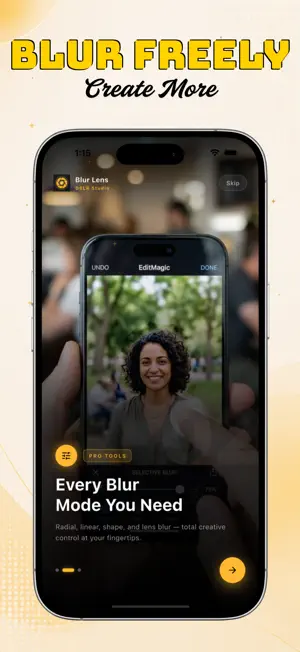
Blur Lens: DSLR Blur Editor is a photo editing app designed to help you create background blur, bokeh, portrait focus, depth and motion-style effects from your photos. Import a photo from your device, choose a blur style, adjust the effect and save your finished image. Whether you want a soft portrait background, focused product image or creative motion effect, Blur Lens gives you multiple blur tools in one simple editor. KEY FEATURES DSLR-Style Background Blur Create a smooth blurred background to help your subject stand out and give photos a focused DSLR-style appearance. Bokeh Effects Add soft bokeh-style blur to portraits, close-up photos, product images and creative edits. Portrait Blur Apply subject-focused blur effects to create a clean portrait-style look. Point Focus Keep a selected area clear while applying blur around it to draw attention to important details. Point Blur Blur a selected area of your photo to reduce distractions or emphasize another part of the image. Linear Blur Apply directional blur for creative depth and tilt-shift-style photo effects. Radial Blur Create a circular blur around a selected point to guide attention toward the center of your image. Shape Blur Create artistic blur effects using supported shapes such as hearts, stars and other visual styles. Free Style Blur Manually paint blur onto selected areas using touch controls for more precise editing. Spin Blur Add a circular motion-style blur effect for dynamic and creative photo edits. Zoom Blur Create a zoom-inspired blur effect that adds a sense of movement and speed. Motion Blur Apply directional motion effects to simulate movement, panning and action photography styles. SIMPLE EDITING FLOW Select a photo from your library Choose a blur mode Adjust the effect Preview your edit Save the finished image MADE FOR CREATIVE PHOTO EDITING Blur Lens is useful for: • Portrait photo editing • Background blur effects • Bokeh photo effects • Product photo enhancement • Creative social media images • Motion and zoom effects • Focus-based photo editing • Artistic blur styles
App privacy
The developer, CONVERSANTECH, reported these privacy practices to Apple.
Data Used to Track You
The following data may be used to track you across apps and websites owned by other companies:
- Identifiers: Device ID
Data Linked to You
The following data, which may be collected and linked to your identity, may be used for the following purposes:
- Identifiers: Device ID
Used for: Third-Party Advertising
Data Not Linked to You
The following data, which may be collected but is not linked to your identity, may be used for the following purposes:
- Usage Data: Product Interaction
- Diagnostics: Crash Data, Performance Data
Used for: Third-Party Advertising, Analytics
Alternatives to Blur Effects
Looking for apps like Blur Effects? Here are 6 similar apps on the App Store. The highest rated is Spol: Retro Video Camera (5.0/5), and all 6 are free to download.
-
 Spol: Retro Video Camera
5.0
Spol: Retro Video Camera
5.0
-
 Lucid - Manual RAW Camera
-
 Grayn: Analog Film Camera
5.0
Grayn: Analog Film Camera
5.0
-
 Loot: Video Color Grading
5.0
Loot: Video Color Grading
5.0
-
 Eight Shot - Instant Camera
5.0
Eight Shot - Instant Camera
5.0
-
 BlurCam Record: Face Blur
| App | Rating | Price | Last updated | Compare |
|---|---|---|---|---|
| Blur Effects | – | Free | September 13, 2026 | |
| Spol: Retro Video Camera | 5.0 / 5 (2) | Free | Oct 13, 2026 | Compare |
| Lucid - Manual RAW Camera | – | Free | Oct 24, 2026 | Compare |
| Grayn: Analog Film Camera | 5.0 / 5 (3) | Free | Sep 18, 2026 | Compare |
| Loot: Video Color Grading | 5.0 / 5 (2) | Free | Aug 26, 2026 | Compare |
| Eight Shot - Instant Camera | 5.0 / 5 (10) | Free | Oct 30, 2026 | Compare |
| BlurCam Record: Face Blur | – | Free | Oct 1, 2026 | Compare |
Compare Blur Effects with the top alternatives: ratings, updates, ASO score and keyword gaps →