

BlurCam Record: Face Blur
WorkersLab LLC Photo & Video iPhoneiPadiPod touch
BlurCam Record: Face Blur is a free Photo & Video app for iPhone and iPad by WorkersLab LLC. Requires iOS 17.0. Updated October 1, 2026.
- Price
- Free
- on the App Store
- Size
- 11 MB
- Age 4+
- Updated
- Oct 1
- 2026 · v1.2.0
Screenshots



About BlurCam Record: Face Blur
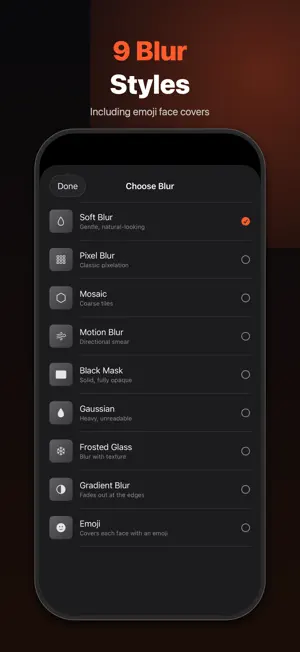
BlurCam is a camera that blurs faces while you record. Press record, press stop, and the video is already blurred. There is no editing step and no waiting. It also blurs videos and photos you already have: pick one from your library, or share it from Photos and choose Blur with BlurCam. EVERYTHING STAYS ON YOUR IPHONE Recording, face detection and blurring all happen on your device. Your video is never uploaded. There is no cloud, no account and nothing to sign up for. Put your iPhone in airplane mode and the whole app keeps working. BlurCam detects faces so it can cover them. It does not recognise anyone, match faces against anything, or store face data of any kind. CHOOSE WHAT TO HIDE - Faces: every face the camera finds, the default - Whole person: the entire figure, head to toe - Background: everything except people, so you can film at home without showing the room - Text and number plates: plates, street signs, screens and paperwork, on top of any of the above KEEP YOUR OWN FACE VISIBLE Tap a face in the viewfinder to leave it clear while everyone else stays blurred. Ideal for vlogs and interviews. The choice lasts only while the camera can follow that face; nothing about it is stored. NINE WAYS TO HIDE A FACE Emoji covers, Soft Blur, Pixel, Mosaic, Motion Blur, Black Mask, Gaussian, Frosted Glass and Gradient. Adjust the strength. Blur scales with each face, so someone across the street is hidden as thoroughly as someone in front of you. BLUR WHAT YOU ALREADY FILMED Import any video or up to 24 photos from your library and get blurred copies back, with the original audio kept. Or use Share, then Blur with BlurCam, from Photos or any other app. The picker hands BlurCam only the items you choose; the rest of your library stays private. BUILT LIKE THE CAMERA YOU ALREADY USE Video, Photo, Slo-mo and Time-lapse. Pinch to zoom, tap to focus, torch, front and rear cameras, portrait and landscape. Voice styles change how a voice sounds while you record: Original, Anonymous, Podcast or Robot. RECORD FIRST, DECIDE AFTER Recording and every blur style are free to try. When you stop, the blurred clip waits on your iPhone. Saving it to Photos and sharing it needs BlurCam Premium. BLURCAM PREMIUM Unlocks saving and sharing, unlimited recording, all blur and voice styles, importing, the share extension, highest export quality (4K at 60 fps), Slo-mo and Time-lapse, and every future premium feature. - Individual: 2.99 USD per month or 24.99 USD per year, each with a 3-day free trial - Family (up to 6 people): 5.99 USD per month or 49.99 USD per year Prices vary by region. Payment is charged to your Apple Account at confirmation of purchase. The subscription renews automatically unless cancelled at least 24 hours before the end of the current period. Manage or cancel in Settings. Cancel during the free trial and you pay nothing. A NOTE ON WHAT THIS CAN AND CANNOT DO BlurCam blurs the faces, people and text it detects. Anything it does not detect, such as a face turned away, very small, in poor light or moving fast, will not be blurred. It makes people harder to identify; it is not a guarantee of anonymity. Review your video before sharing it. Terms of Use: https://blurcam24.web.app/terms/ Privacy Policy: https://blurcam24.web.app/privacy/
What’s new
Version 1.2.0 · Updated October 1, 2026
Blur what you already filmed: import any video or photos from your library, or share from Photos and choose Blur with BlurCam. Keep your own face visible: tap a face in the viewfinder to leave it clear while everyone else stays blurred. New coverage: blur the whole person, or the background instead of people. Also blur text and number plates. Record first, decide after: recording and every style are free to try; saving needs Premium, with a 3-day free trial on monthly and yearly. Emoji is now the default style. Smoother pinch zoom, faster face detection, and the screen stays awake while the camera is open.
App privacy
The developer, WorkersLab LLC, reported these privacy practices to Apple.
Data Linked to You
The following data, which may be collected and linked to your identity, may be used for the following purposes:
- Purchases: Purchase History
Used for: App Functionality
Alternatives to BlurCam Record: Face Blur
Looking for apps like BlurCam Record: Face Blur? Here are 6 similar apps on the App Store. The highest rated is BlurPOV - Hide Faces in Video (5.0/5), and all 6 are free to download.
-
 BlurPOV - Hide Faces in Video
5.0
BlurPOV - Hide Faces in Video
5.0
-
 Private BlurCam
-
 FaceHider: Blur Video & Face
5.0
FaceHider: Blur Video & Face
5.0
-
 Face Blur Photo & Video
-
 NoFace: Anonymous Camera
-
 Face Mosaic: Camera FX
| App | Rating | Price | Last updated | Compare |
|---|---|---|---|---|
| BlurCam Record: Face Blur | – | Free | October 1, 2026 | |
| BlurPOV - Hide Faces in Video | 5.0 / 5 (1) | Free | May 6, 2026 | Compare |
| Private BlurCam | – | Free | May 7, 2026 | Compare |
| FaceHider: Blur Video & Face | 5.0 / 5 (1) | Free | Sep 21, 2026 | Compare |
| Face Blur Photo & Video | – | Free | Oct 19, 2026 | Compare |
| NoFace: Anonymous Camera | – | Free | Aug 11, 2026 | Compare |
| Face Mosaic: Camera FX | – | Free | Sep 8, 2026 | Compare |