

PixBox – Photo File Manager
振峰 曹 Photo & Video iPhoneiPadiPod touch
PixBox – Photo File Manager is a paid Photo & Video app for iPhone and iPad by 振峰 曹. Requires iOS 15.5. Updated September 17, 2026.
- Price
- 2.99 USD
- on the App Store
- Size
- 76 MB
- Age 4+
- Updated
- Sep 17
- 2026 · v1.0
Screenshots

About PixBox – Photo File Manager
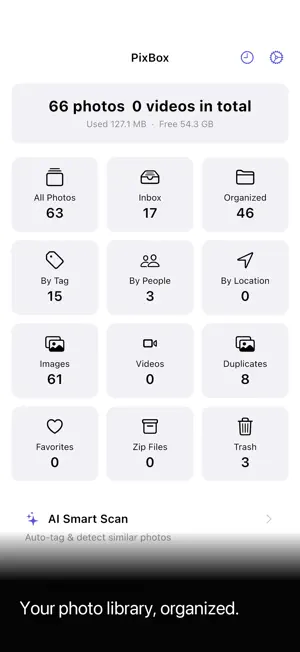
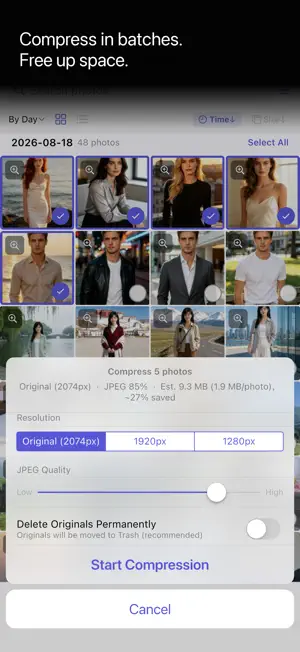
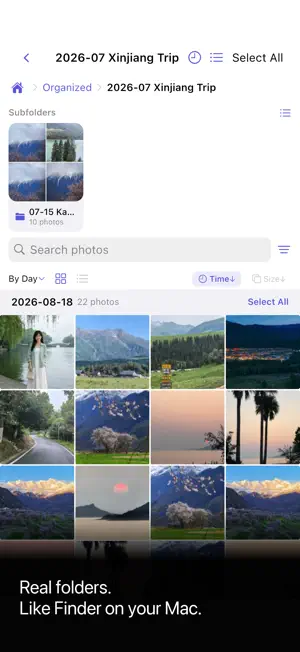
Your photos, your rules. PixBox is the file manager for your photo library — with AI tagging and face grouping built in, plus the batch power tools that one-by-one apps lack. Batch-select hundreds of photos, dedupe, compress, zip, and move them into nested folders, exactly like files on your computer. WHY PIXBOX BATCH, NOT ONE-BY-ONE Every photo cleaner makes you swipe or tap photos one at a time. PixBox lets you multi-select on a thumbnail grid and act on hundreds at once — delete, move, tag, compress, or share in a single step. REAL FOLDERS, LIKE FINDER Nest folders inside folders, cut/copy/paste between them. Zip a folder — or share it straight from the folder menu — with its subfolder structure intact. Your library stops being a flat wall of photos and becomes an organized file system. YOU APPROVE EVERY DELETE Most cleaners "helpfully" delete things for you — and that's how people lose wedding photos, cat videos, and years of memories. PixBox never auto-deletes. You select, you review, you confirm. Deletions go to Recently Deleted, so nothing disappears without your say-so. FIND & FREE UP SPACE - Duplicate detection — find near-identical and similar photos, keep the best automatically - Batch compression — resize and re-encode photos to reclaim gigabytes - Batch zip & share — package a shoot, a trip, or a project into one file - Share a folder — resize then zip a whole folder (subfolders kept), no leftover zip left behind SMART, BUT LOCAL - Face grouping — auto-cluster faces into people - Scene tags — indoor, outdoor, food, document, and 28 more - Location grouping — browse by country, state, city - Everything runs on-device. No cloud upload, no AI server, no account. THE PIXBOX PROMISE - One-time purchase. Less than one week of what subscription photo cleaners charge — permanently. - No subscription. No ads. No data selling. No tracking. - No account. We don't even ask your name, age, or gender. - Fully offline and private — your photos never leave your device. Stop tapping through your library one photo at a time. Treat it like a file system — with PixBox. Compatible with iPhone and iPad. Available in English, 中文, 日本語, 한국어, Español, Français, Deutsch, Русский, and 繁體中文. END USER LICENSE AGREEMENT(EULA): https://www.apple.com/legal/internet-services/itunes/dev/stdeula/
App privacy
The developer, 振峰 曹, reported these privacy practices to Apple.
Data Not Collected
The developer does not collect any data from this app.
Alternatives to PixBox – Photo File Manager
Looking for apps like PixBox – Photo File Manager? Here are 6 similar apps on the App Store. The highest rated is Photo Hidden (5.0/5), and 5 of the 6 are free to download.
-
 Youxu - Photo Date & Baby Age
-
 Photo Hidden
5.0
Photo Hidden
5.0
-
 Exacto
4.5
Exacto
4.5
-
 Button Badge Maker
4.3
Button Badge Maker
4.3
-
 IPTV Freedom
4.3
IPTV Freedom
4.3
-
 PicsFold: Separate Photo Album
3.2
PicsFold: Separate Photo Album
3.2
| App | Rating | Price | Last updated | Compare |
|---|---|---|---|---|
| PixBox – Photo File Manager | – | 2.99 USD | September 17, 2026 | |
| Youxu - Photo Date & Baby Age | – | Free | Oct 12, 2026 | Compare |
| Photo Hidden | 5.0 / 5 (1) | Free | Jun 26, 2026 | Compare |
| Exacto | 4.5 / 5 (616) | 2.99 USD | Jun 5, 2024 | Compare |
| Button Badge Maker | 4.3 / 5 (6) | Free | Oct 22, 2026 | Compare |
| IPTV Freedom | 4.3 / 5 (11) | Free | Mar 6, 2026 | Compare |
| PicsFold: Separate Photo Album | 3.3 / 5 (4) | Free | Oct 19, 2026 | Compare |