

Button Badge Maker
云涛 贾 Photo & Video iPhoneiPadiPod touch
Button Badge Maker is a free Photo & Video app for iPhone and iPad by 云涛 贾. Rated 4.3/5 from 6 ratings. Requires iOS 17.6. Updated October 22, 2026.
- Rating
- 4.3
- 6 ratings
- Price
- Free
- on the App Store
- Size
- 68 MB
- Age 4+
- Updated
- Oct 22
- 2026 · v3.0.1
Screenshots

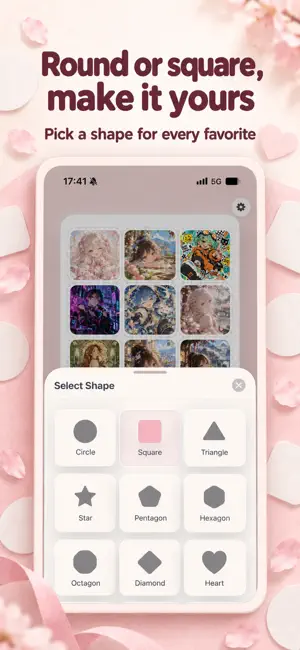


About Button Badge Maker
Turn your favorite photos into your own button badges. A favorite character, a family moment or a pet photo can become a little keepsake to hold. Button Badge Maker brings shape cropping, text decoration, background editing and A4 layouts together, without complex design software or positioning every image by hand. FEATURES • Automatic A4 layouts Add up to 50 images and arrange them automatically by shape and size. Layouts are centered, and the app shows how many images do not fit on the page. • 21 shapes Choose circles, squares, triangles, stars, polygons, hearts, ovals, shields, drops, candy, clouds, bookmarks, bells, tags and more. • Sizes in millimeters Set the finished size and spacing, save favorite sizes and keep separate settings for each shape. Adjust supported corners, show dashed cutting guides and optionally extend edge colors into the bleed area. • Adjust each composition Move, scale, rotate and flip images to frame the details you want. Make several copies at once for matching badges. • Text and decorative symbols Circles support full-circle, upper-arc and lower-arc text layers with adjustable character spacing and edge distance. Full-circle text also has an adjustable start position. Other supported shapes place text along the bottom. Choose colors, bold text and shadows, then add hearts, stars, flowers, geometric symbols or colorful emoji. • Your choice of fonts Use built-in fonts, including MiSans, or import TTF, OTF and TTC font files from Files. • 28 photo filters Explore Hasselblad Blue, Leica Vivid, Japanese-inspired tones, black and white, vintage film, neon and cinematic teal-orange looks. Apply a look to the whole set or to individual photos. • Keep the subject sharp On-device subject recognition lets you add Gaussian, outward or rotational blur, bokeh, motion blur, pixelation or crystallization to the background, with adjustable strength. • Create a new background Replace the original background with dots, squares, triangles, hearts and other patterns, or emoji. Set individual pattern colors, automatically match a background color, and choose regular or random placement. • Refine the subject Use a brush or similar-color selection to add or remove foreground areas when automatic recognition needs a little help. Adjust edge softness for a gentler blend. • Save your progress Your current layout and unfinished edits are saved locally. Come back later and keep creating. • Print and export Print directly with AirPrint or export PNG, JPEG and A4 PDF files. Choose a white or transparent background; PNG and PDF can preserve transparency, while JPEG uses white. For final printing, PDF is recommended. Select Actual Size or 100% to avoid automatic scaling. • More room on iPad The editor uses the larger display, with preview and controls side by side in wide windows and layouts that adapt to portrait, landscape and Split View. Available in Simplified Chinese, Traditional Chinese, English, German, French, Japanese and Korean. No account required. Photo editing and subject recognition run on your device. The free version allows one print or export per day in total. Upgrade to Pro for unlimited printing and exports. Choose, decorate, arrange and print. Turn the things you love into keepsakes of your own.
Ratings & reviews
4.3
6 ratings
What’s new
Version 3.0.1 · Updated October 22, 2026
• Restored the original image movement: drag to adjust a photo’s position within its shape. • In edit mode, drag photos to swap their layout positions. Adjusting crops and rearranging photos now have their own modes for smoother editing.
App privacy
The developer, 云涛 贾, reported these privacy practices to Apple.
Data Not Collected
The developer does not collect any data from this app.
Alternatives to Button Badge Maker
Looking for apps like Button Badge Maker? Here are 6 similar apps on the App Store. The highest rated is Fever.Dream (3.7/5), and all 6 are free to download.
-
 Acsta: Fan Goods Maker
-
 Fever.Dream
3.7
-
 Print Photo Studio
-
 鸦青相机
-
 Photo Stamp Maker — Pullu
-
 PhotoCream Pro: Film Filters
| App | Rating | Price | Last updated | Compare |
|---|---|---|---|---|
| Button Badge Maker | 4.3 / 5 (6 ratings) | Free | October 22, 2026 | |
| Acsta: Fan Goods Maker | – | Free | Sep 29, 2026 | Compare |
| Fever.Dream | 3.7 / 5 (3) | Free | Aug 28, 2026 | Compare |
| Print Photo Studio | – | Free | Oct 19, 2026 | Compare |
| 鸦青相机 | – | Free | Oct 10, 2026 | Compare |
| Photo Stamp Maker — Pullu | – | Free | Apr 18, 2026 | Compare |
| PhotoCream Pro: Film Filters | – | Free | Oct 9, 2026 | Compare |
Compare Button Badge Maker with the top alternatives: ratings, updates, ASO score and keyword gaps →