

Voice Keyboard: Speech to Text
Han Kim Productivity iPhoneiPadiPod touch
Voice Keyboard: Speech to Text is a free Productivity app for iPhone and iPad by Han Kim. Requires iOS 17.0. Updated October 7, 2026.
- Price
- Free
- on the App Store
- Size
- 6 MB
- Age 4+
- Updated
- Oct 7
- 2026 · v1.1.7
Screenshots
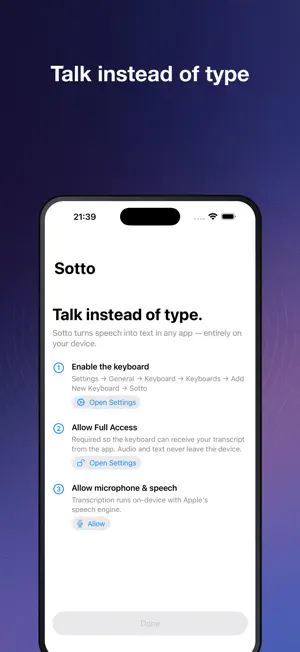
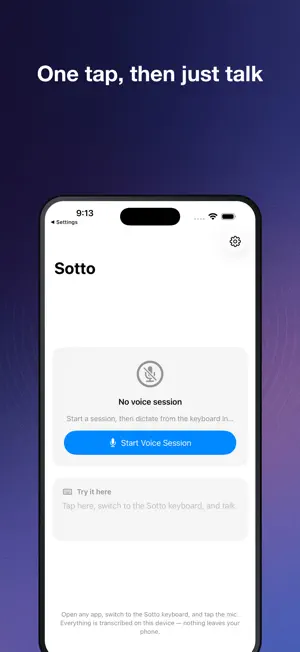
About Voice Keyboard: Speech to Text
Sotto is a keyboard with a mic key on it. Tap the key, say what you meant to type, tap it again. The text lands wherever you were already typing: Messages, Mail, a search box, someone's badly built web form. Transcription happens on the phone, using Apple's on-device speech recognition. Nothing gets uploaded. There is no server to upload it to. It works in airplane mode. Otherwise it is a plain keyboard. Letters, numbers, symbols, shift, backspace, return. The mic is one more key, not a mode you have to go somewhere else to turn on. The setup has one odd wrinkle. iOS will not let a keyboard extension open the microphone, so the Sotto app listens and puts the transcript in a container shared with the keyboard. Start a Voice Session in the app once, then go type wherever you want. On the default setting it stays open until you end it. Most of the time you start it and forget it's there. Recording begins only after you tap the mic. To set it up: add Sotto under Settings, General, Keyboard, then turn on Full Access. In this keyboard, Full Access is used to read the transcript from that shared container. Network permission never appears because Sotto doesn't request it. Dictation runs in over 60 languages: Spanish, German, French, Portuguese, Japanese, Korean, Mandarin and the rest of Apple's list. Pick yours in Settings. There's also a switch that drops the "um" and "uh" before the text gets typed. The keys use a Latin QWERTY layout. If a language needs its own script, Sotto does the talking and you switch keyboards to type. Terms of Use (EULA): https://www.apple.com/legal/internet-services/itunes/dev/stdeula/
What’s new
Version 1.1.7 · Updated October 7, 2026
Performance and reliability improvements to the paywall and in-app purchase flow.
App privacy
The developer, Han Kim, reported these privacy practices to Apple.
Data Not Linked to You
The following data, which may be collected but is not linked to your identity, may be used for the following purposes:
- Usage Data: Product Interaction
- Diagnostics: Other Diagnostic Data
Used for: Analytics
Alternatives to Voice Keyboard: Speech to Text
Looking for apps like Voice Keyboard: Speech to Text? Here are 6 similar apps on the App Store.
-
 Zero Typing AI: Voice to Text
-
 Spok3n: AI Voice Keyboard
-
 Voice to Text Keyboard: ARA
-
 Locked In Habit Tracker
-
 Soyini
-
 Vibetype - AI Voice Typing
| App | Rating | Price | Last updated | Compare |
|---|---|---|---|---|
| Voice Keyboard: Speech to Text | – | Free | October 7, 2026 | |
| Zero Typing AI: Voice to Text | – | Free | Oct 8, 2026 | Compare |
| Spok3n: AI Voice Keyboard | – | Free | Oct 7, 2026 | Compare |
| Voice to Text Keyboard: ARA | – | Free | Sep 26, 2026 | Compare |
| Locked In Habit Tracker | – | Free | Feb 26, 2026 | Compare |
| Soyini | – | Free | Oct 28, 2025 | Compare |
| Vibetype - AI Voice Typing | – | Free | Oct 6, 2026 | Compare |