

Vibetype - AI Voice Typing
Paprik Technologies Private Limited Productivity iPhoneiPadiPod touch
Vibetype - AI Voice Typing is a free Productivity app for iPhone and iPad by Paprik Technologies Private Limited. Requires iOS 26.0.
- Price
- Free
- on the App Store
- Size
- 28 MB
- Age 4+
- Updated
- Oct 17
- 2026 · v1.3
Screenshots


About Vibetype - AI Voice Typing
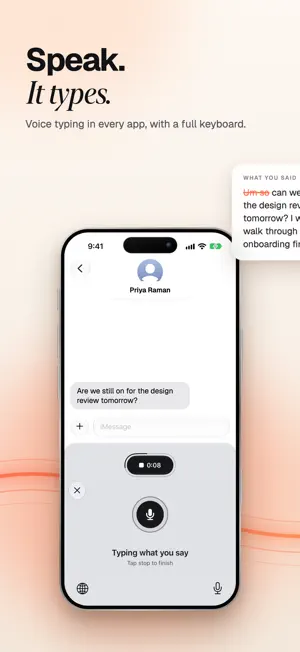
Talk naturally. VibeType turns your speech into polished text wherever you type. VibeType is an AI-powered voice typing keyboard built for people who would rather speak than type. Dictate messages, emails, notes, prompts and longer thoughts directly inside the apps you already use. Instead of carefully speaking every comma and full stop, just talk normally. VibeType transcribes what you say and cleans up the result so it is ready to use. VOICE TYPE ANYWHERE Use VibeType directly from your iPhone keyboard: tap Speak and talk. Dictate in Messages, Mail, WhatsApp, Notes, ChatGPT and other apps without constantly switching between a recorder and the app you are writing in. SPEAK NATURALLY You don't need to dictate like a robot. Pause, rethink a sentence or use filler words while speaking. VibeType is designed to turn natural speech into clean, readable writing. AI-POWERED CLEANUP VibeType improves punctuation, capitalization and formatting and removes filler words, giving you polished text with less editing afterward. Choose Light to keep your own words, or Smart to have what you meant written more clearly. WRITE WITH AI Tap Write for me and say what you want written. Copy a message and the button offers to reply to it; select your text and it offers to rewrite it. VibeType writes it straight into the text field and changes only what you asked about. LEARNS HOW YOU WRITE Tell VibeType how you sign off, who you write to and the words you prefer, and it learns from the changes you make to its text. In Gmail, Mail and Outlook, what you dictate comes out laid out as an email, with your name under your sign-off. WORKS OFFLINE With no signal, VibeType turns your voice into words on the phone itself. A recording that could not be sent is kept on your phone and goes through when you are back online, so a dictation is never lost. Turn on On this phone only, in Settings, Advanced, to keep every dictation on your iPhone. Offline works in English. HINDI AND ENGLISH, SPOKEN TOGETHER Say a sentence in both and get it back the way you said it, in Roman letters, not translated into English you did not say. PRIVATE BY DESIGN Your recording goes straight from your phone to the speech service, not through VibeType's servers. With On this phone only, or with no signal, it never leaves your phone. VibeType does not save what you dictate, except what your writing profile learns from, which you can see, change or delete in Settings. It never sells your words or uses them for advertising. USE VIBETYPE FOR • Messages and replies • Emails • Notes and ideas • ChatGPT and AI prompts • Longer-form writing • Everyday hands-free typing PLANS • Free: 1,000 words a week, every week • Pro: 6,000 words a week. Monthly, yearly, or a one-time lifetime purchase • Max: no weekly limit, fair use applies. Monthly or yearly Your plan belongs to your VibeType account, so it also works in VibeType for Mac when you sign in there with the same account. Pro and Max monthly and yearly plans are auto-renewing subscriptions. Payment is charged to your Apple Account when you confirm the purchase. A subscription renews automatically unless it is cancelled at least 24 hours before the end of the current period. You can manage or cancel it in your App Store account settings. Pro Lifetime is a single payment and does not renew. Terms of Use: https://tryvibetype.com/terms/ Privacy Policy: https://tryvibetype.com/privacy/ Speak it. VibeType writes it.
What’s new
Version 1.3 · Updated October 17, 2026
WHAT IS NEW IN 1.3 A redesigned keyboard strip (Speak, and an AI button that names its job: Write for me, Rewrite, Reply to), the return to the app the user was typing in for every app, and "On this phone only" (Settings, Advanced) in place of the Online and Offline choice: with it on, no audio or text leaves the phone. Nothing new is collected. IN-APP PURCHASES Pro (monthly, yearly, or a one-time lifetime purchase) raises the weekly word limit from 1,000 to 6,000. Max (monthly or yearly) removes it, subject to fair use in our Terms of Use. To buy, sign in first: tap the person icon at the top left of the home screen; Sign in with Apple is at the top, and no demo account is needed. Then tap Upgrade beside the weekly word count, or Account and billing, See plans. Restore purchases is on the plans screen. Buying needs an account because the allowance is kept per account on our server and the same plan works in VibeType for Mac. A plan bought in our Mac app is honoured on iPhone (3.1.3(b)); the app then says "Managed on your Mac" and links to no other way to pay. KEYBOARD AND FULL ACCESS iOS does not let a keyboard extension use the microphone, so the container app records and the keyboard asks it to through an App Group; Full Access is required for that. The keyboard reads the text around the cursor when the user taps the AI button, and, with "Learn from my writing" on (Settings, Writing profile), after a dictation it typed, until the message is sent or the user moves on. THE KEYBOARD OPENS VIBETYPE, AND VIBETYPE TAKES THE USER BACK (4.4.1) The keyboard opens only VibeType itself (vibetype://): to take the microphone, to sign in, to show plans, and to open Journal. Once the microphone is running, VibeType brings back the app the user was typing in, and no other; if it cannot, it shows how to swipe back. It never opens an app the user was not already typing in. WRITE WITH AI The AI button sends the spoken request with the text around the cursor to our service. The clipboard is read when the user taps it after copying, and iOS asks Allow Paste first; once the user has set Paste from Other Apps to Allow, the button also quotes the copy. Text that looks like a password or code is left out. WRITING PROFILE The profile (signature, people the user writes to, word preferences) is kept with the account, encrypted, and can be seen, changed and deleted in Settings. When the user changes text the keyboard dictated, the change is kept with the account. Once a day, after ten or more new changes, the latest changed dictations (at most 60, without the app names) and a count of unchanged ones go to our service and AI provider to find habits; our service stores nothing, and each habit is shown with Undo. Never in Raw, Meeting or Medical. NOTIFICATIONS Optional; nothing is required. Reminders (journal, words back, an update, a few days without dictating) are scheduled on the phone; a friend-joined notice and our messages come through APNs. Offers and promotions are off until the user turns on that switch, captioned "Discounts and news about VibeType, sent only if you turn this on" (4.5.4). Person icon, Settings, Notifications. OFFLINE AND AUDIO On wifi the app downloads a 443 MB speech model from Hugging Face; offline, no audio leaves the phone. Online, audio goes from the device to the speech provider with a short-lived credential and never reaches our servers. Background audio keeps the microphone session alive so dictation starts without switching apps; the indicator stays visible and the user can turn it off (Settings, Dictation). INVITE FRIENDS Optional: when an invited friend has dictated 2,000 words, both accounts earn a free month of Pro, granted by our server. Rules are on the Invite tab. No purchase is involved. ACCOUNT Sign in with Apple and Sign in with Google. The account can be deleted in the app: person icon, Account and billing.
App privacy
The developer, Paprik Technologies Private Limited, reported these privacy practices to Apple.
Data Linked to You
The following data, which may be collected and linked to your identity, may be used for the following purposes:
- Identifiers: Device ID, User ID
- Diagnostics: Performance Data, Other Diagnostic Data
- Purchases: Purchase History
- Contact Info: Email Address, Name
- User Content: Other User Content
- Usage Data: Product Interaction
Used for: Developer’s Advertising or Marketing, Analytics, App Functionality
Data Not Linked to You
The following data, which may be collected but is not linked to your identity, may be used for the following purposes:
- Usage Data: Product Interaction
- User Content: Other User Content, Audio Data
Used for: Developer’s Advertising or Marketing, Analytics, Product Personalization, App Functionality
Alternatives to Vibetype - AI Voice Typing
Looking for apps like Vibetype - AI Voice Typing? Here are 6 similar apps on the App Store. The highest rated is airtxt: Voice to Text Keyboard (5.0/5), and all 6 are free to download.
-
 Tend: Relationship Manager
-
 airtxt: Voice to Text Keyboard
5.0
airtxt: Voice to Text Keyboard
5.0
-
 VibeNote: AI Transcribe Notes
-
 Voice Keyboard: Speech to Text
-
 Peeply: Relationship Manager
3.2
Peeply: Relationship Manager
3.2
-
 VoiceKey: AI Voice Keyboard
4.9
VoiceKey: AI Voice Keyboard
4.9
| App | Rating | Price | Last updated | Compare |
|---|---|---|---|---|
| Vibetype - AI Voice Typing | – | Free | October 17, 2026 | |
| Tend: Relationship Manager | – | Free | Apr 11, 2026 | Compare |
| airtxt: Voice to Text Keyboard | 5.0 / 5 (9) | Free | Oct 20, 2026 | Compare |
| VibeNote: AI Transcribe Notes | – | Free | Jul 26, 2026 | Compare |
| Voice Keyboard: Speech to Text | – | Free | Oct 7, 2026 | Compare |
| Peeply: Relationship Manager | 3.3 / 5 (4) | Free | Jul 3, 2026 | Compare |
| VoiceKey: AI Voice Keyboard | 4.9 / 5 (7) | Free | Jun 17, 2026 | Compare |