

App Blocker & Focus: Hermit
Loreon Productivity iPhoneiPadiPod touch
App Blocker & Focus: Hermit is a free Productivity app for iPhone and iPad by Loreon. Rated 5.0/5 from 1 ratings. Requires iOS 17.0.
- Rating
- 5.0
- 1 ratings
- Price
- Free
- on the App Store
- Size
- 100 MB
- Age 4+
- Updated
- Oct 31
- 2026 · v1.0
Screenshots


About App Blocker & Focus: Hermit
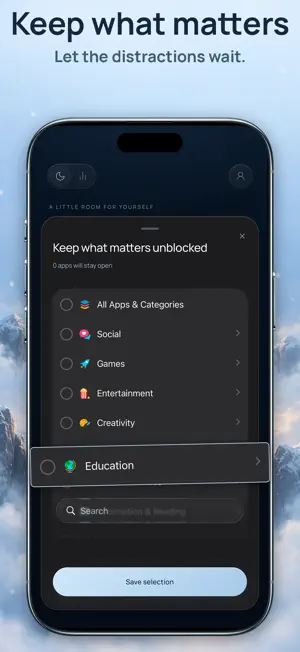
Make the decision once. Keep your time. Instead of limits, schedules and pause screens to manage, Hermit asks for one commitment: choose how long, keep the few apps you truly need, and everything else stays blocked until the timer ends. ONE DECISION, NOTHING TO MANAGE Choose 1, 5, 15, 30, 45 or 60 minutes, see your finish time, and hold to commit. There are no daily limits to tune, no schedules to maintain and no snooze to tap, and there is no early-stop button inside Hermit. The decision you make while you feel calm is the one that holds when the urge to scroll arrives. THE HERMITAGE: YOUR FOCUS, ILLUSTRATED Every completed session lights up the Hermitage, an interactive landscape built from your own focus history. Each month is a ring in the sky and each focused day a star, and connected days reveal your streaks. Below, floating islands hold your weeks and compare your focus time with the same days a week earlier, and every day opens to a timeline of your sessions. It's a calm, beautiful record of the time you took back. A SESSION THAT HOLDS, EVEN WHEN HERMIT IS CLOSED Your countdown stays on the Lock Screen with Live Activities and, on supported iPhones, in the Dynamic Island. Close Hermit and the session keeps running to its original finish time; reopening the app never restarts the timer. Open a blocked app and Hermit's shield reminds you that this time is protected. KEEP WHAT MATTERS Instead of building a long blocklist, choose the few apps that stay available, like maps, music or a study tool. Everything else waits behind Apple's Screen Time shields. PRIVATE BY DESIGN No account and no sign-in. Your focus history stays on your iPhone, and the apps you choose stay inside Apple's private Screen Time selection. Terms of Use: https://hermitapp.top/terms.html Privacy Policy: https://hermitapp.top/privacy.html
App privacy
The developer, Loreon, reported these privacy practices to Apple.
Data Not Linked to You
The following data, which may be collected but is not linked to your identity, may be used for the following purposes:
- Purchases: Purchase History
- Location: Coarse Location
- Identifiers: Device ID
- Usage Data: Product Interaction, Other Usage Data
- Diagnostics: Crash Data, Other Diagnostic Data
Used for: Analytics, App Functionality
Alternatives to App Blocker & Focus: Hermit
Looking for apps like App Blocker & Focus: Hermit? Here are 6 similar apps on the App Store. The highest rated is Paw Streaks - Habit Tracker (5.0/5), and all 6 are free to download.
-
 Paw Streaks - Habit Tracker
5.0
-
 Habit Tracker - StreakZen
-
 Check It Again
5.0
-
 Remindio: Reminders & Alarms
5.0
-
 Stellata: Save Links & Reels
5.0
-
 DisabilityLog
| App | Rating | Price | Last updated | Compare |
|---|---|---|---|---|
| App Blocker & Focus: Hermit | 5.0 / 5 (1 rating) | Free | October 31, 2026 | |
| Paw Streaks - Habit Tracker | 5.0 / 5 (2) | Free | Nov 6, 2026 | Compare |
| Habit Tracker - StreakZen | – | Free | Nov 2, 2026 | Compare |
| Check It Again | 5.0 / 5 (8) | Free | Nov 11, 2026 | Compare |
| Remindio: Reminders & Alarms | 5.0 / 5 (2) | Free | Nov 12, 2026 | Compare |
| Stellata: Save Links & Reels | 5.0 / 5 (12) | Free | Nov 9, 2026 | Compare |
| DisabilityLog | – | Free | Nov 1, 2026 | Compare |