

Stellata: Visual Bookmarks
Abdullah Alkhatib Productivity iPhoneiPadiPod touchMac
Stellata: Visual Bookmarks is a free Productivity app for iPhone and iPad by Abdullah Alkhatib. Rated 5.0/5 from 4 ratings. Requires iOS 18.0.
- Rating
- 5.0
- 4 ratings
- Price
- Free
- on the App Store
- Size
- 19 MB
- Age 17+
- Updated
- Oct 15
- 2026 · v1.7
Screenshots


About Stellata: Visual Bookmarks
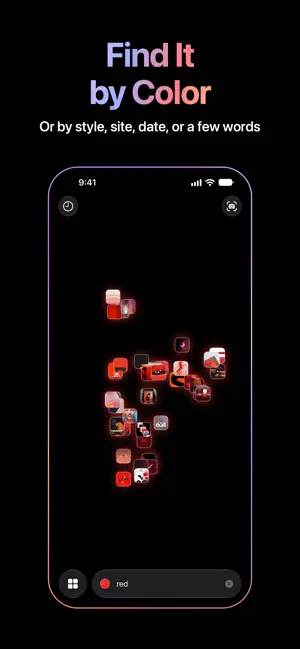
Some things stay with you. The image you stop for. The idea you come back to. Stellata is where they go. Tap Share in any app — Instagram, TikTok, X, YouTube, Pinterest, a blog, anything — and the picture, the words and the video come across with the link. Screenshots, photos, videos and PDFs come in too, no link needed. Then it starts to sort itself. ALIKE SAVES DRIFT TOGETHER Every link is read on your phone: its words, and what its picture shows. Nothing is sent anywhere. Tags appear on their own, and saves that belong together drift into groups in the galaxy, so even from far off you can see what your saving is really about. The same links gather into themes you can filter by — branding, motion, space, whatever you turn out to be into. EIGHT WAYS TO LOOK Grid — everything you saved, at a glance, image first. Pinch to see more or less at once. Board — your saves spread over one plane, like a wall. Drag to roam, pinch to zoom. Wall — your pictures in columns that go on forever, whichever way you go. Leave it be, and it drifts on its own. Galaxy — your library as a world in space, alike saves floating together in groups. Tap a link and a light travels out through everything it connects to, by picture, by meaning, by tag, through its own group and across to the others. Follow it somewhere unexpected. Sort it by color, by time, by site or by style, or place words of your own, and the links they're about gather around them. Globe — step inside the galaxy, your saves all around you, above and below. Drag to look around. Earth — your saves light up where in the world they are. Timeline — every save on one line, newest first, opening out as you scroll back through the days. Projects — a space for a trip, a piece of work, or whatever you're into this week, each with a moodboard to lay out by hand: move, pinch and twist the pictures, then draw, write and join them with arrows. Send one out as a lookbook, a PDF of every save. Hold a finger still and draw a loop in the galaxy or on a board, and everything inside is picked, ready to move, share or delete together. SIT DOWN WITH A FRIEND Put two phones side by side and your libraries become one galaxy, each in its own color. See where your tastes meet, pass a link across, and leave with a little of theirs. The phones talk to each other directly — nothing goes through a server, and only what you choose to bring ever leaves your phone. BRING WHAT YOU ALREADY SAVED Your Instagram saves come across, and your Pinterest boards and Are.na channels too, so you start with your real collection instead of an empty page, and watch it sort itself into groups. FIND YOUR WAY BACK Type what you're looking for, or tap + to pick a color, a style or a photo, and the saves that fit fly in close. Or describe what a picture shows, like “cracked ice,” and Search finds it, even when no title or tag says so. It reads the words in your pictures too, so a screenshot turns up by what it says. Point the camera at a poster or a wall to see the saves that look most like it. Filter by site, by type, by color. Or just wander. ON YOUR MAC TOO Stellata is on the Mac as well, your library kept in step by iCloud, and Stellata Unlimited comes along. IT STAYS YOURS Everything syncs through your own iCloud, and previews are kept on the phone, so your library is there with no signal. Share a project and a few people can save into it together, on one moodboard. No account to make, no feed, no one else's algorithm. STELLATA UNLIMITED The free plan holds 30 links. Unlimited holds any number, as a monthly subscription or a one-time purchase. If Unlimited ends, nothing is deleted: your newest 30 stay open and the rest wait for you. Terms of Use: https://www.apple.com/legal/internet-services/itunes/dev/stdeula/ Privacy Policy: https://stellata.app/privacy.html
What’s new
Version 1.7 · Updated October 15, 2026
Stellata 1.7 brings the Timeline, lets you hide a project from your Library, and now speaks German and Chinese. SCROLL BACK IN TIME Pick Timeline from the view menu and your saves line up newest first, a strip of little pictures that opens out around the one you're on, with the day you saved it underneath. Scroll back through the days, tap a picture to open it, or leave it be and it plays through your saves on its own. TUCK IT AWAY Hide a project from its menu, or by holding its card in Projects, and its saves stay out of your Library, still in the project and in Search. Show it again the same way. GERMAN AND CHINESE Stellata now speaks German, and Chinese, Simplified for the mainland and Traditional for Taiwan, from its menus to its tags and Search. A FEW MORE THINGS Rename any save from its page's menu, and in a shared project everyone sees the new name. The board gathers alike saves side by side, as the galaxy does. Tags you type with capitals of their own, like NFL or eBay, keep them. When a tag you type isn't kept, a line says why. And you can rate Stellata from Settings.
App privacy
The developer, Abdullah Alkhatib, reported these privacy practices to Apple.
Data Not Collected
The developer does not collect any data from this app.
Alternatives to Stellata: Visual Bookmarks
Looking for apps like Stellata: Visual Bookmarks? Here are 6 similar apps on the App Store. The highest rated is ObsiKO: AI Note + Mindmap (5.0/5), and 5 of the 6 are free to download.
-
 ObsiKO: AI Note + Mindmap
5.0
-
 Peek Calendar – Simple Cal
2.6
-
 Askive: Ask Your Files
-
 Sampledex Producer Notes
5.0
-
 Isy.AI: AI Notes, Second Brain
5.0
-
 Referat: AI Meeting Notes
| App | Rating | Price | Last updated | Compare |
|---|---|---|---|---|
| Stellata: Visual Bookmarks | 5.0 / 5 (4 ratings) | Free | October 15, 2026 | |
| ObsiKO: AI Note + Mindmap | 5.0 / 5 (1) | Free | Oct 13, 2026 | Compare |
| Peek Calendar – Simple Cal | 2.6 / 5 (22) | Free | Sep 29, 2026 | Compare |
| Askive: Ask Your Files | – | Free | Oct 3, 2026 | Compare |
| Sampledex Producer Notes | 5.0 / 5 (1) | Free | Sep 15, 2026 | Compare |
| Isy.AI: AI Notes, Second Brain | 5.0 / 5 (2) | Free | Oct 19, 2026 | Compare |
| Referat: AI Meeting Notes | – | 1.99 USD | Oct 22, 2026 | Compare |