

ObsiKO: AI Note + Mindmap
Hyojin Kim Productivity iPhoneiPadiPod touchApple Watch
ObsiKO: AI Note + Mindmap is a free Productivity app for iPhone and iPad by Hyojin Kim. Rated 5.0/5 from 1 ratings. Requires iOS 15.1.
- Rating
- 5.0
- 1 ratings
- Price
- Free
- on the App Store
- Size
- 77 MB
- Age 4+
- Updated
- Oct 24
- 2026 · v1.4.3
Screenshots


About ObsiKO: AI Note + Mindmap
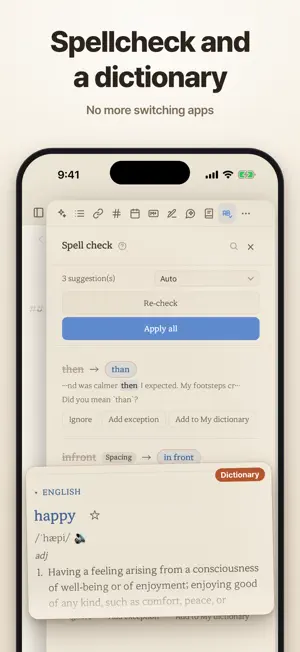
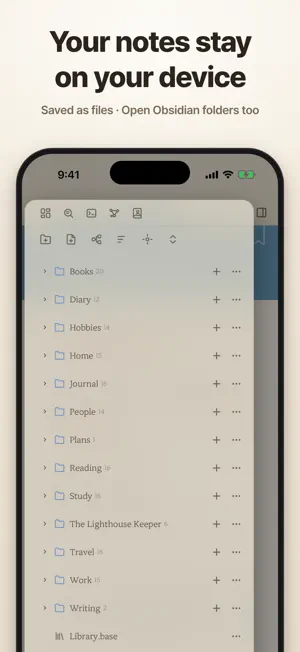
Tired of converting files or picking plugins? Spent the day on settings and never wrote a line? Plenty of features, none of them talking to each other? Writing, knowledge management, mind maps, reading logs, codices, schedules, file conversion — all in ObsiKO, with no login, payment or subscription. Obsidian vaults (.md·.canvas·.base) open as-is. (AI uses your own API key. With Apple Intelligence on, no key needed.) ■ Made for iPhone Duo · Folded: floating glass buttons and your favorite menus on the right strip · Unfolded: an iPad-style layout with a pinned side panel, books in two pages · Half-folded: the app on top, the keyboard below — like a small laptop ■ Built for Korean · A Korean dictionary and spell checker from the National Institute of Korean Language's data — no key · A "Korean word of the day" widget ■ A focus timer on your Lock Screen · A dial like a real pomodoro clock — tap or drag the ticks in 1-minute steps · Start from the widget without opening the app; time left on the Lock Screen, in StandBy and the Dynamic Island ■ Share and sync (GitHub) · "Share to the web" opens a note at one address — theme, tables, images, comments. Stored in your GitHub, not on our servers · Sync devices through your own repository. Share your LLM wiki as one file or a subscription link that follows your edits ■ Write once, it connects itself · One "color" property tints tabs, headers, tree icons, .base and codex cards · Type "book" and a search fills in the rest; "project" adds dates to the calendar · Highlight a PDF and quotes collect in a note of the same name. Define your own types and relations ■ A graph like the night sky · Links, types, relations and PARA form one constellation — more links, brighter stars · Names appear as you zoom in, and your layout is remembered ■ Infinite mind-map canvas (.canvas) · Apple Pencil drawing, sketches into AI images. Ask the AI and it builds, sizes and colors the map · Grow cards with Enter and Tab, drop in URLs and files. 5 styles, 10+ presets, auto-built maps & dungeons ■ .base files and search · Projects, kanban, cards, charts, a library, PARA and a budget. Dataview queries become tables · Search filenames, full text, Korean jamo, meaning and word forms. Find books and papers, or just ask Siri ■ Dashboard, themes and Markdown · 50+ widgets — calendar, habits, stats, mini games, AI briefing, tarot. 20+ themes, your own fonts · Calm editing tuned for Korean, a format bar, Mermaid, 20+ charts, inline drawing, embeds ■ Writing helper · 70+ structures across 13 genres (Hero's Journey, Save the Cat, TRPG characters, world sheets) · Socratic questions, genre feedback, style polish, your own assistants, on-device translation, read-aloud · One search across dictionaries, thesaurus, hanja, proverbs and Wikipedia ■ Schedules · A date in any file lands on the calendar (Obsidian Tasks compatible) — year to timeline views, widgets, writing reminders ■ Viewers from one line of front matter · Book view (two pages, page turns that follow your finger, covers in the note's color), web-novel view (platform presets) · Messenger and visual-novel views — record the screen and it's a short. Codex view with auto profile icons ■ Clip, convert, export · Web clipper and RSS. Import from Apple Notes, Notion, Evernote, Bear, Logseq and Roam · doc, docx, PDF, hwp and hwpx to Markdown, a reference view for dozens of formats, AI OCR and transcription · Slides with Marp. Export to PDF, HWPX, DOCX, EPUB, HTML, ZIP and wikis ■ AI agent · Just add an API key (Claude, Gemini, GPT) — the app works fully without one · Mind maps and tables on your phone, voice input, and a plan card before big changes · Auto memory, LLM wikis, Zettelkasten folders, slash commands, a prompt helper, MCP No login, no payment, no subscription, no ads. Tell us about bugs anytime. ■ Supported · iPhone, iPad, Mac, Apple Watch / Korean, English, Japanese, Chinese (Traditional, Simplified) · Ready for iOS 27 and iPhone Duo
What’s new
Version 1.4.3 · Updated October 24, 2026
■ New in 1.4.3 Made for iPhone Duo · Folded — the strip on the right (where the clock sits) is no longer empty: floating glass buttons, like Safari. View and Share on top, your favorite menus below (Search, New note, Today's note, Spell check… change them in Settings). The tabs get that much wider, and graph and mind-map backgrounds run to the edge of the screen. · Unfolded — a roomy iPad-style layout, with the right panel pinned beside the editor. Drag its width and it snaps at the default size and at the middle of the screen. Side by side with another app, when ObsiKO is the left window the glass buttons move to its left edge. Fold, unfold or rotate — your text and cursor stay put. · Half-folded — stand it up and the app takes the top half while the bottom half becomes the keyboard area, like a laptop. Hold it sideways and a pinned panel fills the right half up to the fold. · Unfolded portrait and Focus mode hide the clock and battery so only your writing shows. Buttons near the curved corners moved inward so they're easier to tap. · The e-book viewer shows two pages on the unfolded screen — drag and the page follows your finger. · Put the focus timer widget on a standing Duo and StandBy turns it into a desk clock. Focus timer — Lock Screen, StandBy and Dynamic Island · The widget looks like a real pomodoro clock — a 0–55 dial lights up for the minutes left, and [▶] starts it without opening the app. · The time left shows on the Lock Screen, in StandBy and in the Dynamic Island. Stopping pauses it; when it ends, [Start again]. The circular and rectangular Lock Screen widgets now show the time left, pauses and breaks too. · The in-app timer uses the same dial — tap or drag the ticks to set it in 1-minute steps. It notifies you when time's up, even with the app closed. New widgets · Voice memo (small) — tap to record, tap again to add it to today's note. · Korean word of the day — a beautiful Korean word for each day of the year (366 words); tap to open it in the dictionary. · The large Calendar widget keeps its header and buttons in the same place every month — the buttons are now four icons (New note, Today's note, New mind map, Search). The graph view becomes a real night sky — glowing stars, labels that appear as you zoom in, a galaxy that keeps turning, and your layout remembered. E-book viewer — page-turn motion, a title page painted in the note's color, and full-bleed paper with the clock and battery hidden. The logo comes alive when the app starts. Fixed the first letter typed right after pasting splitting apart. Dictionary — words written only in Chinese characters are looked up in your screen language. AI mind maps — the app sizes, lays out and colors the cards Send your LLM wiki as one .opack file · subscription links When the AI changes notes — Answer only · Ask for big changes · Change right away AI chat — microphone in the input box; reads links, text in photos and recordings Spell check — [Stop flagging] words you keep ignoring Halloween app icon — Settings ▸ Basics ▸ App icon + Other improvements and bug fixes
App privacy
The developer, Hyojin Kim, reported these privacy practices to Apple.
Data Not Linked to You
The following data, which may be collected but is not linked to your identity, may be used for the following purposes:
- Location: Coarse Location
- User Content: Photos or Videos, Audio Data, Other User Content
- Search History: Search History
- Identifiers: Device ID
Used for: App Functionality
Alternatives to ObsiKO: AI Note + Mindmap
Looking for apps like ObsiKO: AI Note + Mindmap? Here are 6 similar apps on the App Store. The highest rated is Brain.dmp: Notes & Voice Memos (5.0/5), and all 6 are free to download.
-
 Folio: Notes, PDFs & Canvas
-
 Brain.dmp: Notes & Voice Memos
5.0
Brain.dmp: Notes & Voice Memos
5.0
-
 Askive: Ask Your Files
-
 Anycap: Capture & Bookmarks
5.0
Anycap: Capture & Bookmarks
5.0
-
 Nook: Read, Write, Own
-
 Isy.AI: AI Notes, Second Brain
5.0
Isy.AI: AI Notes, Second Brain
5.0
| App | Rating | Price | Last updated | Compare |
|---|---|---|---|---|
| ObsiKO: AI Note + Mindmap | 5.0 / 5 (1 rating) | Free | October 24, 2026 | |
| Folio: Notes, PDFs & Canvas | – | Free | Sep 10, 2026 | Compare |
| Brain.dmp: Notes & Voice Memos | 5.0 / 5 (2) | Free | Jul 1, 2026 | Compare |
| Askive: Ask Your Files | – | Free | Oct 3, 2026 | Compare |
| Anycap: Capture & Bookmarks | 5.0 / 5 (2) | Free | Oct 22, 2026 | Compare |
| Nook: Read, Write, Own | – | Free | Aug 27, 2026 | Compare |
| Isy.AI: AI Notes, Second Brain | 5.0 / 5 (2) | Free | Oct 25, 2026 | Compare |