

Remindio: Reminders & Alarms
Dmytro Palamarchuk Productivity iPhoneiPadiPod touch
Remindio: Reminders & Alarms is a free Productivity app for iPhone and iPad by Dmytro Palamarchuk. Rated 5.0/5 from 2 ratings. Requires iOS 18.0.
- Rating
- 5.0
- 2 ratings
- Price
- Free
- on the App Store
- Size
- 25 MB
- Age 4+
- Updated
- Nov 12
- 2026 · v1.4.2
Screenshots


About Remindio: Reminders & Alarms
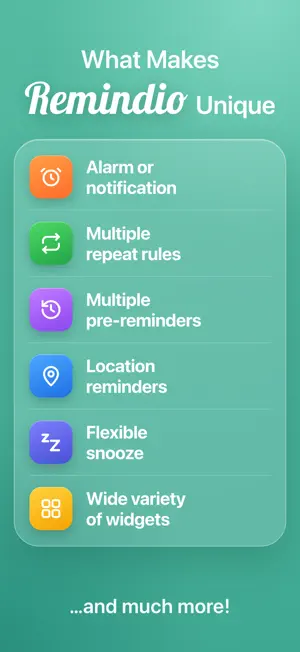
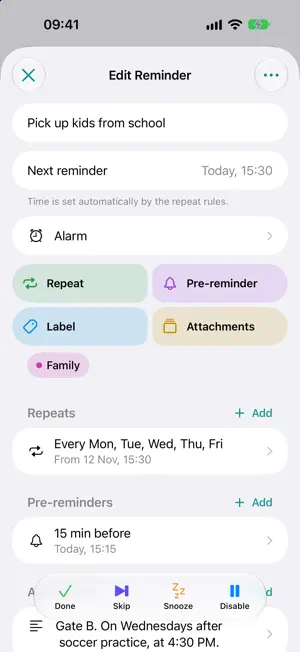
Remindio is a smart reminder app for everything you can't afford to forget - daily habits, bills, appointments, medication, birthdays, errands. Simple to start, powerful when you need it. Most reminder apps cover the basics. Remindio goes further - every feature was built around real user requests. KEY FEATURES • Notification or Alarm - choose how each reminder alerts you. Alarms ring even in Silent mode and during Focus, with a sound of your choice or your own imported sound. • Flexible repeats - pick from 20+ ready repeats like Weekdays or Every 2 hours, or build your own: daily, weekly, monthly, yearly, chosen days, "2nd Tuesday of the month", last day of the month and more. Repeat forever, until a date or a set number of times, from the start time or from when you complete it. • Repeats during the day - e.g. every 2 hours from 9:00 to 18:00. • Holidays - move repeating reminders off weekends and public holidays. • Pre-reminders - get a heads-up minutes, hours or days before, as a notification or an alarm. • Trackers - turn any reminder into a habit tracker: Yes/No or a value like glasses of water, km or weight. Answer right from the notification and see your streaks and stats. • Timers - countdown timers with seconds and rounds for workouts, cooking or focus breaks. Run several at once. • Anniversaries - yearly reminders for birthdays, weddings and memorials that show how many years have passed. • If ignored - notify again a few times or switch to a ringing alarm, so nothing slips by. • Smart snooze - long-press a notification to snooze for exactly as long as you need, or skip one occurrence of a repeating reminder. • Location reminders - get reminded when you arrive at or leave a place: a store, home, work. Set the radius and the hours when it's active. • Home tabs - split your list into tabs like Work, Later, Birthdays or Attachments. • Calendar - see every upcoming reminder and repeat by day and month. • Import - bring over your Apple Reminders and Calendar events, birthdays included, in a few taps. • Templates - save frequent reminders and create them in one tap. • Pinned reminders - keep the most important ones at the top. • Swipe actions - Done, Snooze, Skip, Pin or Delete with a swipe, set up your own way. • Do Not Disturb rules - on chosen days and hours, skip reminders or deliver them quietly as notifications, for all reminders or only selected labels. • Set time later - save a reminder now and pick the time when you know it. • Colored labels - organize reminders and filter the list by type and labels. • Attachments - add checklists, notes, links, contacts, photos and trackers to any reminder. • Search and Activity History - find any reminder in seconds and see what you've completed. • Widgets - Up Next, Today, Month and Week calendars, Checklist, Note, Tracker, Countdown Timer and Templates on the Home Screen; Lock Screen widgets, a quick add button and Control Center controls. • Shortcuts - start a new reminder or search from Shortcuts, Spotlight or the Action button. • Light and Dark themes with accent colors of your choice. REMINDIO PREMIUM The essentials are free. Premium unlocks alarms, location reminders, several repeat rules, pre-reminders and attachments per reminder, and multiple Do Not Disturb rules. Try it free for 14 days, unlock it for a day by watching a short ad, or get it forever with a one-time purchase - no subscription. Use it as a daily planner, habit tracker, task reminder, medication reminder, bill and payment reminder, birthday reminder, workout timer, shopping list or to-do list with alarms - set it once and let Remindio remember for you.
What’s new
Version 1.4.2 · Updated November 12, 2026
Minor UI updates
App privacy
The developer, Dmytro Palamarchuk, reported these privacy practices to Apple.
Data Not Linked to You
The following data, which may be collected but is not linked to your identity, may be used for the following purposes:
- Location: Coarse Location
- Identifiers: Device ID
- Usage Data: Product Interaction, Advertising Data
- Diagnostics: Crash Data, Performance Data, Other Diagnostic Data
Used for: Third-Party Advertising, Analytics, App Functionality
Alternatives to Remindio: Reminders & Alarms
Looking for apps like Remindio: Reminders & Alarms? Here are 6 similar apps on the App Store. The highest rated is Check It Again (5.0/5), and all 6 are free to download.
-
 DisabilityLog
-
 Titanova: Life Planner
-
 Check It Again
5.0
-
 Synca · Sync Your Aha Moment
5.0
-
 KeepSpot
5.0
-
 Eisenhower
5.0
| App | Rating | Price | Last updated | Compare |
|---|---|---|---|---|
| Remindio: Reminders & Alarms | 5.0 / 5 (2 ratings) | Free | November 12, 2026 | |
| DisabilityLog | – | Free | Nov 1, 2026 | Compare |
| Titanova: Life Planner | – | Free | Nov 1, 2026 | Compare |
| Check It Again | 5.0 / 5 (8) | Free | Nov 11, 2026 | Compare |
| Synca · Sync Your Aha Moment | 5.0 / 5 (1) | Free | Nov 14, 2026 | Compare |
| KeepSpot | 5.0 / 5 (9) | Free | Oct 22, 2026 | Compare |
| Eisenhower | 5.0 / 5 (2) | Free | Nov 9, 2026 | Compare |