

MixaFrame
JIMMY HU Photo & Video iPhoneiPadiPod touchMac
MixaFrame is a free Photo & Video app for iPhone and iPad by JIMMY HU. Rated 5.0/5 from 1 ratings. Requires iOS 17.6. Updated October 10, 2026.
- Rating
- 5.0
- 1 ratings
- Price
- Free
- on the App Store
- Size
- 6 MB
- Age 4+
- Updated
- Oct 10
- 2026 · v1.0.2
Screenshots



About MixaFrame
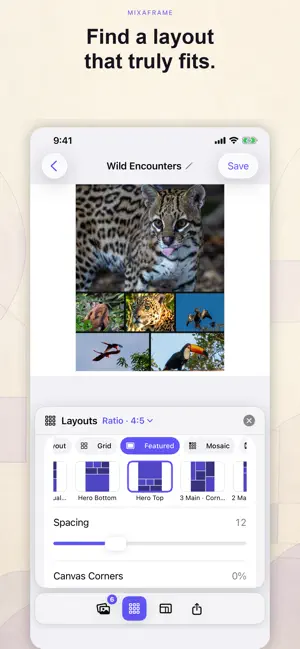
Turn your photos into thoughtful, polished collages with MixaFrame. MixaFrame analyzes your selected photos on-device, identifies important subjects, and recommends layouts that fit your images. Start with a smart suggestion, then customize every detail with direct, responsive controls. SMART COLLAGE CREATION • Combine 1–12 photos in a single collage • Explore layouts chosen to fit your photos • Keep important subjects visible with on-device detection • Feature one, two, or three photos in expressive compositions • Reorder photos whenever you want PRECISE PHOTO CONTROL • Adjust the crop and focus of every photo • Inspect the original image while refining its placement • Control spacing, dividers, canvas corners, and background appearance • Preview every change directly on the collage EDITABLE PROJECTS Your collages remain editable after you close the app. MixaFrame saves your photos, layout, ordering, crops, divider positions, canvas style, export format, quality, and resolution inside organized projects. HIGH-QUALITY EXPORTS • Preview the finished collage before saving • Zoom and inspect fine details • Export with a longest edge of up to 8192 pixels • Choose JPEG, PNG, or WebP • Select Space Saver, Balanced, or Best Quality • Save to Photos or share through iOS PRIVATE BY DESIGN Subject detection runs on your device. Your selected photos and projects are stored locally, and MixaFrame does not upload your photos to its own servers. MIXAFRAME PREMIUM Every collage-editing feature is available without a subscription. Free exports include a MixaFrame watermark. An optional annual MixaFrame Premium subscription removes the watermark from saved and shared collages. Eligible new subscribers may receive a 7-day free trial. Create a collage that preserves the whole story—with every important subject thoughtfully framed. Product website: [https://apps.infiz.com/mixaframe/](https://apps.infiz.com/mixaframe/) Terms of Use: [https://www.apple.com/legal/internet-services/itunes/dev/stdeula/](https://www.apple.com/legal/internet-services/itunes/dev/stdeula/)
What’s new
Version 1.0.2 · Updated October 10, 2026
What’s New in Version 1.0.2 - Added iPhone Duo support with layouts that adapt smoothly as you fold, unfold, and rotate. - Improved readability and controls at larger text sizes. - Refined editing, photo zoom, and export previews. - Added project import and export to move editable collages between devices. - Improved Mac photo imports, window reopening, and canvas editing. - Made draft recovery, saving, and thumbnail updates more reliable.
App privacy
The developer, JIMMY HU, reported these privacy practices to Apple.
Data Not Collected
The developer does not collect any data from this app.
Alternatives to MixaFrame
Looking for apps like MixaFrame? Here are 6 similar apps on the App Store. The highest rated is Photo Grid: Collage Editor (5.0/5), and all 6 are free to download.
-
 Picstack - Collage & Layers
-
 Photo Grid Collage
4.0
Photo Grid Collage
4.0
-
 BlurBrush: Blur Photo & Censor
-
 Gridlai
-
 Photo Grid: Collage Editor
5.0
Photo Grid: Collage Editor
5.0
-
 Blur Text: Screenshot Editor
| App | Rating | Price | Last updated | Compare |
|---|---|---|---|---|
| MixaFrame | 5.0 / 5 (1 rating) | Free | October 10, 2026 | |
| Picstack - Collage & Layers | – | Free | Oct 2, 2026 | Compare |
| Photo Grid Collage | 4.0 / 5 (1) | Free | Sep 9, 2026 | Compare |
| BlurBrush: Blur Photo & Censor | – | Free | Sep 29, 2026 | Compare |
| Gridlai | – | Free | Aug 14, 2026 | Compare |
| Photo Grid: Collage Editor | 5.0 / 5 (1) | Free | Oct 3, 2026 | Compare |
| Blur Text: Screenshot Editor | – | Free | Oct 18, 2026 | Compare |
Compare MixaFrame with the top alternatives: ratings, updates, ASO score and keyword gaps →