

Blur Text: Screenshot Editor
Nikolai Rodionov Photo & Video iPhoneiPadiPod touch
Blur Text: Screenshot Editor is a free Photo & Video app for iPhone and iPad by Nikolai Rodionov. Requires iOS 17.0. Updated October 18, 2026.
- Price
- Free
- on the App Store
- Size
- 22 MB
- Age 4+
- Updated
- Oct 18
- 2026 · v1.5
Screenshots

About Blur Text: Screenshot Editor
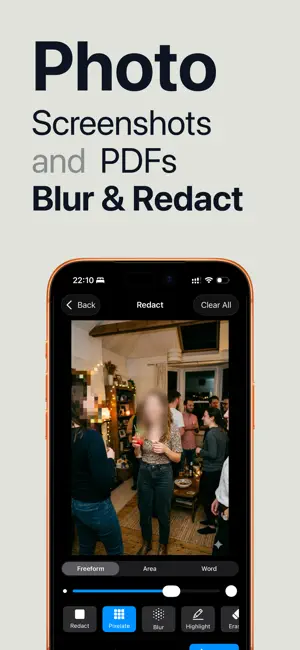
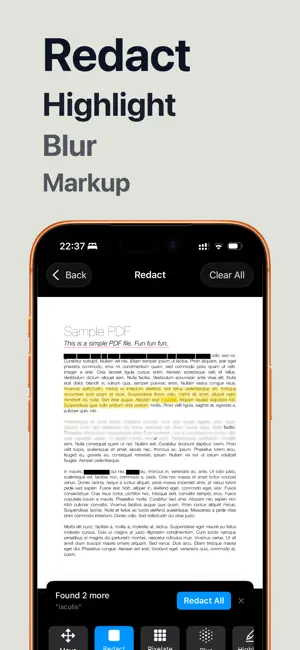
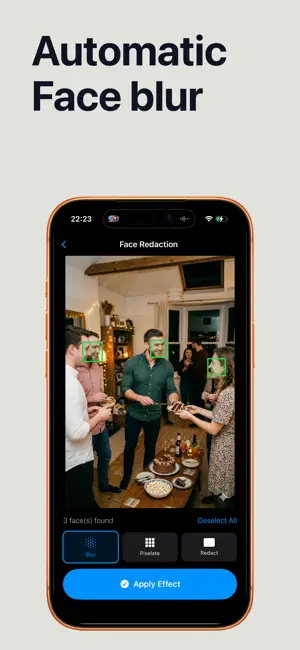
Hide names, phone numbers, addresses and card details in screenshots and PDFs before you share them. Tap a word and it's gone. Everything is processed on your device, and nothing is ever uploaded. TAP A WORD TO HIDE IT - Text is detected automatically in every screenshot, photo and PDF - Tap any word to blur, pixelate or black it out - Drag across a line to hide several words at once - No more fiddly finger-painting over small text BLUR, PIXELATE OR BLACK OUT - Blur for a soft, clean look - Pixelate for the classic censored effect - Solid black bar for complete redaction - Highlight and underline to point things out SCREENSHOTS - Clean up chats, bank statements, receipts and emails before posting - Hide usernames, order numbers and email addresses - Blur faces in photos with one tap PDFS & SCANNED DOCUMENTS - Redact multi-page PDFs - Scan paper documents with your camera and redact them right away - Export at full quality PRIVATE BY DESIGN All processing happens on your device. Your screenshots and documents never leave your phone. GREAT FOR - Sharing chat screenshots without exposing names or numbers - Posting receipts, tickets and orders without personal details - Sending documents with account numbers and addresses removed - Bug reports and support tickets that show only what's needed - Journalists, HR and anyone handling confidential information Terms of Use (EULA): https://www.apple.com/legal/internet-services/itunes/dev/stdeula/
What’s new
Version 1.5 · Updated October 18, 2026
- Redesigned editor: choose Text, Box, Brush or Erase from one simple bar, with Find right beside them. Style, brush size and tips show up only when you need them. - Undo anything: erasing and clearing pages now undo and redo just like drawing, and Find & redact or Redact all undo in a single step. - Undo, Redo and Share now sit in the top bar, and a page switcher over the document makes multi-page files quicker to move through. - Simpler erasing: tap a redaction to remove it, or paint over several at once. - Mosaic remembers the tool you used last, and the editor now works well with large text sizes.
App privacy
The developer, Nikolai Rodionov, reported these privacy practices to Apple.
Data Not Linked to You
The following data, which may be collected but is not linked to your identity, may be used for the following purposes:
- Purchases: Purchase History
- Usage Data: Product Interaction
Used for: Analytics
Alternatives to Blur Text: Screenshot Editor
Looking for apps like Blur Text: Screenshot Editor? Here are 6 similar apps on the App Store. The highest rated is Veil: Censor & Blur Photos (5.0/5), and all 6 are free to download.
-
 Redact Photo: Hide Info
-
 Veil: Censor & Blur Photos
5.0
Veil: Censor & Blur Photos
5.0
-
 Screenshot Editor - Blur Text
4.5
Screenshot Editor - Blur Text
4.5
-
 Mosa: Blur, Pixelate & Redact
-
 Auto Redact Privacy Text Blur
-
 Blur Text
4.7
Blur Text
4.7
| App | Rating | Price | Last updated | Compare |
|---|---|---|---|---|
| Blur Text: Screenshot Editor | – | Free | October 18, 2026 | |
| Redact Photo: Hide Info | – | Free | Aug 17, 2026 | Compare |
| Veil: Censor & Blur Photos | 5.0 / 5 (4) | Free | Aug 5, 2026 | Compare |
| Screenshot Editor - Blur Text | 4.5 / 5 (2) | Free | Jul 11, 2026 | Compare |
| Mosa: Blur, Pixelate & Redact | – | Free | Sep 18, 2026 | Compare |
| Auto Redact Privacy Text Blur | – | Free | Jun 18, 2026 | Compare |
| Blur Text | 4.7 / 5 (3) | Free | Apr 30, 2026 | Compare |