

Screenshot Editor - Blur Text
Adrian Kajda Photo & Video iPhoneiPadiPod touch
Screenshot Editor - Blur Text is a free Photo & Video app for iPhone and iPad by Adrian Kajda. Rated 4.0/5 from 1 ratings. Requires iOS 17.6.
- Rating
- 4.0
- 1 ratings
- Price
- Free
- on the App Store
- Size
- 21 MB
- Age 4+
- Updated
- Jul 11
- 2026 · v1.0.9
Screenshots

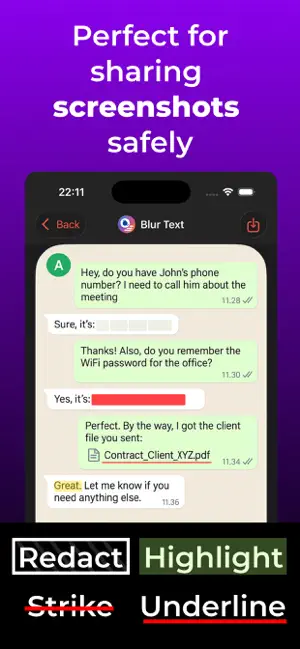


About Screenshot Editor - Blur Text
Share screenshots without sharing private information. Screenshot Editor - Blur Text helps you hide sensitive text and turn ordinary screenshots into clear, polished visuals. Smart on-device text detection makes words and lines easy to select and edit with a tap. PROTECT SENSITIVE INFORMATION • Blur, pixelate, cover, or blend detected text into its background • Hide names, messages, email addresses, phone numbers, payment details, and other private text • Highlight, underline, or strike through important text • Use a freehand brush to blur, pixelate, cover, or erase any selected area ANNOTATE AND EXPLAIN • Add arrows, lines, circles, rectangles, and ovals • Add styled text, reusable text templates, symbols, and photo overlays • Create numbered steps for tutorials and instructions • Use Spotlight to focus attention on one area • Add a magnifying loupe with adjustable zoom for important details MAKE SCREENSHOTS READY TO SHARE • Crop images and adjust the composition • Add colorful gradients, solid backgrounds, padding, rounded corners, shadows, title bars, and watermarks • Save the finished image or share it directly • Undo and redo edits as you work BUILT FOR PRIVACY Text recognition and image editing happen on your device. Your screenshots are not uploaded for processing. The app works offline, requires no account, and contains no ads. Perfect for sharing conversations, documents, receipts, forms, social posts, bug reports, product feedback, tutorials, and work instructions without exposing sensitive text. Terms of Use: https://screenshoteditor.app/terms/
What’s new
Version 1.0.9 · Updated July 11, 2026
Video guides added inside the app showcasing features available in the app: Redact, Brush, Markup, Numbers, Text, Photo, Zoom, Backdrop, Spotlight, Crop
App privacy
The developer, Adrian Kajda, reported these privacy practices to Apple.
Data Not Collected
The developer does not collect any data from this app.
Alternatives to Screenshot Editor - Blur Text
Looking for apps like Screenshot Editor - Blur Text? Here are 6 similar apps on the App Store. The highest rated is Blur Text (4.7/5), and all 6 are free to download.
-
 Blur Photo & Text: Censor App
-
 Blur Text
4.7
Blur Text
4.7
-
 BlurQ: Face Blur Photo & Video
4.3
BlurQ: Face Blur Photo & Video
4.3
-
 Whiteout: Redact & Blur Photos
4.3
Whiteout: Redact & Blur Photos
4.3
-
 Screenshot Editor - ScreenCut
4.6
Screenshot Editor - ScreenCut
4.6
-
 Blur Photo Editor: blur effect
4.7
Blur Photo Editor: blur effect
4.7
| App | Rating | Price | Last updated | Compare |
|---|---|---|---|---|
| Screenshot Editor - Blur Text | 4.0 / 5 (1 rating) | Free | July 11, 2026 | |
| Blur Photo & Text: Censor App | – | Free | Aug 18, 2026 | Compare |
| Blur Text | 4.7 / 5 (3) | Free | Apr 30, 2026 | Compare |
| BlurQ: Face Blur Photo & Video | 4.3 / 5 (18) | Free | Oct 13, 2026 | Compare |
| Whiteout: Redact & Blur Photos | 4.3 / 5 (246) | Free | Sep 1, 2026 | Compare |
| Screenshot Editor - ScreenCut | 4.6 / 5 (124) | Free | May 18, 2026 | Compare |
| Blur Photo Editor: blur effect | 4.7 / 5 (1,669) | Free | Jul 16, 2026 | Compare |