

BlurQ: Face Blur Photo & Video
Anas Hafidi Photo & Video iPhoneiPadiPod touch
BlurQ: Face Blur Photo & Video is a free Photo & Video app for iPhone and iPad by Anas Hafidi. Rated 4.1/5 from 19 ratings. Requires iOS 18.0.
- Rating
- 4.1
- 19 ratings
- Price
- Free
- on the App Store
- Size
- 38 MB
- Age 4+
- Updated
- Oct 13
- 2026 · v5.8
Screenshots


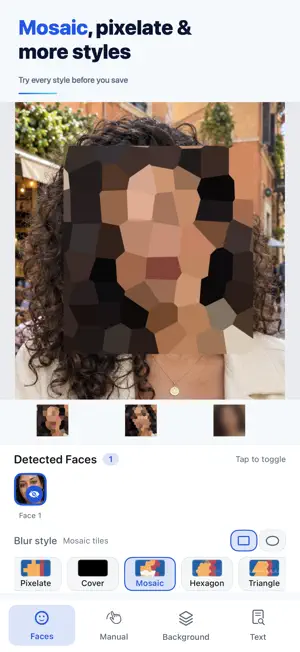

About BlurQ: Face Blur Photo & Video
Blur faces in photos and videos in seconds, right on your iPhone. Using Apple's on-device Vision framework, BlurQ finds the faces for you, so you can share pictures of kids, friends, crowds and strangers without exposing anyone. • Blur faces automatically, on device: faces are detected for you, and you choose which ones to hide • Blur faces in videos: one tap finds the faces and keeps them covered, even when people turn their heads • Cover faces in videos with emoji stickers that follow them • Blur the background and keep people sharp, in photos and videos • Blur anything by hand, or keep your shapes sharp and blur everything else • Hide license plates, signs and text in photos (Pro) Ten blur styles In photos, Gaussian, Pixelate and Cover are free, and Pro adds Mosaic, Hexagon, Triangle, Frost, Motion, Zoom and Bokeh. Try any style on your own photo before you save. Private by design Faces are found and blurred on your device. Your photos and videos are not uploaded, and the photos you save carry no location or camera data. Free and Lifetime Pro Face, background and manual blur are free, and photos always save at their original resolution. Free saves carry a small watermark, and free video exports stop at 8 seconds in 720p. Lifetime Pro is a one-time purchase: no watermark, full-length videos in full quality, all seven Pro styles for photos, text and plate blur, and no ads. Pick a photo and blur your first face now. Terms of Use: https://www.blurq.app/terms Privacy Policy: https://www.blurq.app/privacy
Ratings & reviews
4.1
19 ratings
What’s new
Version 5.8 · Updated October 13, 2026
• Video: faces stay covered when people turn their heads or pass behind a hand • Video: new People and Background blur, plus emoji stickers that follow a face • Video: tap an object to track it, such as a license plate or a sign • New styles: Hexagon, Triangle, Frost, Motion, Zoom and Bokeh • Try every style on your own photo before you save • Photos keep their original resolution in every save • A simpler design, faster saving and fewer ads • The Batch tool is retired: the photo editor does the same job one photo at a time
App privacy
The developer, Anas Hafidi, reported these privacy practices to Apple.
Data Used to Track You
The following data may be used to track you across apps and websites owned by other companies:
- Location: Coarse Location
- Identifiers: Device ID
- Usage Data: Product Interaction, Advertising Data
Data Not Linked to You
The following data, which may be collected but is not linked to your identity, may be used for the following purposes:
- Location: Coarse Location
- Identifiers: Device ID
- Usage Data: Product Interaction, Advertising Data
- Diagnostics: Crash Data, Performance Data
Used for: Third-Party Advertising, App Functionality
Alternatives to BlurQ: Face Blur Photo & Video
Looking for apps like BlurQ: Face Blur Photo & Video? Here are 6 similar apps on the App Store. The highest rated is Blur Face - photo & video (5.0/5), and all 6 are free to download.
-
 Blur Face - photo & video
5.0
Blur Face - photo & video
5.0
-
 Blur Face Video - TrackBlur
4.2
Blur Face Video - TrackBlur
4.2
-
 Deface: Blur Faces in Video
2.6
Deface: Blur Faces in Video
2.6
-
 MozFace - Face Blur & Mosaic
-
 FaceHider: Blur Video & Face
5.0
FaceHider: Blur Video & Face
5.0
-
 Face Blur on Photo
5.0
Face Blur on Photo
5.0
| App | Rating | Price | Last updated | Compare |
|---|---|---|---|---|
| BlurQ: Face Blur Photo & Video | 4.1 / 5 (19 ratings) | Free | October 13, 2026 | |
| Blur Face - photo & video | 5.0 / 5 (1) | Free | Oct 16, 2026 | Compare |
| Blur Face Video - TrackBlur | 4.2 / 5 (13) | Free | Oct 8, 2026 | Compare |
| Deface: Blur Faces in Video | 2.6 / 5 (5) | Free | Oct 22, 2026 | Compare |
| MozFace - Face Blur & Mosaic | – | Free | Aug 27, 2026 | Compare |
| FaceHider: Blur Video & Face | 5.0 / 5 (1) | Free | Sep 21, 2026 | Compare |
| Face Blur on Photo | 5.0 / 5 (2) | Free | Sep 24, 2026 | Compare |