

Blur Face - photo & video
Adrian Kajda Photo & Video iPhoneiPadiPod touch
Blur Face - photo & video is a free Photo & Video app for iPhone and iPad by Adrian Kajda. Rated 5.0/5 from 1 ratings. Requires iOS 17.6.
- Rating
- 5.0
- 1 ratings
- Price
- Free
- on the App Store
- Size
- 22 MB
- Age 4+
- Updated
- Oct 16
- 2026 · v2.9.0
Screenshots
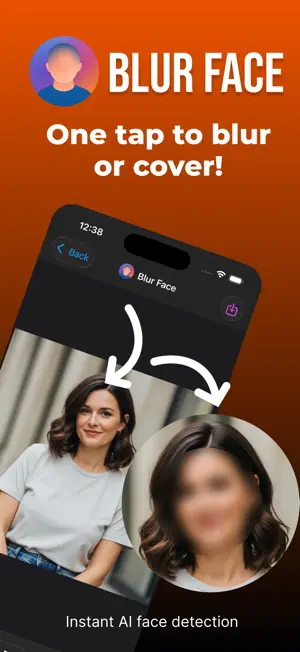
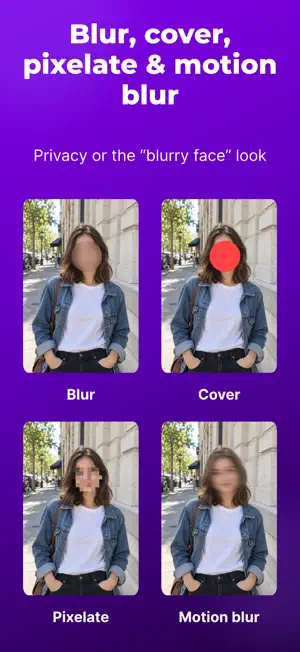


About Blur Face - photo & video
Description Protect Privacy with One-Click Face Censoring (Photos & Videos) Blur Face makes it incredibly easy to hide sensitive information in your photos and videos. Our AI instantly detects faces, then you simply tap to blur, cover, or pixelate them - perfect for social media, work documents, or any time you need to protect someone's identity. Blur Face app key features: - One-click face detection - AI finds all faces automatically - Multiple censoring options - Blur face, pixelate, cover, or highlight - Works offline - All processing happens on your device - Blur faces in videos (Pro) - Protect privacy in video content - Batch processing (Pro) - Hide all detected faces at once - Perfect for sharing - Photos and videos ready for social media - No data collection - Your images never leave your phone Blur Face app - perfect for: - Family photos and videos - Keep kids safe when sharing online - Social media posts with strangers in background - Work presentations and screenshots - Real estate photos and property tours - Documentation that needs identity protection - Sharing group content while respecting privacy Pro Features: - Blur faces in videos - One-click to blur all faces - Unlimited batch photo processing - no daily limits - Custom area blur in photos - Advanced editing tools - Priority support Blur Face processes everything locally on your device - no cloud uploads, no data sharing, just simple and secure face censoring for photos and videos. Terms of use: https://blurface.app/terms-of-use/ Promo Text Photo & Video Face Blur - One-Click Face Censoring - Pixelate, Cover, Highlight. Blur faces in videos too (Pro)!
What’s new
Version 2.9.0 · Updated October 16, 2026
Now supports iPhone Duo. Create the viral “blurry face” look with new Motion blur, now available for photos and videos. Adjust the blur length and direction to get the effect you want. - New Motion blur for photos, videos, batch edits, and brush strokes. - Softer edges for a smoother blend with the surrounding image. - Flexible blur shapes: circle, oval, rectangle, or eye-covering. - Easier editing with intensity, area size, shape, and edge softness in one panel. - Smoother previews when adjusting photo blur. - Fixed photo saving with add-only library permission.
App privacy
The developer, Adrian Kajda, reported these privacy practices to Apple.
Data Not Collected
The developer does not collect any data from this app.
Alternatives to Blur Face - photo & video
Looking for apps like Blur Face - photo & video? Here are 6 similar apps on the App Store. The highest rated is Face Blur on Photo (5.0/5), and all 6 are free to download.
-
 Face Blur on Photo
5.0
Face Blur on Photo
5.0
-
 BlurQ: Face Blur Photo & Video
4.1
BlurQ: Face Blur Photo & Video
4.1
-
 Blur Face in Photo
-
 Face Blur Photo & Video
-
 Privacy Blur - hide faces
5.0
Privacy Blur - hide faces
5.0
-
 MozFace - Face Blur & Mosaic
| App | Rating | Price | Last updated | Compare |
|---|---|---|---|---|
| Blur Face - photo & video | 5.0 / 5 (1 rating) | Free | October 16, 2026 | |
| Face Blur on Photo | 5.0 / 5 (2) | Free | Sep 24, 2026 | Compare |
| BlurQ: Face Blur Photo & Video | 4.1 / 5 (19) | Free | Oct 13, 2026 | Compare |
| Blur Face in Photo | – | Free | Aug 12, 2026 | Compare |
| Face Blur Photo & Video | – | Free | Oct 19, 2026 | Compare |
| Privacy Blur - hide faces | 5.0 / 5 (2) | Free | Oct 19, 2026 | Compare |
| MozFace - Face Blur & Mosaic | – | Free | Aug 27, 2026 | Compare |