

Whiteout: Redact & Blur Photos
Jordan Zeleny Photo & Video iPhoneiPadiPod touchMac
Whiteout: Redact & Blur Photos is a free Photo & Video app for iPhone and iPad by Jordan Zeleny. Rated 4.3/5 from 246 ratings. Requires iOS 16.0.
- Rating
- 4.3
- 246 ratings
- Price
- Free
- on the App Store
- Size
- 34 MB
- Age 4+
- Updated
- Sep 1
- 2026 · v3.2.2
Screenshots
About Whiteout: Redact & Blur Photos
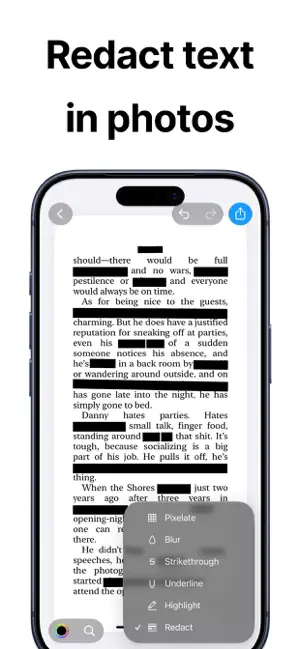
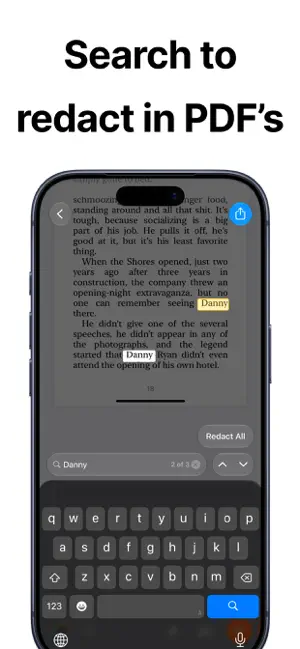
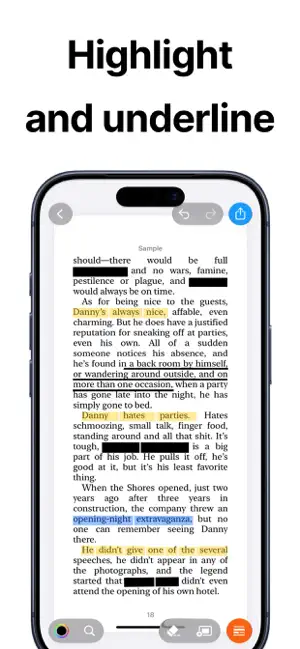
Whiteout makes it fast and precise to mark up text in photos and PDFs. Redact sensitive information, highlight important details, and clean up documents with tools designed for accuracy and speed. This app has a limited free plan, and a paid subscription. Whether you are working with screenshots, scanned documents, or PDFs, Whiteout helps you find and mark exactly what matters. Powerful Markup Tools • Redact, highlight, underline, strike through, blur, pixelate, erase, draw, and sign • Line and word based markups for precise control • Suggested redactions for faster cleanup • Change colors and styles instantly Smart Search & Match • Search and find words on the page • Match and redact repeated text automatically • Quickly apply markups across multiple occurrences Works with Photos and PDFs • Mark up images, screenshots, and PDF files • Find text directly inside PDFs • Share or export in high resolution Built for Speed and Precision • Zoom in for detailed edits • Simple, distraction free interface • Open directly from the Photos share sheet • Designed for fast, accurate text redaction Free Plan Get started at no cost. • Save a limited number of documents for free • Exports contain branded markup Pro Plan Unlock the full experience. • Unlimited saves and edits • Remove watermark on export Download and start redacting today. CONTACT: [email protected] TERMS OF USE: https://www.apple.com/legal/internet-services/itunes/dev/stdeula/ PRIVACY: https://sites.google.com/view/whiteout-privacy-policy?usp=sharing
Ratings & reviews
4.3
246 ratings
What’s new
Version 3.2.2 · Updated September 1, 2026
Bug fixes and performance improvements.
App privacy
The developer, Jordan Zeleny, reported these privacy practices to Apple.
Data Not Linked to You
The following data, which may be collected but is not linked to your identity, may be used for the following purposes:
- Purchases: Purchase History
- Identifiers: Device ID
- Usage Data: Product Interaction, Other Usage Data
- User Content: Photos or Videos, Customer Support, Other User Content
- Diagnostics: Crash Data, Performance Data, Other Diagnostic Data
Used for: Analytics, App Functionality
Alternatives to Whiteout: Redact & Blur Photos
Looking for apps like Whiteout: Redact & Blur Photos? Here are 6 similar apps on the App Store. The highest rated is SplitCrop (4.9/5), and all 6 are free to download.
-
 Black Highlighter: Redact Text
4.4
Black Highlighter: Redact Text
4.4
-
 Blur Text
4.5
Blur Text
4.5
-
 SplitCrop
4.9
SplitCrop
4.9
-
 DAMA - Auto Redact Privacy
4.7
DAMA - Auto Redact Privacy
4.7
-
 Screenshot Editor - ScreenCut
4.6
Screenshot Editor - ScreenCut
4.6
-
 Blur ID - Hide Chat Screenshot
4.9
Blur ID - Hide Chat Screenshot
4.9
| App | Rating | Price | Last updated | Compare |
|---|---|---|---|---|
| Whiteout: Redact & Blur Photos | 4.3 / 5 (246 ratings) | Free | September 1, 2026 | |
| Black Highlighter: Redact Text | 4.4 / 5 (92) | Free | Sep 22, 2025 | Compare |
| Blur Text | 4.5 / 5 (2) | Free | Apr 30, 2026 | Compare |
| SplitCrop | 4.9 / 5 (64) | Free | Sep 24, 2025 | Compare |
| DAMA - Auto Redact Privacy | 4.7 / 5 (168) | Free | Sep 30, 2026 | Compare |
| Screenshot Editor - ScreenCut | 4.6 / 5 (124) | Free | May 18, 2026 | Compare |
| Blur ID - Hide Chat Screenshot | 4.9 / 5 (29) | Free | Sep 9, 2025 | Compare |