

SaveSpeak: Budget Tracker
Dmitri Melnic Finance iPhoneiPadiPod touch
SaveSpeak: Budget Tracker is a free Finance app for iPhone and iPad by Dmitri Melnic. Rated 5.0/5 from 1 ratings. Requires iOS 17.0.
- Rating
- 5.0
- 1 ratings
- Price
- Free
- on the App Store
- Size
- 7 MB
- Age 4+
- Updated
- Sep 23
- 2026 · v1.1
Screenshots


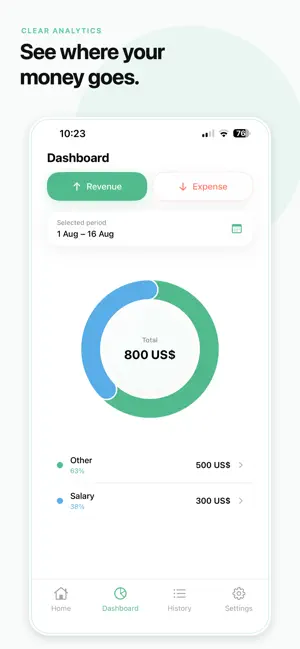
About SaveSpeak: Budget Tracker
Track expenses, income, and your personal budget in seconds — using your voice, a receipt photo, or quick manual entry. SaveSpeak turns everyday financial activity into organized records without complicated forms. Simply describe a purchase or income, scan a receipt, or enter the amount manually. ADD TRANSACTIONS YOUR WAY • Voice entry — tap the microphone and describe an expense or income naturally, then tap Stop when finished. • Receipt scanner — capture receipts, notes, and transaction lists. • Manual entry — record a transaction with a simple numeric keypad. LOG APPLE PAY PURCHASES FASTER Set up the optional Shortcuts automation to open SaveSpeak after an Apple Pay transaction with the amount ready. Choose a category and save the expense. SEE WHERE YOUR MONEY GOES • Track income, expenses, and your current balance. • Explore trends and category breakdowns for a selected period. • Choose custom periods in History and Analytics. • Browse, search, edit, retry, or delete transactions. • Review your complete balance history in one timeline. • Add optional notes and comments. PRIVATE AND EASY TO START No account or registration is required. Your financial records are stored locally on your iPhone, helping you stay in control of your data. IMPORT, EXPORT, AND BACK UP • Export transactions to CSV. • Import CSV files from SaveSpeak and other finance apps. • Create and restore local backups. • View key financial information with iOS widgets. FREE FEATURES Free users can add transactions manually, select custom periods, and receive a limited number of voice and receipt entries each day. The free version includes advertising. SAVESPEAK PREMIUM Upgrade to Premium for: • Unlimited voice entries • Unlimited receipt scanning • CSV import • Backup and restore • An ad-free experience Subscriptions renew automatically unless canceled at least 24 hours before the end of the current billing period. You can manage or cancel your subscription in your Apple Account settings. Terms of Use: https://savespeak.com/terms Privacy Policy: https://savespeak.com/privacy
What’s new
Version 1.1 · Updated September 23, 2026
We’ve made SaveSpeak more convenient and reliable: • Added Apple Pay expense automation through the Shortcuts app. • Improved CSV importing, including files created by SaveSpeak and other finance apps. • Added daily income and expense totals to balance history. • Made date range selection in History and Analytics available to everyone. • Fixed bugs and improved overall stability.
App privacy
The developer, Dmitri Melnic, reported these privacy practices to Apple.
Data Not Linked to You
The following data, which may be collected but is not linked to your identity, may be used for the following purposes:
- Location: Coarse Location
- Usage Data: Advertising Data, Product Interaction
- Diagnostics: Crash Data, Performance Data
- Financial Info: Other Financial Info
- User Content: Audio Data, Other User Content
- Identifiers: Device ID
Used for: Third-Party Advertising, Analytics, App Functionality, Other Purposes
Alternatives to SaveSpeak: Budget Tracker
Looking for apps like SaveSpeak: Budget Tracker? Here are 6 similar apps on the App Store. The highest rated is Expense Tracker: SpendVoice (5.0/5), and all 6 are free to download.
-
 Spent - Speak it. It's saved.
-
 Expense Tracker: SpendVoice
5.0
Expense Tracker: SpendVoice
5.0
-
 Airy: Money Intelligence
-
 Budget Planner App - FloosYo
4.6
Budget Planner App - FloosYo
4.6
-
 Budget Planner + Money Manager
5.0
Budget Planner + Money Manager
5.0
-
 Lumi: Budget & Expense Tracker
| App | Rating | Price | Last updated | Compare |
|---|---|---|---|---|
| SaveSpeak: Budget Tracker | 5.0 / 5 (1 rating) | Free | September 23, 2026 | |
| Spent - Speak it. It's saved. | – | Free | Oct 5, 2026 | Compare |
| Expense Tracker: SpendVoice | 5.0 / 5 (1) | Free | Jun 24, 2026 | Compare |
| Airy: Money Intelligence | – | Free | Aug 27, 2026 | Compare |
| Budget Planner App - FloosYo | 4.6 / 5 (5) | Free | Oct 8, 2026 | Compare |
| Budget Planner + Money Manager | 5.0 / 5 (4) | Free | Sep 14, 2025 | Compare |
| Lumi: Budget & Expense Tracker | – | Free | Oct 11, 2026 | Compare |